


You've got invoices sitting in an email inbox, VAT figures in a spreadsheet, receipts scattered across phones, and bank reconciliation reserved for a stressful Friday afternoon. At month-end, someone has to work out which version of the numbers is correct, who approved a payment, and whether a missing document will create trouble later.
That's the everyday reality of many small businesses using disconnected accounting tools. Accounting workflow automation replaces this patchwork with a controlled sequence that captures information, checks it, routes decisions, records the result, and keeps the evidence attached. The aim isn't to remove judgment. It's to stop people spending their best hours on chasing, copying, checking, and remembering.
For SMEs, the practical path is clear. Start with repeatable work, measure the time and exceptions involved, build compliance into each handoff, and keep people responsible for decisions that need context. Zynthoro provides a way to connect finance with the wider operation, so accounting data doesn't have to be re-entered across separate systems.
Table of Contents
- Why Disconnected Accounting Workflows Cost SMEs Time and Control
- What Accounting Workflow Automation Really Means
- Five Automation Patterns Every SME Should Know
- Measuring ROI and KPIs That Prove Automation Works
- Staying Compliant and Audit Ready Across the EU
- Your Stepwise Implementation and Prioritisation Plan
- Putting Automation to Work With Zynthoro
Why Disconnected Accounting Workflows Cost SMEs Time and Control
A small services company might receive a supplier invoice by email, save it to a shared drive, copy its details into accounting software, ask for approval in a chat message, and update a spreadsheet to show that payment is pending. The owner may then check the bank separately, while the bookkeeper tries to reconcile the transaction later.
None of those steps is unusual. The problem is that they don't form one reliable workflow.
When information moves between inboxes, spreadsheets, banking portals, expense apps, and accounting software, every handoff creates an opportunity for delay or error. A bill can be approved without a clear record, a customer payment can be chased twice, and a VAT figure can be built from a spreadsheet that no longer matches the ledger.
The cost appears in several ways:
- Lost capacity: People spend time locating documents and requesting status updates instead of serving customers or reviewing performance.
- Delayed cash flow: Invoices may go out late, payment reminders may depend on memory, and overdue balances stay invisible for too long.
- Weak control: Owners can't easily see who approved a payment, why an exception was accepted, or whether a transaction has been posted.
- Audit exposure: Supporting documents and approval evidence may exist, but not in a connected trail.
- Tool sprawl: Each new application solves one problem while creating another integration or data-transfer point.
Accounting workflow automation addresses the operating system around accounting. It can start a process when an invoice arrives, apply defined rules, request approval, match supporting information, and send exceptions to a person. It won't decide whether an unusual supplier charge is commercially sensible, whether a VAT treatment needs professional review, or whether a suspicious transaction should be paid.
That distinction matters. A good workflow gives the right person the right information at the right moment. It doesn't pretend every financial decision can be reduced to a button.
Zynthoro fits this model by bringing finance, operations, sales, projects, communication, and compliance into one connected workspace. The value for a small business isn't another isolated automation. It's a clearer path from transaction to decision to record.
What Accounting Workflow Automation Really Means
Accounting workflow automation means software carries out repeatable accounting steps under defined rules. An event starts the process, and the system moves the work through an agreed route instead of relying on someone to remember the next action.
An assembly line provides a useful comparison. A product passes through stations, then stops at a quality gate when something falls outside the specification. Accounting workflows follow a similar sequence:
- Capture: Collect an invoice, receipt, payment, order, or bank transaction.
- Validate: Check required fields, dates, supplier details, tax treatment, and supporting evidence.
- Match: Compare the transaction with a purchase order, delivery record, bank movement, or customer account.
- Approve: Send the item to the right person based on policy, value, department, or exception status.
- Post and report: Record the approved result in the ledger and make it available for reporting, VAT work, and reconciliation.
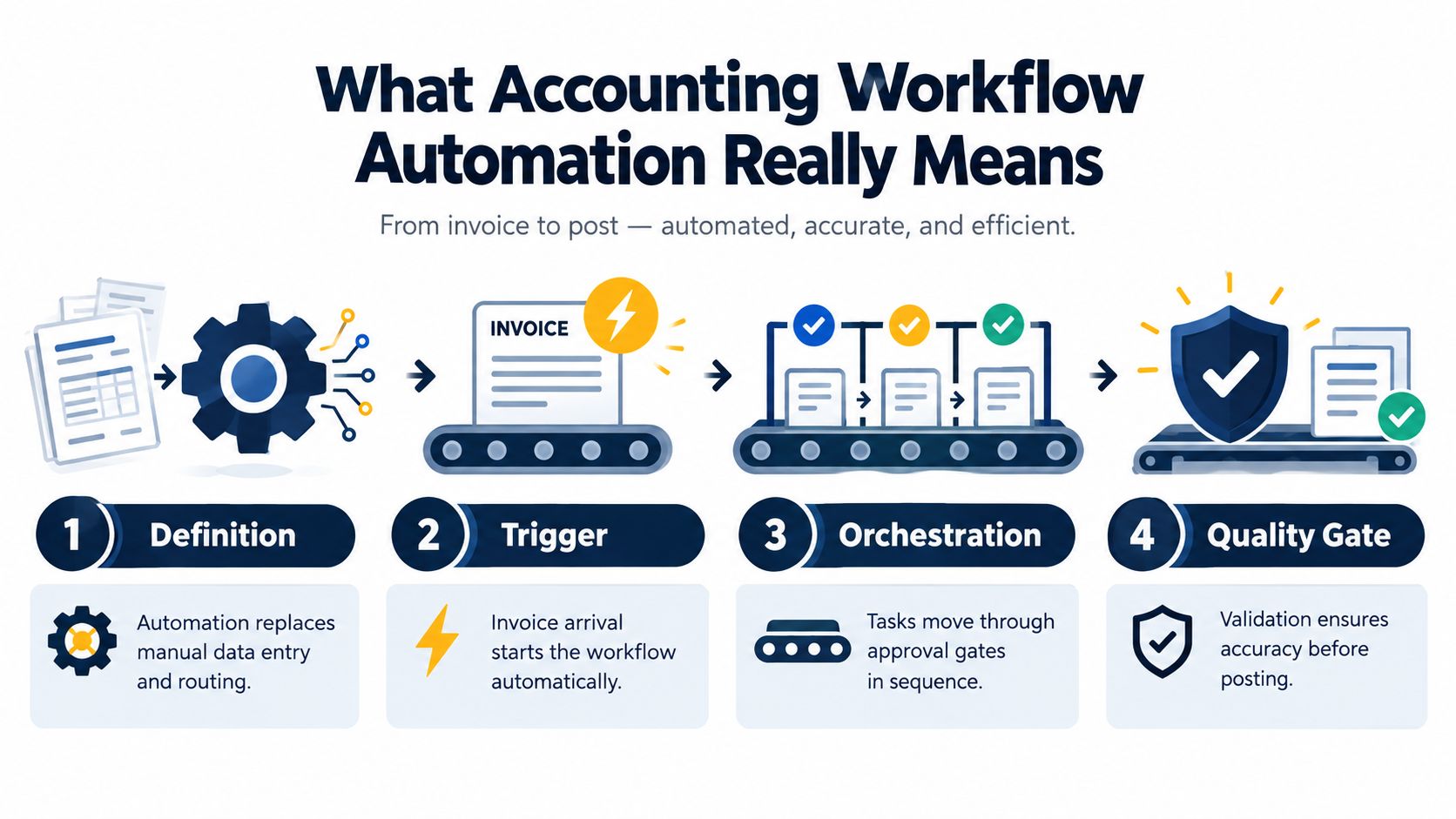
Automation handles steps, orchestration manages flow
An automated task can extract invoice fields or send a payment reminder. Each action helps, but neither action explains what should happen next.
Orchestration connects the actions. It determines what follows extraction, what evidence is needed for matching, which approver owns the decision, and how an exception reaches the ledger. It also records each handoff, giving the business a clear view of where work is waiting.
For example, an invoice can trigger data capture, order matching, an approval request, a duplicate check, and posting. If the amount differs from the order, the workflow pauses and creates an exception for review. It preserves the relevant documents and context rather than forcing the transaction through.
The main building blocks are:
- Triggers: An invoice arrives, a payment becomes overdue, a bank transaction appears, or a period approaches close.
- Rules: Define matching criteria, tax handling, due dates, categories, and escalation paths.
- Approvals: Assign responsibility and require decisions inside the system.
- Exception queues: Separate routine items from transactions needing judgment.
- Audit logs: Preserve actions, timestamps, documents, and decisions.
- Review outputs: Give a human a complete, review-ready item instead of raw extracted data.
Human review remains part of the design. A system can flag an unusual supplier charge, a possible VAT issue, or missing evidence, but a responsible person should decide how to handle it. This matters especially for EU SMEs managing VAT, e-invoicing requirements, and audit trails across different processes.
Recurring work often provides the earliest gains because its sequence is predictable. A major 2025 accounting workflow study found that more than 75% of firms spend 5 hours or less per week scheduling and assigning work after automation, compared with 42.7% before automation. The same study found that 66.1% of respondents view recurring tasks as the most important workflow-software feature. The 2025 Workflow Automation Report links this result with more predictable capacity allocation and standardized client work.
A related comparison appears in this contract workflow automation guide. Contract and accounting documents differ, yet both depend on triggers, ownership, approvals, exceptions, and evidence.
Zynthoro reflects the orchestration approach by connecting finance, operations, sales, projects, communication, and compliance in one workspace. A defined operating process should come before evaluating platform options, including its Kickstarter.
Five Automation Patterns Every SME Should Know
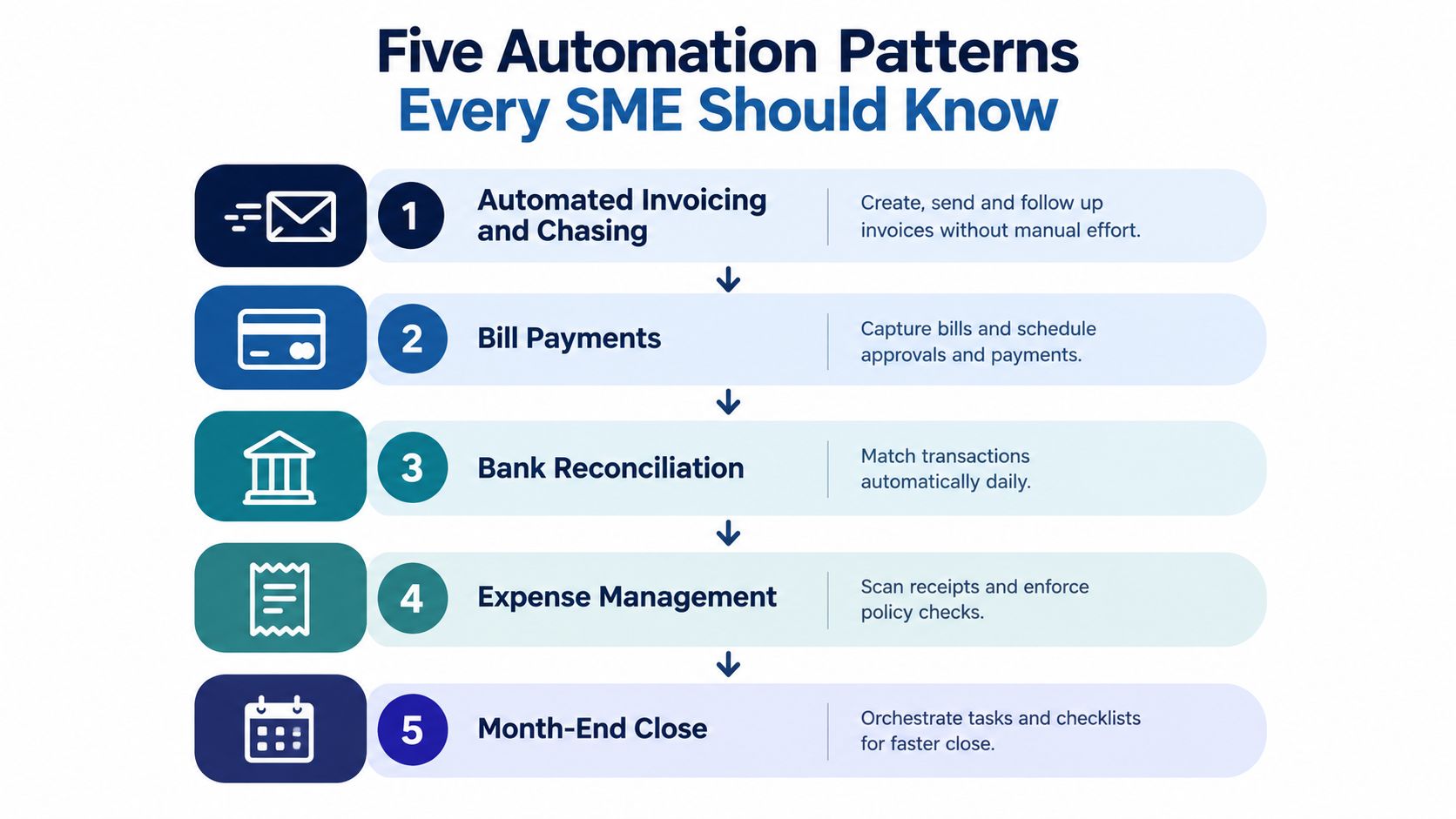
Most SMEs don't need to automate everything at once. They need to remove the recurring bottlenecks that create the most rework. These five patterns cover the accounting work that commonly connects sales, purchasing, banking, employees, and management reporting.
1. Automated invoicing and chasing
A completed sale can trigger invoice creation, delivery, due-date monitoring, and a reminder sequence. The owner still decides whether a customer deserves special treatment, but nobody has to maintain a separate chasing list.
For example, once a project milestone is approved, the invoice is generated from the agreed customer and order data. If payment remains outstanding, the workflow sends a defined reminder and flags the account for review. Zynthoro's Invoicing & Finance capabilities are designed around automated sending, chasing, and reconciliation, while its Sales Administration module connects quotes, orders, customers, and pipeline information.
2. Bill payments with approval routing
Supplier bills should move from capture to validation to approval, not from inbox to payment by habit. A workflow can identify the supplier, check required details, match the bill to purchasing information, and route it to the person responsible for that spend.
Human review stays important when the supplier is new, the amount is unusual, the purchase order is missing, or the tax treatment is unclear. The system should make those reasons visible instead of hiding them inside an email thread.
If you're comparing specialist options, compare fleet invoice processing tools can help clarify which capabilities belong in invoice capture, approval, and payment workflows.
3. Expense tracking and categorization
Employees can submit receipts through a defined process, while the system extracts details, applies category and policy rules, and sends unusual claims to a reviewer. A manager shouldn't need to inspect every routine receipt manually, but they should see missing evidence, policy conflicts, and ambiguous business purposes.
4. Bank reconciliation
Bank transactions can be matched against invoices, bills, transfers, and known recurring entries. Unmatched items should become a focused work queue rather than forcing the bookkeeper to search through every transaction.
This pattern becomes more valuable when the ledger, invoicing, purchasing, and bank data share the same records. Reconciliation then becomes review of exceptions, not repeated data entry.
5. Financial reporting and close
A close workflow assigns tasks, tracks dependencies, requests reconciliations, and flags incomplete work before reports are issued. Owners gain a clearer view of what is ready, what is blocked, and which numbers still need review.
The priority depends on the business:
| Biggest pain | Sensible starting pattern | Human review point |
|---|---|---|
| Customers pay late | Invoicing and chasing | Credit decisions and disputed balances |
| Bills wait in inboxes | Bill approval routing | Unusual spend and missing purchase evidence |
| Receipts are incomplete | Expense management | Policy exceptions and unclear purpose |
| Friday reconciliation takes too long | Bank reconciliation | Unmatched or ambiguous transactions |
| Month-end feels unpredictable | Close and reporting | Variance analysis and final sign-off |
A useful rule is to choose the workflow with a clear trigger, a repeatable sequence, and an obvious exception owner. That gives Zynthoro a stable process to connect rather than a collection of vague intentions.
Measuring ROI and KPIs That Prove Automation Works
Automation earns its place when it changes the operating numbers, not when it merely adds a new dashboard. An SME owner can build a credible business case by comparing the same workflow before and after implementation.
Start with a baseline. For one month, record how long people spend on invoice entry, payment follow-up, reconciliation, exception handling, and close coordination. Count the number of items that need rework and note why they stalled. Don't rely on memory. Ask the people doing the work to record the actual effort.
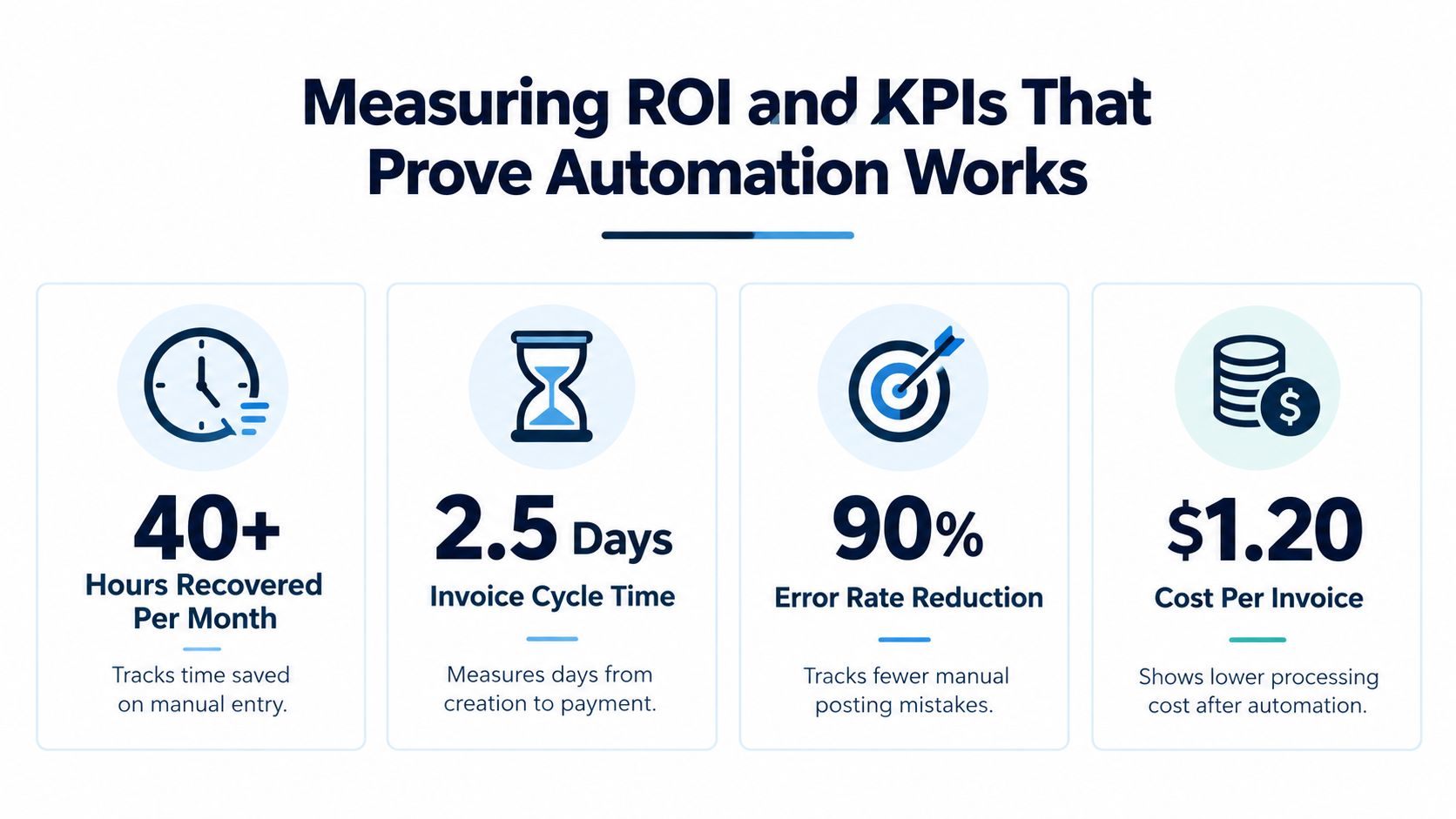
The SME KPI set
Hours recovered per month measures capacity released from coordination and data entry. A small-business automation benchmark estimates that routine accounting automation can recover 8 to 15 hours per month, with invoice follow-up moving from 2 to 3 hours per month to near zero, bank reconciliation moving from 2 to 4 hours to 20 to 30 minutes, and report preparation moving from 1 to 2 hours to near zero. Today CFO's accounting automation analysis provides those estimates.
Invoice exception rate shows whether the workflow is receiving usable information and applying sensible controls. A vendor benchmark reports a 59% lower exception rate for automated invoice operations involving extraction, three-way matching, duplicate detection, and GL coding. UiPath's invoice automation overview explains why preventive checks matter, since missing purchase orders, mismatched lines, and duplicate invoices push work into human queues.
Reconciliation time tells you whether integration is removing repetitive matching. Track the time from the start of reconciliation to a review-ready result, and separate normal matches from unresolved items.
Close cycle length measures whether the whole process is becoming more predictable. A shorter close is useful, but only if review quality remains strong and unresolved issues aren't carried forward.
Cost per invoice can combine staff effort, software costs, rework, and payment delay. Industry reporting gives one published example in which automated invoice processing reduces handling cost from about $14 to $20 to $0.50 per invoice. QuickBooks' financial automation overview presents that example, which should be treated as a benchmark reference rather than a guaranteed SME result.
A simple before-and-after tracker
Use one row per workflow and record:
- Baseline effort: Time spent before automation.
- Transaction volume: Number of invoices, bills, receipts, or reconciliations.
- Exceptions: Count and reason for each item needing intervention.
- Cycle time: Start-to-finish duration.
- Control quality: Missing approvals, missing documents, or unexplained changes.
- Post-launch result: The same measures after the workflow is stable.
For a practical comparison, separate automation output from human decisions. If the system processes more routine items but sends every unusual item to one overloaded manager, the workflow hasn't solved the bottleneck. It has moved it.
Staying Compliant and Audit Ready Across the EU
Compliance shouldn't be a final inspection added after the workflow is built. It should shape the workflow from the first trigger.
An EU SME may sell into several markets, each with different e-invoicing and reporting expectations. A process that works for one customer or jurisdiction may not cover another. A 2025 global e-invoicing study found that businesses selling into multiple mandated countries automate only 60% of their e-invoicing processes on average, leaving a substantial manual burden. Vertex's global e-invoicing study also reports that 80% of respondents rate AR automation as important, high priority, or critical, while only 3% say it's fully automated and 21% use a dedicated AR automation platform.
Four design rules for safer workflows
Keep the audit trail connected. The electronic invoice, internal processing record, approval, ledger entry, and payment evidence should remain traceable to one another. The EU European eInvoicing Guide for SMEs says businesses should maintain an audit trail between the electronic invoicing system and the internal system used to process invoice data.
Build recovery into the process. A reliable system needs a documented recovery plan for system failure or data loss. The same EU guidance says businesses should be able to demonstrate such a plan. That means knowing how records are protected, how access is restored, and how the business continues processing during disruption.
Require approvals in-system. Email approval may feel quick, but it separates the decision from the transaction. Define thresholds and approvers for bills, refunds, write-offs, and other sensitive actions, then require the approval to happen where the record is stored.
Protect access by role. People should see and change the information needed for their work, not every financial record in the company. Role-based access, secure retention, and clear permissions support GDPR-ready operations and reduce the risk of uncontrolled changes.
Compliance is also an exception problem
Rules vary across borders, and real invoices don't always arrive in perfect form. A supplier may use an unexpected format, a tax code may need confirmation, or an invoice may fail a local reporting check. The workflow should stop, explain, and route the issue.
Zynthoro's Accounting module includes real-time ledger and VAT handling, while Compliance & Security capabilities include audit trails, role-based access, and GDPR readiness. That doesn't eliminate the need for qualified tax advice. It gives the business a structure in which evidence and responsibility remain visible.
Your Stepwise Implementation and Prioritisation Plan
Start with the process people complain about most often, not the process that sounds most advanced. If invoices sit in email for days, begin there. If bank matching consumes every Friday, begin with reconciliation.
1. Map the current workflow
Write down the sequence, including inboxes, spreadsheets, approvals, and rework. Name the owner of each step and define what “complete” means. You'll often find that the longest delay happens between tasks, not during the accounting work itself.
2. Choose one high-friction pattern
Select a process with a clear trigger and a manageable exception set. Invoicing, supplier bills, expenses, and reconciliation are usually easier starting points than a full close transformation because the inputs and outcomes are easier to observe.
3. Define approval paths
Set thresholds and approvers before configuring rules. For example, routine bills can route to the budget owner, while higher-value or unusual purchases can require an additional review. The exact thresholds should reflect your policy and risk, not a generic template.
4. Connect the records
Bring the relevant customer, supplier, invoice, ledger, VAT, bank, and approval information into Zynthoro where appropriate. The purpose is continuity. If staff still copy the same data between separate tools, the workflow remains partly manual.
5. Test real transactions
A current accounting software guide recommends testing 10 real transactions end-to-end, plus 5 real bills with one exception case. Artsyl's accounting software workflow guidance offers this as a practical test structure.
Use the test to check:
- Capture: Were the fields extracted or entered correctly?
- Routing: Did the right person receive the task?
- Controls: Did missing or conflicting information create an exception?
- Posting: Did the approved result reach the correct accounting record?
- Evidence: Can you trace the final entry back to the source document?
6. Keep human review where judgment matters
People should review unusual suppliers, disputed invoices, unclear VAT treatment, fraud indicators, material variances, and decisions involving commercial context. Automation should prepare the case, show the evidence, and record the decision.
7. Expand only after the first workflow is stable
Review the KPI tracker, inspect exception reasons, and simplify rules that create unnecessary friction. Then connect the next pattern. A controlled rollout gives your team confidence and makes failures easier to diagnose.
Putting Automation to Work With Zynthoro
A useful automation plan starts with one recurring workflow, such as invoice approval or reconciliation. Document each handoff, record time and exceptions, then automate the routine path. Keep judgment-heavy cases with people, and connect approvals, source documents, and ledger activity so each result has clear evidence.
That sequence turns automation into orchestration. The system moves predictable work forward, while staff review unusual suppliers, disputed invoices, unclear VAT treatment, fraud indicators, and material variances. For EU SMEs, VAT handling, e-invoicing, and audit trails should receive priority because errors in these areas affect compliance as well as cash flow.
Zynthoro is an AI-native ERP platform that brings accounting, VAT, invoicing and finance, purchasing, sales, projects, HR, operations, communication, compliance, planning, and marketing into one EU-hosted workspace. Embedded AI assistants support workflow activity within that environment, reducing the copying and searching created by separate tools.
Begin with one workflow. Define its review points, measure time and exceptions for a month, and expand only when the process is stable. This controlled sequence makes failures easier to diagnose and gives your team a clear operating model.
Visit Zynthoro to see how a unified, EU-hosted workspace can support stepwise orchestration across accounting and wider SME operations.