



Your operations manager starts Monday by re-entering the same customer details into a CRM, a spreadsheet, an email client, a project tracker, and a legacy invoicing tool. A signed order sits in one system, the delivery notes in another, and the finance team only learns about the deal when someone forwards an email. By Friday, the business has spent hours moving information between tools instead of serving customers.
That's the promise and the problem of AI workflow automation. AI can interpret documents, classify messages, draft content, and coordinate multi-step work, but it can't rescue a process nobody has clearly defined. For SMEs replacing disconnected tools, the practical path is readiness first, then automation. Audit what happens, map the actual process, design reusable workflows, deploy with controls, and monitor the result.
Table of Contents
- Why Most SME Automation Efforts Stall Before They Start
- Finding Your Highest-Impact Automation Opportunities
- Mapping Processes and Building Reusable Workflows
- Choosing AI Triggers and Setting Reliable Guardrails
- Implementing Automation on a Single Connected Platform
- Monitoring Performance and Scaling What Works
Why Most SME Automation Efforts Stall Before They Start
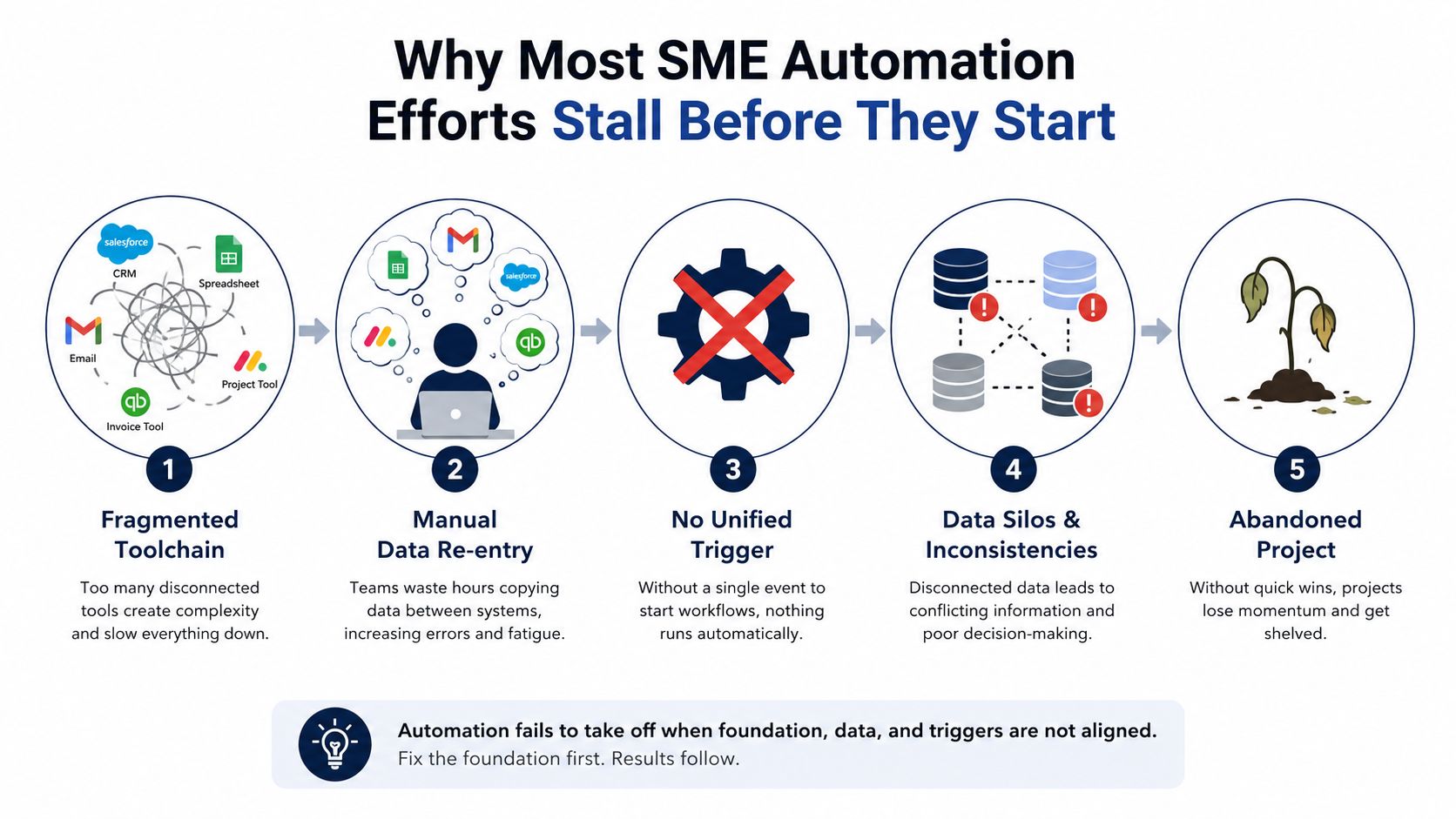
The logistics firm in this example doesn't lack software. It has plenty of it. The operations manager toggles between a CRM for leads, a spreadsheet for shipment status, email for customer instructions, a project tracker for exceptions, and an invoicing tool that doesn't share the same customer record. Each application works reasonably well on its own. The failure happens between them.
A team member copies a company name from an email into the CRM, copies the deal value into a spreadsheet, creates a project manually, and later sends finance the details needed to invoice. Someone adds an automation that watches for a new CRM record, but it misses orders arriving by email. Another automation forwards a notification, but the notification lacks the delivery date. The business has automated isolated movements without designing the complete workflow.
Adoption doesn't equal operational readiness
AI adoption is moving into everyday work. A 2025 McKinsey survey cited in 2026 industry reporting found that 88% of organizations regularly use AI in at least one business function, up from 78% the previous year. The same reporting says 72% of enterprises are using or testing AI agents, while some are scaling agentic systems and others remain in experimentation.
Those figures describe usage, not successful process redesign. An SME can use AI to draft an email while still requiring three people to confirm the customer record, check pricing, update the project board, and notify finance. That's activity around automation, not a dependable automated workflow.
The most common failure is attaching a model to a poorly understood process. When an edge case appears, the system has no defined route, no approved source of truth, and no clear owner. It either makes an unsafe decision, stops, or sends the exception back to the same person who was already overloaded.
Practical rule: AI should execute a process your team understands. It shouldn't be asked to discover the process while handling live customer or financial records.
Use a readiness-first sequence
A workable sequence is simple:
- Audit: Identify where work starts, who touches it, and where information gets re-entered.
- Map: Break the process into triggers, actions, decisions, handoffs, and exception paths.
- Design: Define the reusable workflow, data requirements, permissions, and human approvals.
- Deploy: Start with one controlled process and a named owner.
- Monitor: Track accuracy, exceptions, processing time, and business outcomes.
This approach keeps tool selection in its proper place. A unified platform such as Zynthoro can help connect sales, finance, operations, projects, communication, and other business domains, but the platform still needs a precise operating design. The model's capability matters. The workflow definition matters more.
Finding Your Highest-Impact Automation Opportunities
Don't start by asking which AI feature looks impressive. Start by asking where your team repeats the same work, loses time, or carries unacceptable error risk.
Interview the people who perform each process. A managing director may believe customer onboarding is the main bottleneck, while the account coordinator knows that invoice reconciliation consumes the most attention because purchase orders arrive in inconsistent formats. Frontline staff can also identify informal workarounds, hidden approvals, and the moments when a spreadsheet becomes the primary system of record.
Score the work before choosing the tool
Use four criteria for each candidate process:
- Repetition frequency: How regularly does the task occur, and does it follow a recognizable pattern?
- Error cost: What happens when someone enters the wrong amount, misses a renewal, or routes a request incorrectly?
- Time drain: How much team capacity disappears into the work each week?
- Data readiness: Are the inputs structured, accessible, and consistent enough for an AI system to interpret?
Score each criterion using a simple internal scale, such as low, medium, or high. The labels matter less than applying them consistently. Data readiness deserves equal attention to time savings because an automation built on incomplete records will create review work instead of removing it.
A practical comparison
| Process | Repetition Frequency | Error Cost | Time Drain | Data Readiness | Priority Score |
|---|---|---|---|---|---|
| Lead qualification | High | Medium | Medium | Medium | High |
| Invoice reconciliation | High | High | High | Medium | Very high |
| Customer onboarding | Medium | High | High | High | High |
Invoice reconciliation ranks first in this example because it repeats frequently, consumes substantial coordination time, and carries financial consequences. Customer onboarding may be a close second, particularly if signed contracts already arrive in a consistent format. Lead qualification can be a good pilot when the business has enough historical examples to define what a qualified lead looks like.
The score isn't a substitute for judgment. It creates a defensible reason to choose one process over another and makes it easier to explain the decision to the team.
Don't automate a broken process
If sales staff create opportunities differently, finance uses a separate customer naming convention, and project managers track delivery milestones in free-form notes, automation will reproduce those inconsistencies at greater speed. Before deploying AI, agree on required fields, ownership, approval points, and the definition of completion.
Choose the highest-scoring process that also has measurable success criteria. For invoice reconciliation, that might include fewer manual corrections, faster exception handling, and complete audit records. Establish the current baseline before switching anything on, then compare the automated workflow against that baseline.
Mapping Processes and Building Reusable Workflows
A reliable AI workflow starts as a process map, not a prompt. Write down the current path from the first event to the final outcome, including the steps people consider too obvious to document. Those overlooked steps often contain the business rules that determine whether automation works.
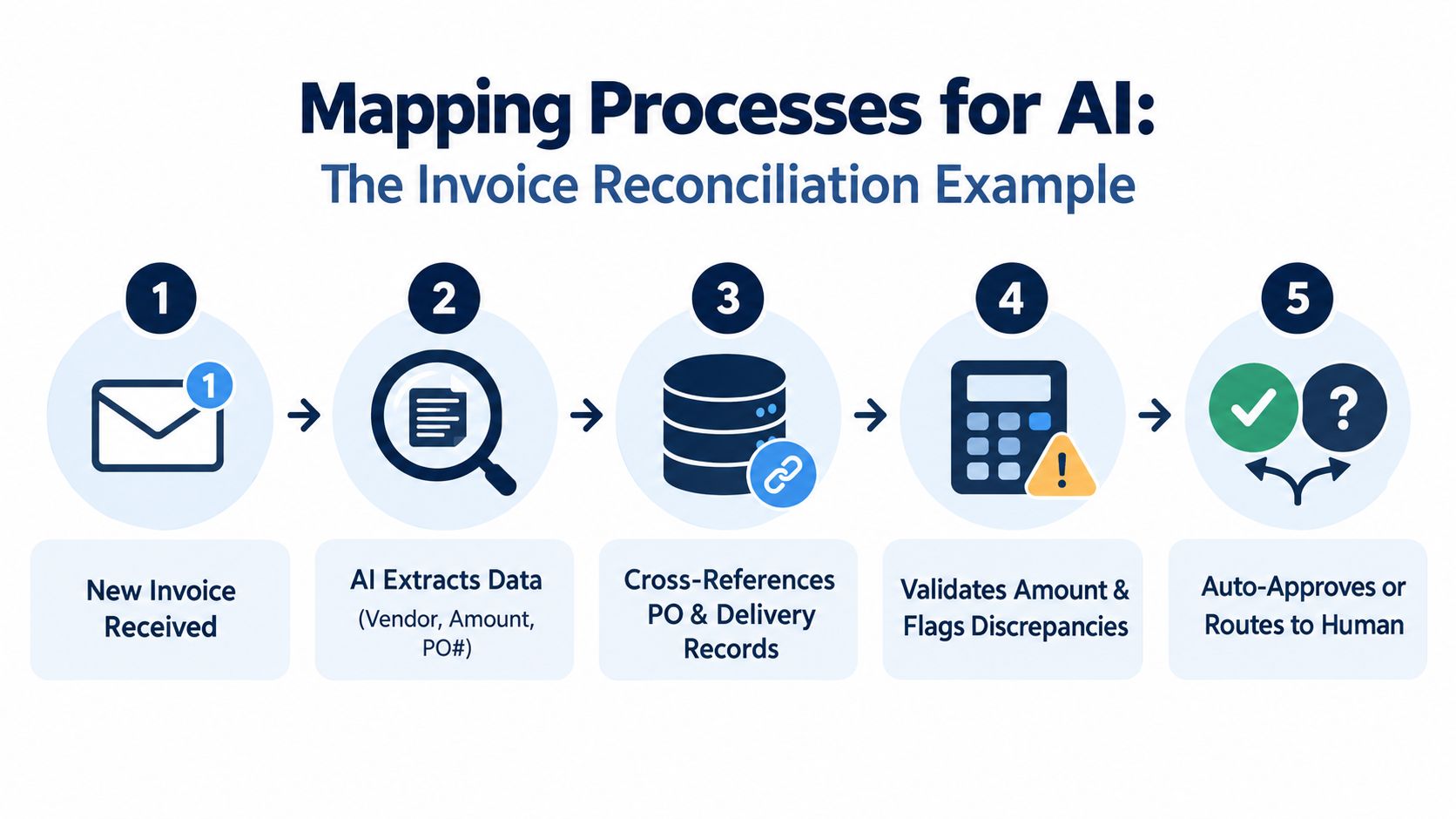
Invoice reconciliation makes the distinction clear. The process might begin when a new invoice arrives by email. The system extracts the vendor, amount, invoice date, purchase order number, and line items. It then checks the purchase order and delivery record, validates the amount, identifies discrepancies, and either sends the invoice for approval or posts it to the ledger.
Turn repeated traces into a reusable sequence
A one-off automation handles the example you built during setup. A reusable workflow handles the pattern, including controlled variations such as different vendors, currencies, payment terms, and approval routes.
A benchmark covering 15 tasks found that task-only execution succeeded 24.2% of the time, while attaching a synthesized workflow raised success to 70.1%, a 45.9 percentage-point improvement over baseline, according to Arcade's AI workflow automation metrics analysis. The useful method is to identify a repeated process, collect successful traces, synthesize the reusable sequence, and evaluate it against a task-only baseline.
That means your workflow should explicitly state:
- What event starts the process.
- Which system provides each input.
- What the AI may extract or classify.
- Which rules determine the next step.
- Where a human must review or approve.
- What counts as successful completion.
- What happens when information is missing or contradictory.
Define the data contract at every handoff
At each system boundary, specify the required fields and acceptable formats. For invoice reconciliation, the extraction step might need a vendor identifier, invoice number, amount, tax treatment, purchase order reference, and currency. The matching step should return a clear result, not a vague paragraph, such as matched, unmatched, or review required.
Domain grounding turns general AI into operational automation. Include your payment terms, approval hierarchy, tax codes, supplier rules, tolerance limits, and ledger requirements in the workflow definition. The assistant should work within those constraints instead of inferring them from a single email.
The same principle applies across departments. A reusable quote approval sequence can later support purchase approvals or expense review if its triggers, data contracts, and exception paths are documented cleanly. The first process becomes a pattern library, not a disposable experiment.
A small team that wants to test planning and time tracking without an ERP can review Starter No Credits, listed as €499 per month with one company workspace, one user, one email, and three aliases.
Choosing AI Triggers and Setting Reliable Guardrails
An AI agent shouldn't start because an email “looks important.” Ambiguous triggers create false positives, duplicate actions, and workflows that fire at the wrong moment. SMEs should prefer precise events wherever possible, then use AI for interpretation inside the controlled process.
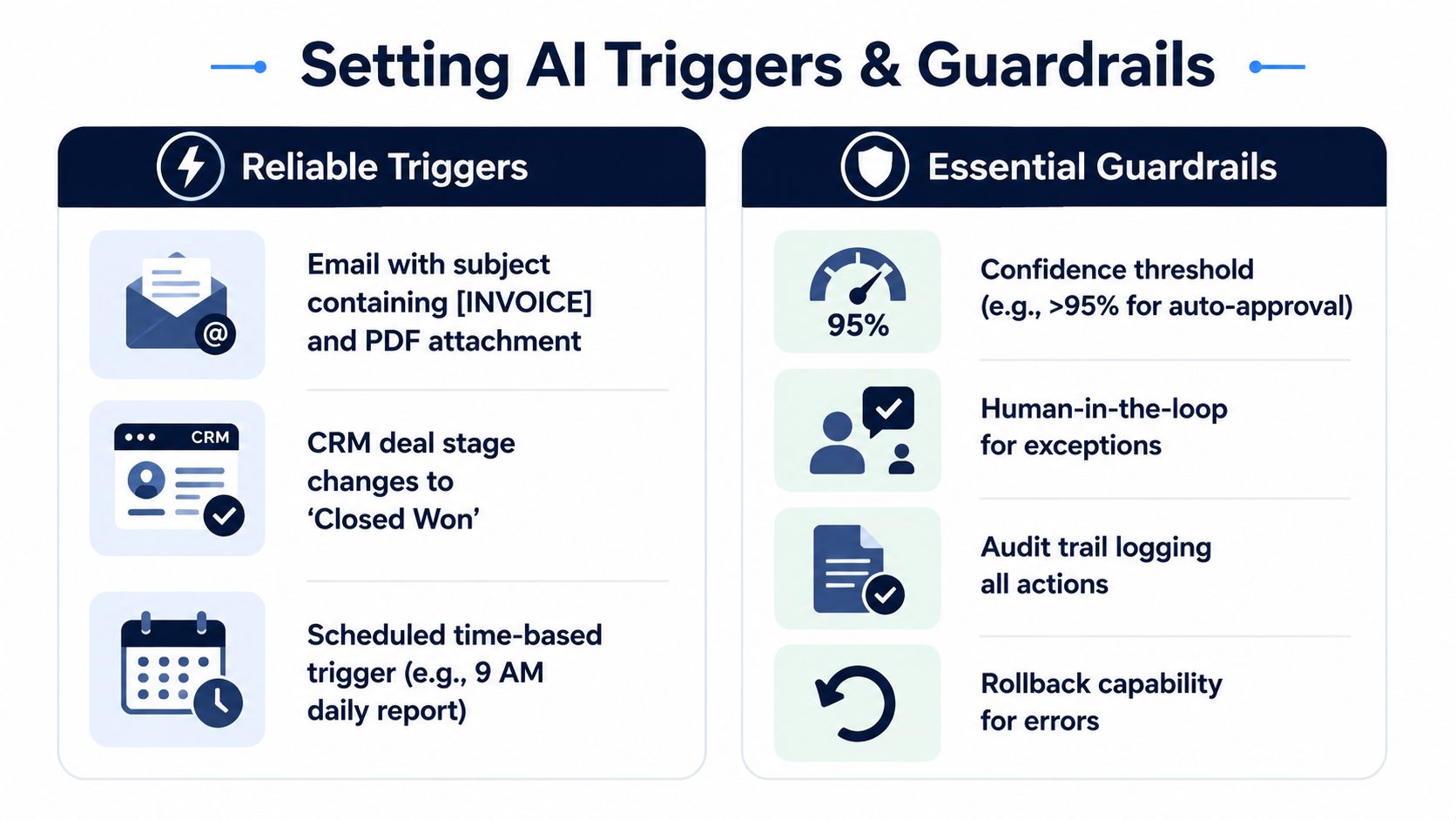
Deterministic triggers include a database record being created, a CRM stage changing to Closed Won, a signed contract being stored, or inventory falling below a defined level. Probabilistic triggers use language classification, such as deciding whether an incoming message is a genuine support request or a sales enquiry. Deterministic events are safer for financial and operational actions. Probabilistic classification is useful when the input is messy, but it needs a review path.
Put limits around autonomous decisions
Guardrails should answer three questions: what can the agent do, what must it verify, and when must it stop?
A Zynthoro AI assistant could draft a client proposal only when the deal meets the business's chosen value threshold and the classification confidence exceeds 85%, while custom pricing still requires human approval. The exact threshold should reflect the risk of the action. Drafting a message and issuing an invoice shouldn't share the same level of autonomy.
Useful controls include:
- Confidence routing: Send low-certainty classifications to a named reviewer.
- Monetary caps: Prevent autonomous refunds, discounts, payments, or credits above an approved limit.
- Domain validation: Check tax codes, payment terms, customer status, and required fields before posting.
- Permission boundaries: Let the assistant read project context without giving it unrestricted write access.
- Audit logging: Record the trigger, inputs, decision, action, reviewer, and final outcome.
- Rollback paths: Make it possible to reverse or quarantine an incorrect action.
Demonstrations beat zero-shot confidence
General-purpose models often struggle with structured enterprise work when they receive no examples or domain context. On the SCUBA benchmark, zero-shot open-source agents achieved under 5% task success on Salesforce CRM workflows, while closed-source methods reached up to 39%. Adding demonstrations increased success to 50% and reduced time by 13% and cost by 16%, according to Agentra's framework for measuring AI automation success.
The operational lesson is direct. Give the agent high-quality examples of accepted inputs, correct decisions, exception handling, and prohibited actions. Then measure both task completion and operational cost. A workflow that completes more tasks but creates a long approval queue may not improve the business.
Guardrails aren't a sign that automation failed. They define the conditions under which the team can trust it.
Implementing Automation on a Single Connected Platform
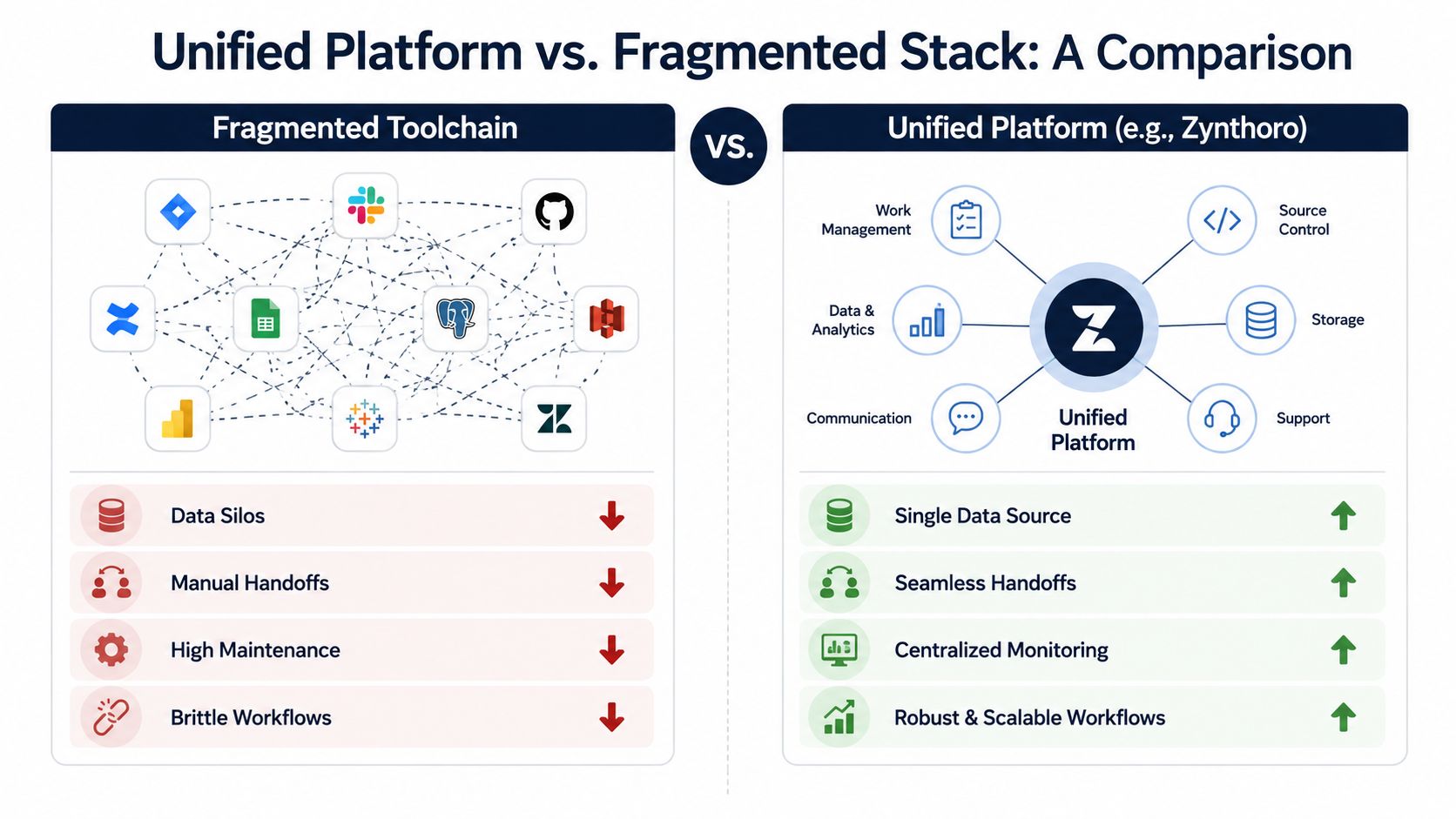
Fragmented toolchains create fragile dependencies. A webhook chain between a CRM, spreadsheet, project system, email platform, and invoicing application can break when an API changes, a field is renamed, a rate limit is reached, or a user edits the source data manually. The more connectors a workflow crosses, the more places someone must diagnose when it stops.
A connected platform changes the maintenance model. Zynthoro brings finance, operations, sales, marketing, HR, production, projects, communication, and process monitoring into an EU-hosted workspace with shared business data. That doesn't eliminate the need for process design, but it reduces the number of synchronization points an SME has to govern.
Three practical advantages
Data consistency comes first. If sales, project delivery, and finance reference the same customer and order records, the workflow doesn't need to reconcile multiple copies after every handoff. That reduces the risk of an invoice using an outdated address or a project team working from an old scope.
Cross-module context makes AI assistance more useful. A project status summary can draw on assignments, delivery milestones, and client communication instead of relying on a manually assembled update. A finance workflow can use the approved order and supplier information already held in the same environment.
Centralized maintenance limits the blast radius of change. With a fragmented stack, changing one application can require retesting several connectors. With a unified system, the platform owner manages more of the underlying compatibility, while the SME still controls its workflow rules and approvals.
A complete onboarding example
A practical client onboarding workflow can start when a signed contract is recorded. The system creates the project space, schedules the kickoff meeting, generates a welcome packet, assigns initial tasks, and notifies finance that billing can begin. The account manager reviews the generated materials, while operations checks that the delivery plan matches the signed scope.
This is stronger than asking an assistant to “onboard the client.” Each action has an owner, a source record, and an exception path. The workflow can also preserve an audit trail, which matters when the team needs to understand who approved a change or why a task was created.
For agencies and multi-client teams, Agency is listed at €1,199 per month and includes five company workspaces and 25 users, alongside accounting, inventory, project management, and marketing capabilities.
Monitoring Performance and Scaling What Works
An automation that isn't monitored can fail unnoticed. The workflow may still appear active while triggers miss new records, confidence falls as customer language changes, or human reviewers spend longer clearing exceptions than they did completing the original task.
Track operational performance weekly, not just model output. A useful dashboard shows whether the workflow started when it should, whether it made the right classification, how long processing took, and how often people had to intervene.
| Metric | Target Range | Warning Threshold | Action When Breached |
|---|---|---|---|
| Trigger accuracy rate | Consistently high against reviewed events | Missed or irrelevant triggers appear repeatedly | Review trigger conditions and event data |
| False positive frequency | Low enough that the team trusts notifications | Reviewers receive frequent irrelevant cases | Narrow the trigger or improve classification examples |
| Average processing time | Below the comparable human baseline | Automation adds delay or creates queues | Remove bottlenecks and simplify approvals |
| Exception escalation volume | Manageable for the assigned reviewer | Exceptions accumulate faster than they're resolved | Revisit data quality, rules, and workflow scope |
Watch for three failure patterns
Model drift appears when the business changes its vocabulary, pricing, product mix, or document formats. A classifier trained on old customer language may misroute new enquiries.
Trigger fatigue develops when activation rules are too sensitive. Reviewers start ignoring alerts, which defeats the purpose of the workflow.
Guardrail bottlenecks occur when every low-risk action requires approval. Human review should protect high-consequence decisions, not recreate manual processing at every step.
Use human corrections as feedback. When a reviewer changes a category, fixes an extracted field, or rejects a proposed action, record that correction and update the examples or rules governing the workflow.
Scale by evidence, not enthusiasm
Pilot one workflow with one team for 30 days, measure it against the predefined KPIs, document the configuration, and decide whether to expand, revise, or retire it. The point isn't to deploy as many automations as possible. It's to identify a repeatable pattern that another department can adopt without inheriting hidden defects.
Broader adoption doesn't guarantee profitability. A McKinsey survey summary reports that 78% of organizations use AI in at least one business function, while only 21% had redesigned workflows and 5.5% were AI high performers with more than 5% EBIT impact. Adoption creates capacity for value, but process redesign and governance determine whether that value reaches the bottom line.
SMEs also face readiness constraints that large enterprises can sometimes absorb. One dataset found that only 11.3% of SMEs reported adopting AI tools in operations, with skill shortages, hiring difficulties, and digital infrastructure gaps among the barriers described in the SME adoption research. A readiness-first rollout gives smaller teams a way to address those constraints before they commit to a broad automation program.
Zynthoro provides connected modules for finance, sales, projects, operations, communication, HR, marketing, and production, with embedded AI assistants and workflow monitoring in an EU-hosted workspace. Visit Zynthoro to assess which fragmented SME process you can audit, map, and automate first.