




Your invoice stack probably looks fine on paper and still wastes Friday afternoons. One inbox, one spreadsheet, one accounting login, one person chasing approvals in chat, and one more reminder sitting unanswered because nobody knows which version of the invoice is current. That is not automation. That is a polite mess with better fonts.
The problem with invoicing automation software is that most buyers shop for features and ignore the workflow. They buy capture, then still key data into accounting by hand. They buy reminders, then keep reconciliation in a spreadsheet. If you want a clean flow from supplier email to reconciled ledger, you need a connected system, not another tool bolted onto the pile. Zynthoro fits that model because it keeps invoicing, finance, accounting, and operations in one workspace instead of forcing your team to jump across disconnected apps.
Table of Contents
- The Friday Afternoon Invoice Problem Most SMEs Still Live In
- What a Working Invoice Lifecycle Looks Like
- Auto-Send, Chasing, Reconciliation, and EU VAT Compared
- How to Move From Disconnected Apps to One Connected Flow
- Why ERP Integration Matters More Than Feature Checklists
- Common Mistakes and Quick Wins in the First 90 Days
- Questions SME Owners Ask Before They Sign
The Friday Afternoon Invoice Problem Most SMEs Still Live In
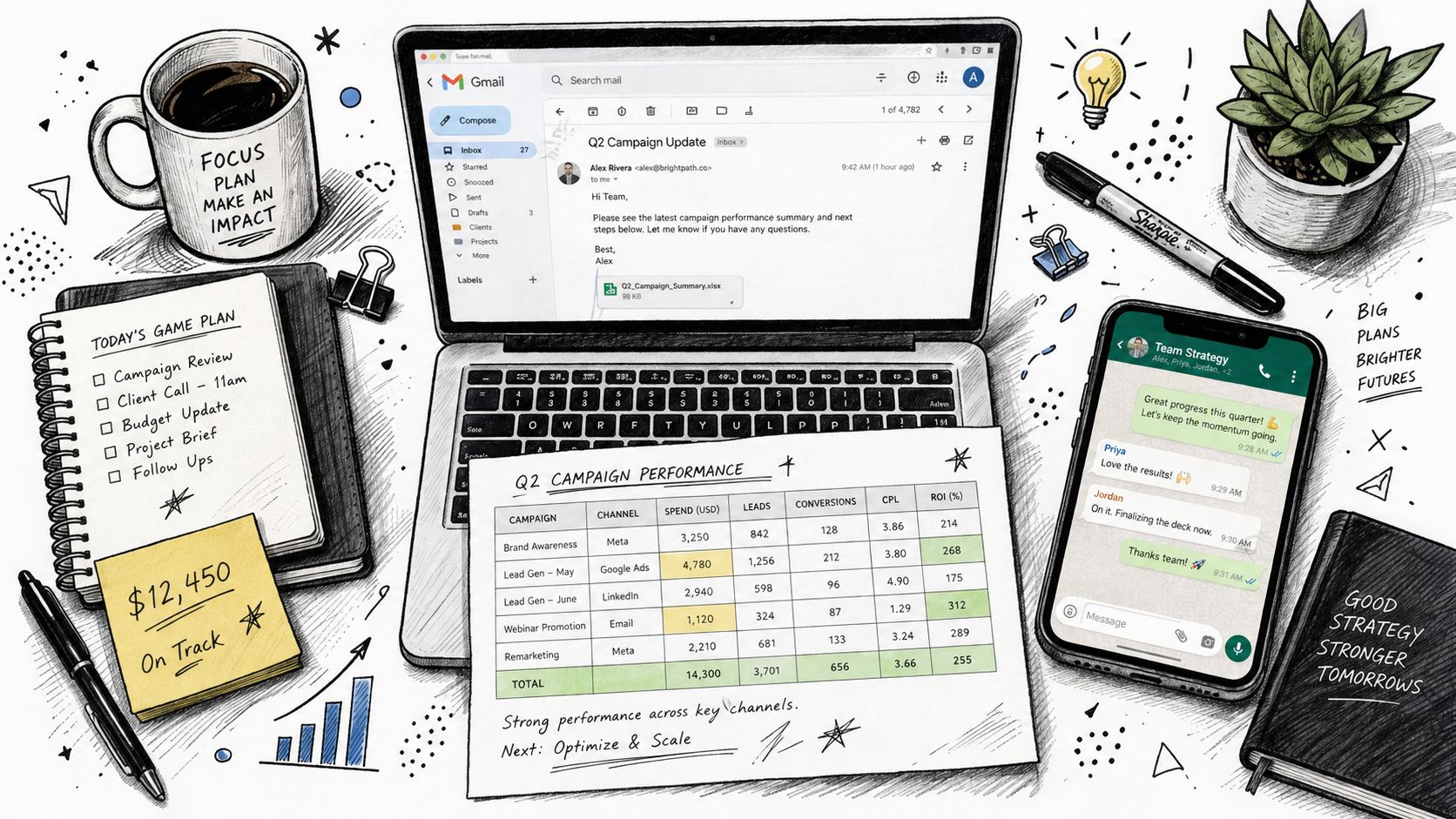
By Friday afternoon, the same small studio pattern shows up everywhere. Invoices sit in Gmail, the tracker lives in a spreadsheet, the accounting system has partial data, and the founder is pinging vendors in WhatsApp because no one trusts the payment status. That workflow feels “digital” until someone has to copy the same number into three places.
Partial digitization is not automation
That gap matters because 75% of AP departments were using some form of AI or automation in invoice workflows by 2025, but only 8% of finance teams had full automation and 68% still manually keyed invoice data into accounting systems, according to the 2025 benchmark from Gennai. The same benchmark also showed best-in-class teams at $2.78 per invoice versus $12.88 for the average organization, and 3.1 days versus 17.4 days to process invoices, which tells you exactly where the money and time leak out of the stack. Read that again. Teams have software, but not a system.
What this looks like inside a real SME
A founder thinks the problem is invoicing. It's not. The problem is that invoicing touches sales, purchasing, accounting, approvals, and payments, and the team has stitched those jobs together with separate tools that don't agree with each other. That's why a clean-looking invoice process can still collapse when someone's out of office, a supplier sends a PDF with a different layout, or a payment lands without the right reference.
Practical rule: if your team still copies numbers between four tabs, you don't have automation. You have a digital version of paper.
That's the reason I recommend treating Zynthoro as a workflow consolidation move, not just a software purchase. It gives SMEs one place to send, chase, reconcile, and account for invoices, which is the only way this stops being a weekly scramble. A point tool can help at the edges. A connected platform changes the operating rhythm.
What a Working Invoice Lifecycle Looks Like
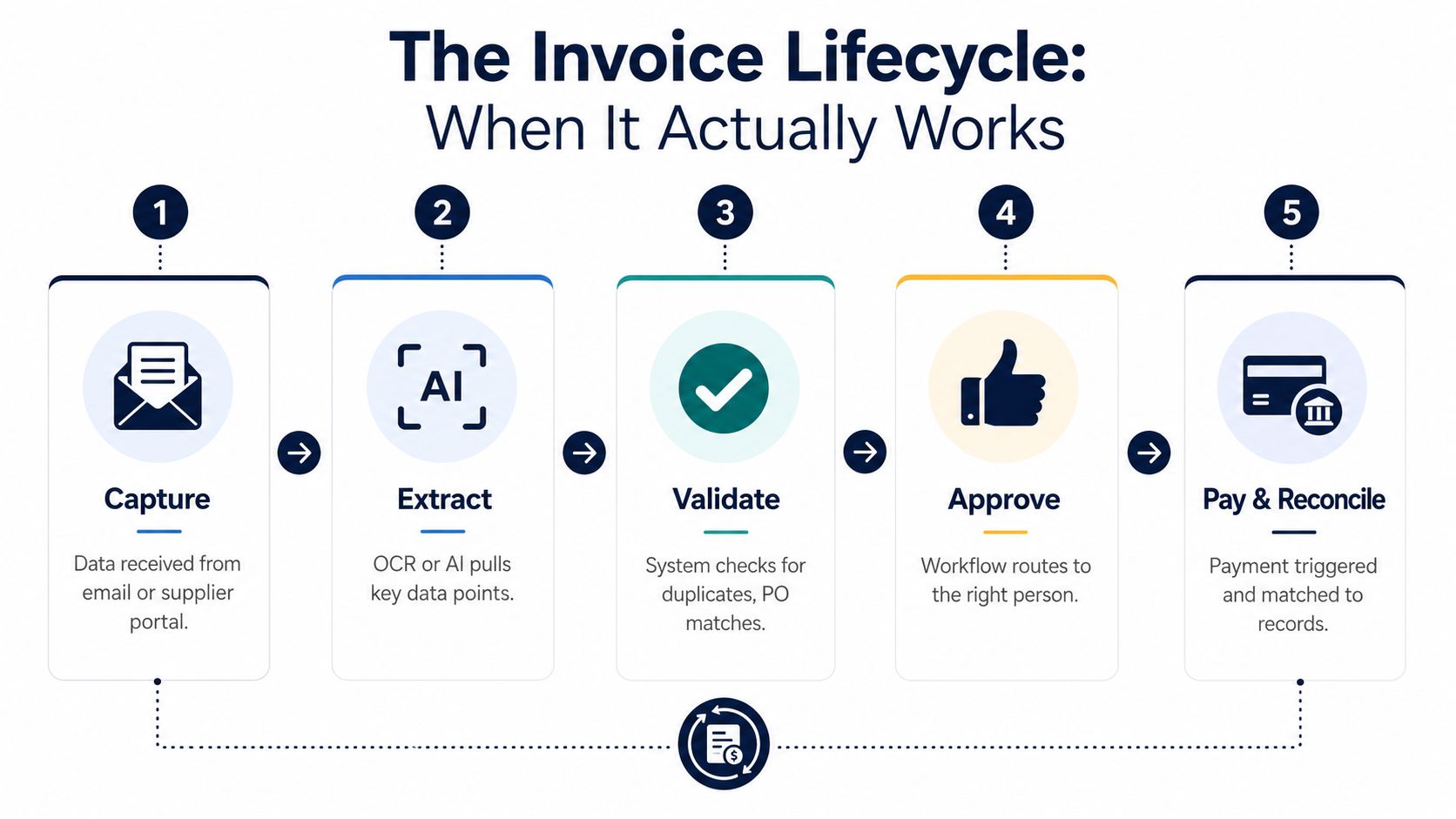
A working invoice flow has more moving parts than most owners want to admit. The invoice lands in an email inbox or supplier portal, OCR or AI pulls the fields, the system validates the supplier, matches the document to a purchase order or receipt, routes it for approval, posts it to the ERP, sends it, chases payment, and reconciles the payment back to the ledger. That chain is the job. Anything less is just document handling.
Capture and validation
Capture should mean the invoice arrives once, not three times. A supplier sends a PDF, the system reads it, and the AP team does not retype line items into the accounting system. That is where the first savings show up, because manual data entry is where basic mistakes start, and those mistakes become late payments later.
Validation has to happen at the front door. The supplier name, tax details, invoice number, and basic document fields should be checked before the invoice moves deeper into the flow. If the system lets bad records through, the rest of the lifecycle just carries the error forward.
Matching and approval
Matching is the part many generic tools underbuild. Rossum describes invoice automation as extracting data, updating the ERP, and performing 2-way or 3-way matching against purchase orders and related records before approval and payment, while DocuWare frames AP automation as matching invoices to purchase orders and proof of delivery. That matters for a small manufacturer or agency because a mismatched invoice should stop early, not become a month-end headache.
Approval should follow the match, not sit apart from it. If a manager approves an invoice without seeing the PO, receipt, or delivery note, the process is weak no matter how polished the interface looks. Good invoice automation keeps approval tied to the same records the business already used to buy the goods or services.
Payment and reconciliation
The last mile is where most stacks fall apart. The invoice can be approved and sent, but if the payment does not map back to the right invoice, project, and ledger line, someone still has to clean up the books by hand. Zynthoro's finance and operations modules are built for that connected handoff, so the invoice does not disappear between approval and accounting.
A good example is a cosmetics manufacturer buying lanolin. The invoice comes in, the system checks it against the PO and the goods-received note, the production lead approves it, the VAT line is posted correctly, and the due date triggers a chase if payment stalls. That is a real lifecycle. Everything else is just a prettier inbox.
Auto-Send, Chasing, Reconciliation, and EU VAT Compared
The strongest invoicing tools don't just “send invoices.” They handle the awkward, repetitive parts that eat an owner's week. For SMEs, that means auto-send, chasing, reconciliation, and VAT logic have to work together. If one of them is weak, the whole thing drifts back toward manual work.
What good looks like in each capability
Auto-send should trigger from a real business event, like a milestone or recurring contract, not from someone remembering to click a button. Generic tools often stop at template-based sending, which is fine until your billing cycle depends on a delivery date, a project phase, or a service window. A connected platform like Zynthoro can tie sending to the same operational data that produced the invoice in the first place.
Chasing should be polite, automatic, and easy to stop when the customer pays. If a reminder keeps going after payment, that's a systems problem and a trust problem. Good chasing includes human override, because you'll still have the odd customer who needs a personal nudge instead of a scripted reminder.
Reconciliation should post payment back to the exact invoice and ledger line without someone matching bank entries in a spreadsheet. That's where disconnected tools fail most often. They can issue the invoice, but they can't close the loop cleanly.
EU VAT is a critical test. Reverse charge, intra-community supply, country-specific IDs, and multi-entity logic are where generic invoicing apps tend to get vague or fragile. If the system can't show you exactly how it handles those rules, don't buy it.
| Capability | Generic invoicing tool | Connected platform like Zynthoro |
|---|---|---|
| Auto-send | Template-based, often manual trigger | Tied to billing events and internal workflows |
| Chasing | Basic reminders, limited control | Automated follow-up with human override |
| Reconciliation | Often external or spreadsheet-based | Payment mapped back to invoice and ledger |
| EU VAT | Spreadsheet workarounds are common | VAT logic sits inside the finance flow |
BILL's own positioning makes the right point here, even if many tools still underserve it, invoice automation has to manage the end-to-end invoice-to-pay workflow, including capture, validation, approval routing, and payment execution. That's the standard SMEs should hold vendors to. If the platform only does one slice, you'll still own the mess between the slices.
Good invoice automation doesn't reduce visibility. It removes re-entry while keeping the audit trail intact.
How to Move From Disconnected Apps to One Connected Flow
Start with an honest audit. List every app and person that touches an invoice, from email inboxes and approval chats to accounting, bank feeds, and VAT tracking. If a step lives on paper or in someone's head, write it down first. You can't automate a process you can't see.
Phase one, map the real path
Look at channels, not just software. Where do supplier invoices arrive, who checks them, who approves them, and who posts them? This is also where you catch hidden friction, like approval chains that stall because the right person is traveling or a vendor portal that only one team member can access.
Phase two, pick the primary system
Choose one system to own the invoice lifecycle. For most SMEs, that should be the finance core, because the invoice eventually has to land in accounting with correct posting and VAT logic. Zynthoro fits that role for teams that want invoicing, accounting, and operations in one flow instead of a patchwork of exports and imports.
A practical example helps here. If you only need a starter workspace for one person, Starter No Credits is listed with €499/mo, 1 company workspace, and No ERP. That snapshot tells you the difference between a lightweight setup and the deeper finance stack most growing SMEs eventually need.
Phase three, roll out in the right order
Don't do a big bang cutover. Start with the suppliers that make up the bulk of your invoice volume, then move to PO-based invoices with 3-way matching, then tackle non-PO invoices that need GL coding. That staged order is the sane one because it lets the team learn the system where the volume is highest and the exceptions are easiest to spot.
Phase four, measure what changed
Track processing time, error rate, payment cycle, and discount capture before and after go-live. If those numbers don't move, the rollout is cosmetic. A vendor demo is not proof. A cleaner month-end close is.
Why ERP Integration Matters More Than Feature Checklists
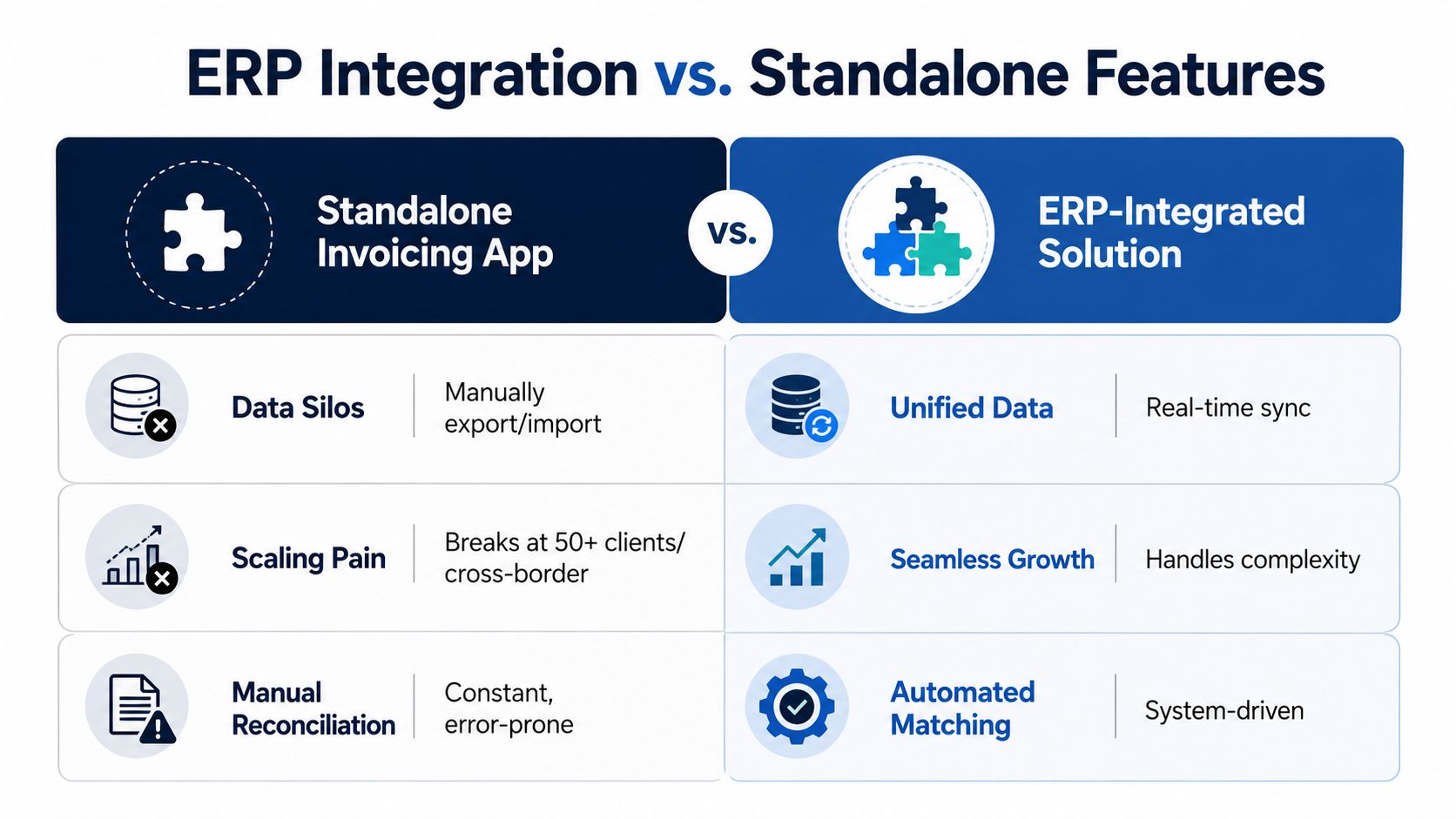
Standalone invoicing apps break once an SME has real structure. They force re-entry between invoicing and accounting, they get messy across countries, and they leave orphaned payments that don't reconcile cleanly. Those are not edge cases. They're the normal growth path.
The architectural difference that actually matters
An ERP-deep system shares one model across finance, sales, purchasing, and production. That means an invoice can pull customer data from sales, validate against a PO from purchasing, post to the ledger in accounting, and update cost data in production without anyone rekeying the same transaction. That's the core value. Not faster typing. Fewer handoffs.
Why this gets harder, not easier, as you grow
The more entities, currencies, and approval layers you add, the less tolerant your stack becomes of loose integrations. Bill.com's guidance is useful here because it points buyers toward global payment needs, ERP compatibility, tax handling, and multi-level approval chains. Those are the questions SMEs should ask before they sign. If the system can't keep auditability, VAT handling, and approval control intact across jurisdictions, it will create more work than it removes.
The trade-off nobody should hide
An all-in-one platform is heavier to evaluate than a single-purpose app. You're choosing a model for the business, not just a feature. That means the upside only appears if you replace the other tools instead of keeping the old spreadsheet “just in case.”
Bottom line: buy the system that keeps your finance data unified, not the app that looks easiest in a demo.
That's why Zynthoro makes sense for SMEs that have outgrown disconnected tools. It ties invoicing to accounting, purchasing, and operations in one workspace, which is the only setup that stays stable when the business stops being simple.
Common Mistakes and Quick Wins in the First 90 Days
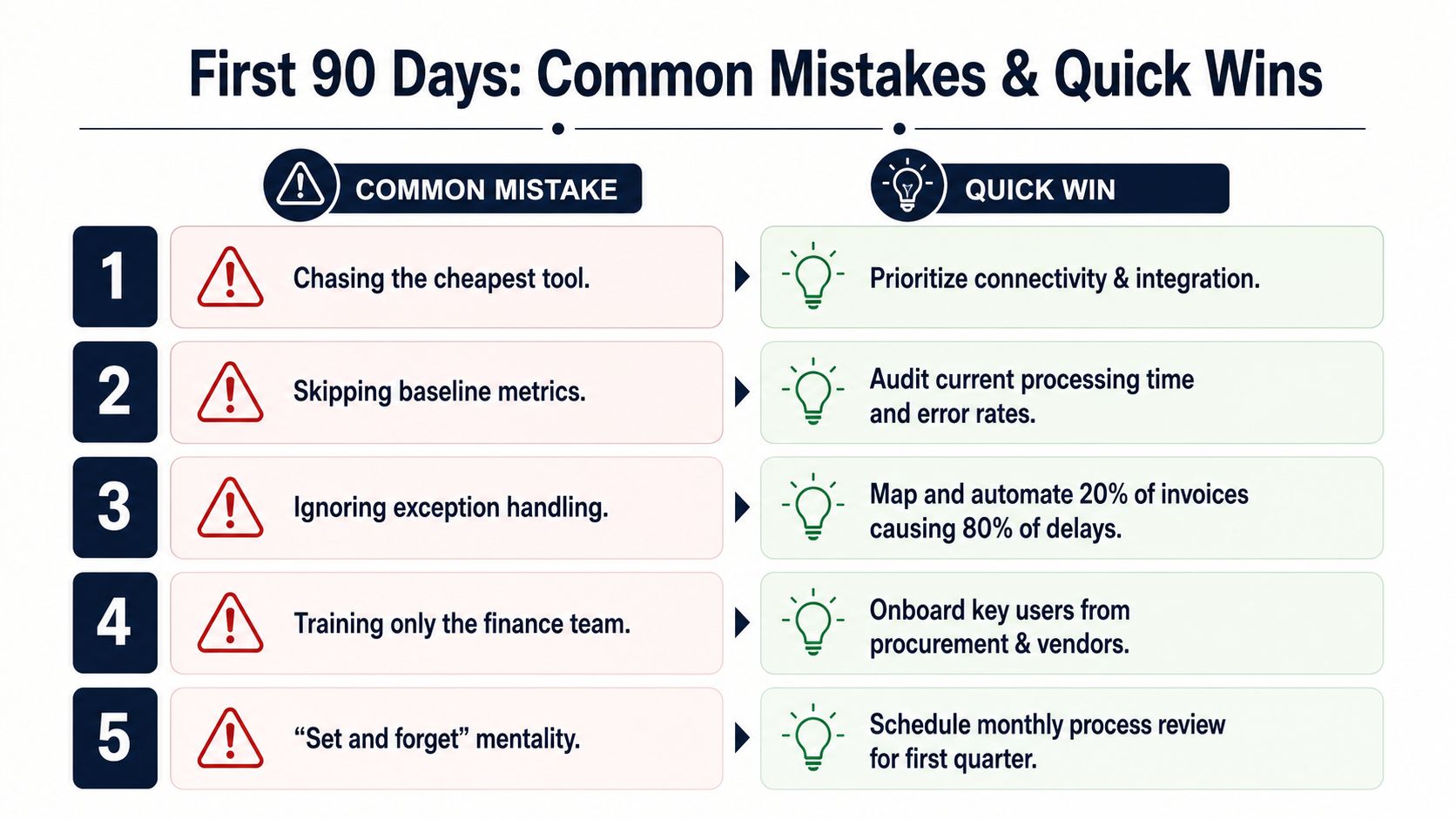
The first 90 days usually fail for the same five reasons. Owners buy the cheapest tool, skip baselines, ignore exceptions, treat VAT like an afterthought, and switch everything at once. Each one looks small. Together, they drag the project back into manual work.
Mistakes worth avoiding
- Chasing the cheapest tool. It feels safe until you discover the “savings” came from weak integration. Fix: prioritize connectivity and ERP depth.
- Skipping baseline metrics. Teams say things got better, but they can't prove it. Fix: audit processing time, error rates, and payment cycle before rollout.
- Ignoring exception handling. The same 20% of invoices causes most of the delay. Fix: map the exceptions first, then automate those paths.
- Training only finance. Procurement, vendors, and approvers still break the process. Fix: bring in the people who touch the invoice outside AP.
- Setting and forgetting. Automation needs review during the first quarter. Fix: schedule a monthly process review.
Quick wins that land fast
Turn on recurring invoices for your top five customers. Connect the bank feed so reconciliation isn't a separate chore. Switch on auto-chase for invoices over 14 days. Stop using a separate spreadsheet for VAT. Those are small moves, but they remove the most annoying handoffs quickly.
If you want a lighter starting point for an individual operator, Kickstart is listed as €79 one-time, with 40% of Starter, lifetime access, AI Assistants, 50 credits/month, and a Communication module. That kind of entry point matters less than the discipline of using the system consistently from day one.
Questions SME Owners Ask Before They Sign
How long until this pays for itself? Usually inside one to two invoice cycles if you replace two or more disconnected tools and stop retyping data across them. If the new system still leaves reconciliation or VAT in a spreadsheet, the payback will drag.
Does EU VAT and reverse charge really work? Only if the vendor can show it in a live demo with your actual country mix and entity setup. If they dodge the question, walk away.
What happens to existing accounting data during migration? Keep your chart of accounts, move open invoices, and leave closed history where it already sits unless you have a real reporting reason to migrate it. Clean migration beats heroic migration.
Can a small team run it without hiring finance? Yes, if the system handles approval routing, reconciliation, and audit trails well enough that the founder or ops lead isn't babysitting every invoice.
The two red flags I watch for are simple. First, vendors who can't explain their VAT logic clearly. Second, vendors who treat ERP integration as a paid extra instead of a core function. If either shows up, the platform is probably built to sell demos, not to run your books.
If your current invoicing flow still depends on copied numbers, chat reminders, and spreadsheet cleanup, Zynthoro is worth a serious look. It brings invoicing, finance, accounting, and operations into one EU-hosted workspace, so your team can stop stitching together disconnected tools and start running one connected process. Visit Zynthoro and see how a real SME finance stack looks when it's built to reconcile, not just to send invoices.