



Your Monday plan looked fine on paper. Then Tuesday morning hit, one machine was down, one operator called in sick, raw material was late, and your spreadsheet still said the week was on track. That's the moment most small manufacturers start looking for production planning software, not because they want more features, but because they need one answer to one question, what can we ship this week?
If you're still juggling a spreadsheet, a shared calendar, a paper job card, and three browser tabs, you already know the pain. The factory looks busy, but the plan keeps drifting because the floor and the plan don't match. Only 16% of manufacturing leaders report real-time WIP monitoring throughout the full process, which means many are still running blind on the variable that decides on-time delivery, according to industry guidance from Tractian. Most buyers don't need another dashboard. They need one connected view that tells the truth fast.
Do nothing, buy one more disconnected tool, or consolidate into one workspace. The wrong choice usually costs more in confusion than in software.
Table of Contents
- The Tuesday Morning Reality for Growing Manufacturers
- Five Capabilities Every Production Planning Software Must Cover
- Three Archetypes of Production Planning Software
- Feature Matrix and the SME Decision Lens
- How to Evaluate and Pilot Without Wasting Three Months
- Why Connected Workspaces Win for SMEs Replacing Disconnected Tools
- Your Next Move and What to Do This Week
The Tuesday Morning Reality for Growing Manufacturers
By 8:15 a.m., the owner is staring at a spreadsheet, a wall calendar, and a WhatsApp thread asking whether Friday's order will ship. The planner says yes. The shop supervisor says maybe. The material buyer says the supplier promised a delivery that still hasn't arrived. That gap between promise and reality is where small factories bleed time, trust, and margin.
What breaks first
The first thing that breaks is not the machine, it's the plan. Once orders, inventory, labor, and machine availability live in separate places, every update becomes a manual chase. That's why production planning software stops being a nice-to-have the moment the owner can't answer a customer with confidence.
A connected planning layer gives you more than a prettier schedule. It gives you a single version of what's supposed to happen, what's happening, and what needs to move next. That matters most when the day is already messy, because messy days are normal in small manufacturing.
The decision point is simple. If you can still hold the whole operation in your head, you can postpone the purchase. If you're constantly reconciling three sources of truth, you're already paying for the lack of a system.
Practical rule: if your team is making shipping decisions from memory, you're not managing production, you're improvising it.
Five Capabilities Every Production Planning Software Must Cover
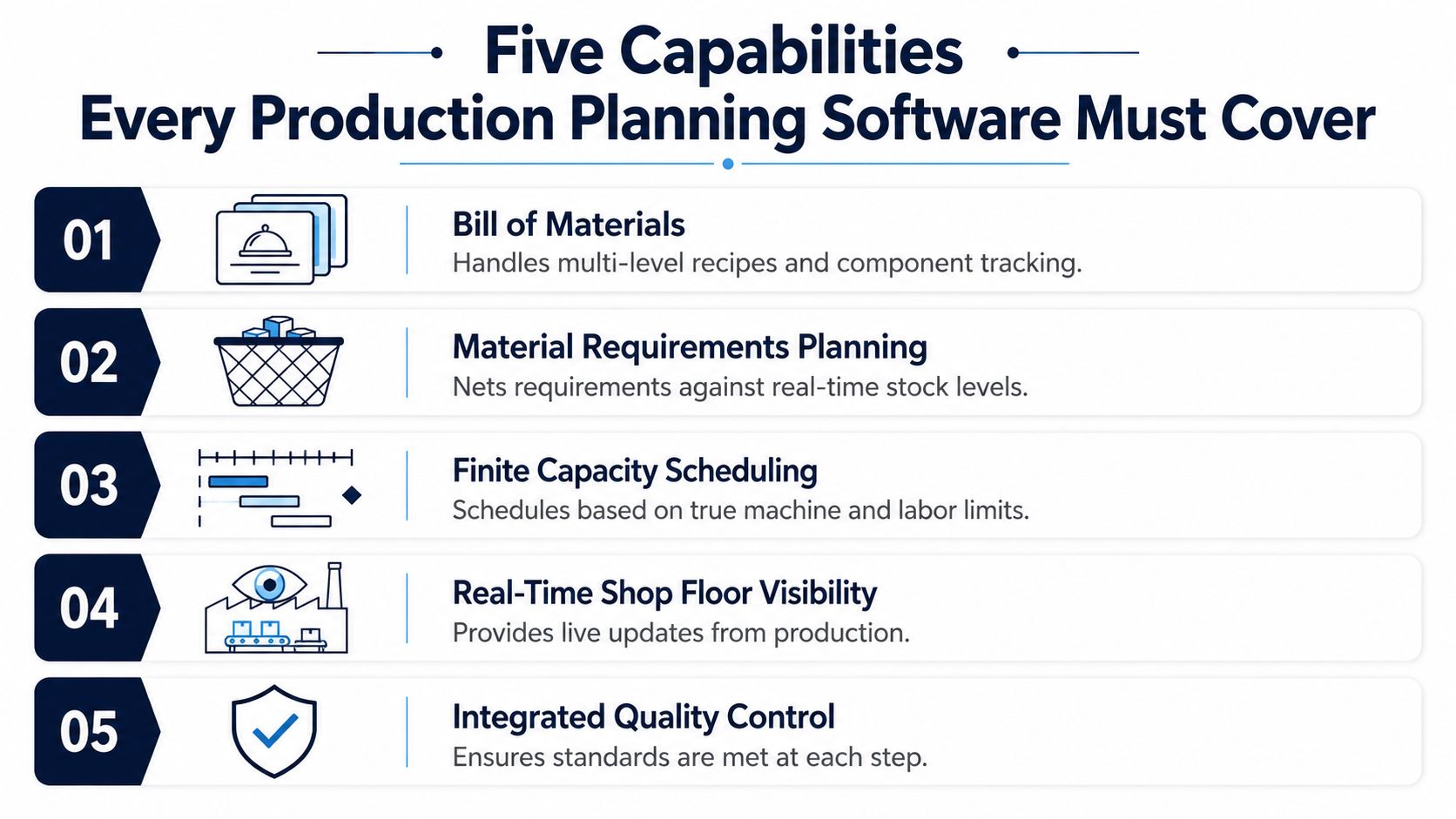
A serious tool has to do five jobs well. If it can't, skip it, no matter how polished the demo looks. The point is not to admire screens, it's to get a usable plan out the door without hand-stitching half the factory back together.
The five checks that matter
Bill of materials comes first. If you make food, cosmetics, or light industrial products, the software must handle multi-level recipes and component tracking cleanly. A sauce maker needs to know that one finished batch consumes jars, labels, caps, and ingredients at the right levels, not just a total order quantity.
Material requirements planning comes next. The tool has to net demand against real stock, open purchase orders, and in-process work. If it only tells you what you need without checking what you already have, it's pretending to help.
Finite-capacity scheduling is the third test. The software must schedule against real machine and labor limits, not infinite fantasy capacity. A cosmetic filler line, for example, can't run two jobs at the same time just because the calendar says the slot is open.
Real-time shop-floor visibility is what separates a static planner from a usable one. The plan should update when a batch finishes early, a line goes down, or a technician logs a delay. A planner that doesn't reflect floor events quickly becomes decorative.
Integrated quality control closes the loop. Lot traceability, checks at each step, and linked corrective action matter when a bad run has to be isolated fast. That's especially important in food and regulated production, where one error can spread through the week's output.
A staged methodology is the right way to implement this, define objectives and KPIs, validate data sources, design the architecture, then implement the BOM explosion, requirement netting, and finite scheduling in that order. That sequencing comes straight from systems engineering guidance, and it's the difference between a useful rollout and a very expensive spreadsheet replacement.
A tool that covers these five capabilities is the floor, not the finish line. If it can't do all five, it's not production planning software, it's a partial workaround.
For smaller teams, Kickstarter 3 is positioned as a lightweight connected option with accounting, operations, project management, and marketing tools in one package. That makes sense only if you want the planning layer to live alongside the rest of the operating system instead of being bolted on later.
Three Archetypes of Production Planning Software
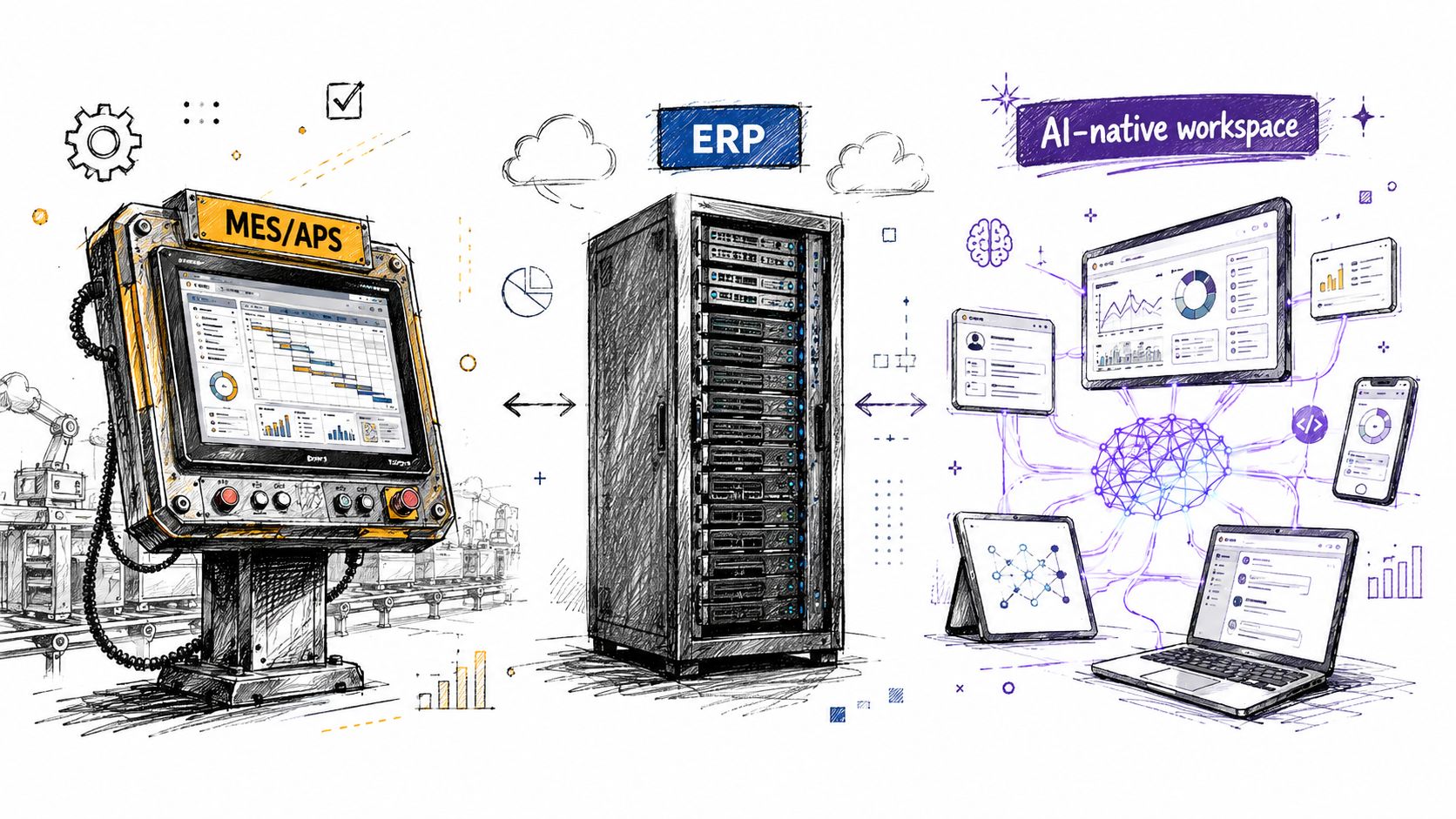
The market splits into three clear buckets. Sales decks blur them together, and that is exactly why small manufacturers end up buying the wrong tool. Skip the blur. Decide which model fits your shop, then accept the trade-off that comes with it.
Standalone MES or APS
A standalone MES or APS is a shop-floor-first tool. Pick it when the problem is sequencing work, capturing execution, and controlling finite capacity on live jobs. APS systems are built to plan and schedule production with available materials, labor, and enterprise capacity, and they extend into demand planning, production planning, production scheduling, distribution planning, and transportation planning, as described by the Institute of Industrial and Systems Engineers in its APS definition.
The trade-off is plain. You get depth in scheduling and execution, but you may still need separate tools for finance, sales, or broader operations. That is workable for a plant with a strong internal systems team. It is a poor fit for a small owner who wants fewer tabs, not more.
Traditional ERP with manufacturing modules
A traditional ERP fits a business that already runs on purchasing, costing, invoicing, and disciplined master data. It can be the right choice for an owner who wants production tied tightly to finance and procurement. The weak spot is also obvious. Production often feels like one module among many, not the core of the system.
Ask a hard question in the demo. Does the system treat scheduling as a real operational process, or as a checkbox under manufacturing? If the answer sounds vague, the shop floor will pay for it later.
AI-native connected workspace
An AI-native connected workspace fits the SME that wants one shared data model across production, finance, sales, and operations. This is the strongest fit for teams replacing disconnected tools, because integration costs usually matter more than fancy single-function depth. Kickstarter 2 is one catalog example of this kind of bundled workspace, with accounting, invoicing, sales, and AI photo and video tools in one entry-level package.
The decision rule is simple. If your team only needs floor-level control, pick MES or APS. If your shop is already drowning in app sprawl, pick the connected workspace and stop paying the integration tax.
Feature Matrix and the SME Decision Lens
The market is big and still expanding. One analysis estimates the global production planning software market at $8.2 billion in 2025 and projects $17.9 billion by 2034 at a 9.4% CAGR (Market Intelo). That size tells you the category is no longer niche. The hard part is that different vendors pack very different meanings into the same label.
Read the matrix the right way
Use the table below as a filter, not a scoreboard. A standalone MES can be excellent on execution and weak on finance. An ERP can be strong on invoicing and weak on live scheduling. An AI-native workspace should make the data flow easier, but you still need to check the depth of production logic.
| Capability | Standalone MES | Traditional ERP | AI-native connected workspace |
|---|---|---|---|
| Bill of materials | Good if execution-focused | Strong on master data | Strong when production and operations share one model |
| Material requirements planning | Often partial | Strong | Strong with connected purchasing and inventory |
| Capacity planning | Strong on shop-floor constraints | Mixed, often lighter | Strong if finite scheduling is built in |
| Quality | Usually strong on traceability | Varies by module | Strong when quality sits inside production flow |
| Traceability | Strong | Usually good at item-level records | Strong when lots, work orders, and operations are unified |
How to score the shortlist
Score each vendor on three SME lenses as well. First, how quickly can you get a usable schedule? Second, what's the cost after subscriptions, setup, and integration work? Third, how well does it handle GDPR-ready controls, audit trails, and role-based access if you operate in Europe?
Don't let the demo distract you from the workflow. The fastest way to fool yourself is to watch a polished schedule being built from clean fake data. The right question is whether the tool can live with your actual mess.
How to Evaluate and Pilot Without Wasting Three Months
Most bad software buys don't fail because the screens look bad. They fail because the owner never forced the vendor to prove it on live jobs. A clean pilot tells you more in a month than a glossy demo tells you in six.
Run it on your real work
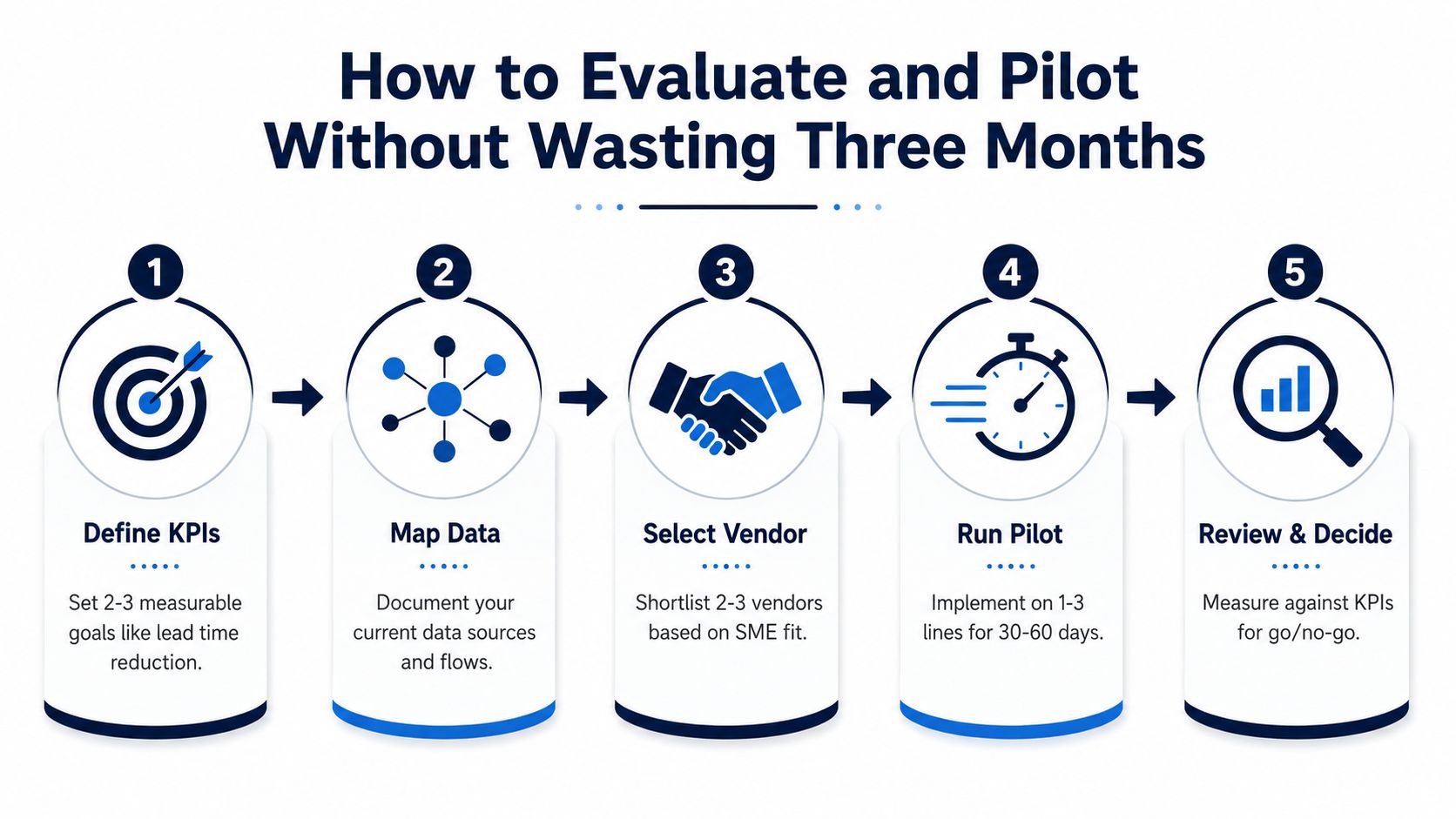
Start with two or three KPIs, not ten. Throughput, lead time, on-time delivery, and operator utilization are the cleanest ones to watch because they show whether the plan is helping the shop, not just the dashboard. Then map the data sources, ERP, machine inputs, operator records, and inventory feeds, before you let anyone promise a schedule.
Run the pilot on one to three real SKUs for 30 to 60 days, using live machine data. That pilot shape comes from industry guidance and is the right scale for an SME because it shows whether the system handles changeovers, maintenance windows, and material arrival uncertainty without drama.
Measure what matters, not what looks impressive.
- Define KPIs: Pick two or three metrics you'll review every week.
- Map data: Write down where orders, stock, machine events, and work orders come from.
- Select vendors: Keep the shortlist small and focused on SME fit.
- Run the pilot: Use live jobs, not sample data.
- Review and decide: Compare outcomes to the original KPI baseline.
The most common failure is late or manual progress updates. Once the feedback loop breaks, the schedule becomes fiction again. That's why a complete module matters, and why Zynthoro's production management setup, with recipes, multi-level BOM, work orders, quality control, and lot traceability, is the kind of structure an SME should demand from a serious system.
If a vendor can't show a measurable change on the original KPIs, walk away. A slick interface is not a result.
Why Connected Workspaces Win for SMEs Replacing Disconnected Tools
If your company already runs five to fifteen separate apps, the case for consolidation is stronger than the case for best-of-breed purity. Every extra system adds login friction, sync problems, and another place where the truth can drift. The hidden cost isn't just subscription spend, it's all the hours spent reconciling data that should have stayed unified.
One data model beats stitching
Production planning systems help companies match manufacturing performance with customer demands, so they're no longer just internal efficiency tools, they're customer-facing alignment tools. That matters because the factory is judged by what ships, not by how tidy the software stack looks. A connected workspace makes it easier to keep the promise that sales made and production has to keep.
An AI-native platform has a real edge here. Zynthoro is built as a single workspace across many business domains, with production management for SMEs, EU-hosted infrastructure, and embedded AI assistants. In a small cosmetics business, that means the team can move from quote to schedule to shipment to invoice without hopping between a separate CRM, planner, and accounting stack.
The consolidation argument gets stronger when the team is small. A ten-person manufacturer doesn't need three different truths. It needs one place where orders, materials, work orders, and financials stay aligned.
If a small factory spends its day copying the same data into different apps, it's not running lean. It's paying staff to act as middleware.
Your Next Move and What to Do This Week
Use one rule. If you're already paying for five or more disconnected tools, pilot a connected workspace on one production line before you buy another point solution. That choice is usually cheaper, easier to maintain, and far less likely to break when the shop gets busy.
Three steps to take now
Pick two measurable KPIs you'll judge the pilot by, such as lead time and on-time delivery. List the exact SKUs that will run in the test, not broad product families. Then book one live demo with a vendor that will show the software against real data from your shop, not a polished mock-up.
The best deployments combine finite-capacity scheduling, live execution feedback, and KPI governance in one workflow because the software's job is to keep correcting the plan. It's not there to produce a perfect forecast and walk away.
Take that seriously, and the software starts paying its way.
If you're replacing spreadsheets and scattered apps, Zynthoro gives you one connected workspace for production, operations, finance, and sales, so the plan, the floor, and the invoice stay in sync. Visit Zynthoro to see how a connected SME setup can handle recipes, BOMs, work orders, quality, and lot traceability without adding another layer of software sprawl.