


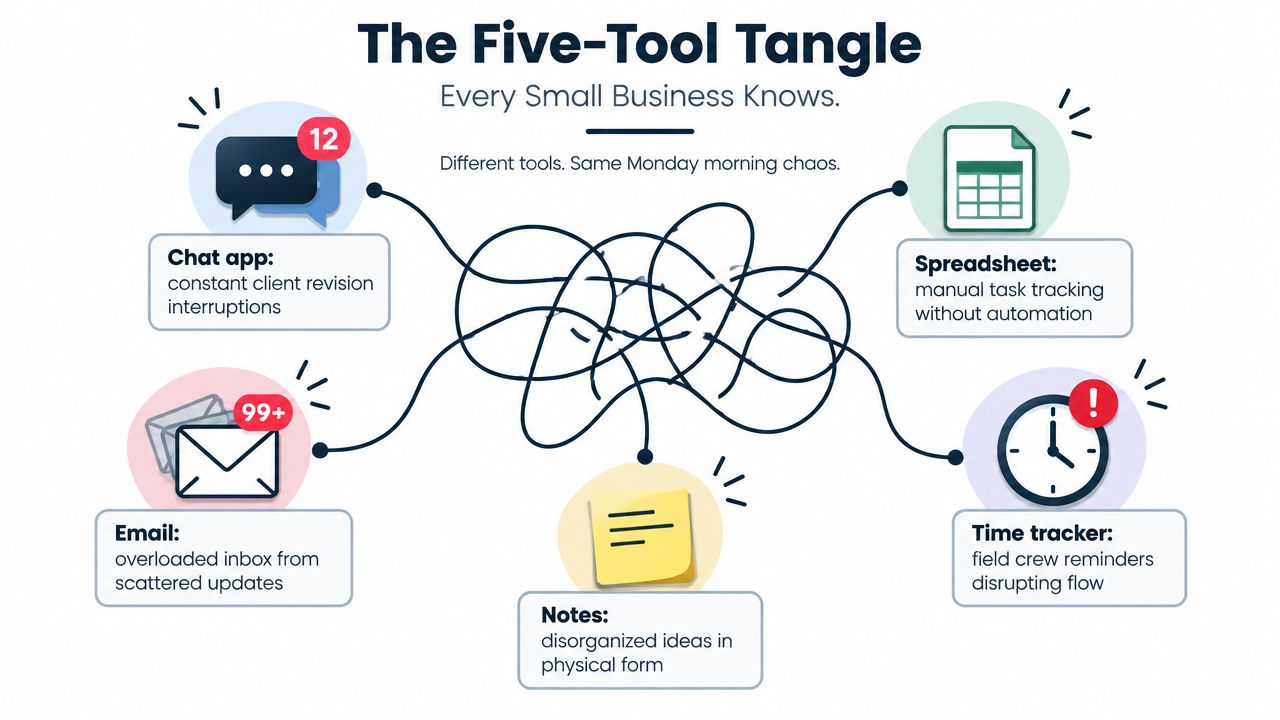
Monday starts with a client revision in your chat app, a spreadsheet that claims to be the project plan, and a time tracker asking the field crew to remember yesterday's hours. Finance is waiting for those hours before drafting an invoice, while the latest contract sits somewhere in a shared drive among several files with nearly identical names.
That isn't a productivity problem. It's an execution problem. Each tool owns a fragment of the work, but no system connects the task, deadline, person, time entry, cost, document, and invoice. The owner becomes the integration layer, carrying project context in their head and rebuilding the truth for every client call.
Project management software should remove that burden. For a small business, the right platform acts as a shared execution layer for planning, delivery, resources, time, and financial follow-through. This guide explains what to look for, where ordinary tools break, and why an AI-native ERP such as Zynthoro changes the decision.
Table of Contents
- The Five-Tool Tangle Every Small Business Knows
- What Project Management Software Actually Does
- Core Features That Matter for Small Teams
- How It Works in Real Small-Business Scenarios
- Why AI Assistants Change the Equation
- Moving From a PM Tool to an AI-Native ERP
- Questions Small Owners Ask Before Switching
The Five-Tool Tangle Every Small Business Knows
At 8:30, the agency founder sees a message about a client revision. The spreadsheet still shows the old deadline. A designer has logged hours in a separate tracker, but the account manager hasn't approved them. The invoice system has no usable time data, and the contract folder contains a newer document than the one attached to the project record.
None of these tools is necessarily bad. The chat app is useful for quick questions. The spreadsheet is flexible. The time tracker captures activity. Email preserves correspondence, and shared notes hold ideas. The failure starts when the team expects those separate systems to behave like one operating model.
Where the handoffs create risk
A manager copies a deadline from email into a spreadsheet. A team member updates the spreadsheet but forgets the chat thread. Someone records time at the end of the week from memory, then finance asks which hours are billable. The founder reconciles the differences manually and still can't tell whether the project is on schedule or underreported.
That is why project management software has become a fast-growing software category. One Grand View Research market analysis estimates the category at USD 6.59 billion in 2022, projecting USD 20.47 billion by 2030 and a 15.7% CAGR from 2023 to 2030. The same source also presents a newer estimate of USD 9.76 billion in 2025, with a projection of USD 23.09 billion by 2030 at a 15.42% CAGR. The definitions differ, but the direction is clear. Businesses increasingly treat project software as infrastructure, not an optional scheduling aid.
Practical rule: If your owner, project manager, and bookkeeper each maintain a different version of project reality, you don't have control. You have reconciliation work.
A unified workspace links the project record to its tasks, milestones, documents, approved hours, costs, and invoice status. That lets a team update work once and expose the change to everyone who needs it. If you're also evaluating broader operational systems, guidance on how to boost efficiency with practice management can help you compare project coordination with the wider management layer.
The recommendation is straightforward. Stop asking whether your team needs another task list. Ask whether the business needs one place that connects what must happen, who owns it, when it is due, what it costs, and what the customer should receive.
What Project Management Software Actually Does
Project management software is the system of record for who is doing what, by when, at what cost, and with what outcome. That definition is more useful than a feature list because it tests whether the software supports execution after the planning meeting ends.
For a service team, think of a dispatch board. Every job has a customer, assigned person, scheduled visit, required materials, notes, hours, and completion status. For a design studio, it's a proof queue where each deliverable carries its brief, reviewer, feedback, approval, and deadline. For a wholesaler, it resembles a delivery run-sheet that connects orders, owners, timing, and exceptions.
The shared model behind the features
Tasks replace mental to-do lists with assigned work and accountable owners. Scheduling replaces a spreadsheet deadline that nobody updates. Time tracking replaces end-of-week memory. Reporting replaces guesswork during client meetings, and collaboration replaces email threads that separate the decision from the deliverable.
The important point is that these capabilities should use the same project data model. A task shouldn't exist in isolation from its milestone. A time entry shouldn't float separately from the task it supports. An invoice draft shouldn't depend on someone exporting hours, cleaning a file, and sending it to finance.
A useful platform also gives different people different views of the same records. A field worker might need a mobile task list. A project manager might need a timeline and dependency map. The owner might need cost, margin, and workload information. The records remain connected even when the screens differ.
For practical guidance on coordinating several workstreams, these tips for project managers are useful alongside a software evaluation. The tool should support the operating habit, not replace judgment.
If you want a compact Zynthoro package that includes project management with accounting and operations, Kickstarter 3 is listed at €199 one-time, with lifetime access, 300 credits per month, and the stated inclusion of Accounting & Operations, Project management, and Marketing & Content.
Core Features That Matter for Small Teams
Small businesses don't need every enterprise feature. They do need the controls that prevent missed ownership, hidden workload, unapproved time, and late financial surprises. Shortlist software against how work moves through your business.
Tasks and dependencies
A credible task module supports subtasks, owners, due dates, milestones, status, attachments, and dependencies. A weak version is a flat checklist. It may show that “launch website” exists, but not whether copy, design, development, review, and approval are blocking one another.
Dependencies matter because a late predecessor should affect the work that follows. Without them, a manager discovers schedule risk through a client complaint instead of a visible project view.
Scheduling and capacity
Look for timeline, calendar, board, and workload views. A Gantt chart can show sequencing, but it doesn't necessarily show whether the assigned person has room to do the work. Capacity views expose collisions across projects, which matters when the same designer, engineer, or installer supports multiple customers.
Time tracking also needs scrutiny. A passive timer records activity, but a useful system connects entries to projects, tasks, billing rules, approvals, and budgets. Otherwise, the owner still has to decide which hours count and where they belong.
Reporting and collaboration
Dashboards should answer operational questions, not decorate a meeting. Can the owner see cost to complete, project margin, approved versus unapproved time, utilisation, overdue milestones, and workload? If the answer requires exports, the reporting layer is too weak.
Comments and proofing should attach directly to deliverables. A decision buried in a chat channel loses meaning when the project closes or a new teammate joins. Context attached to the file or task remains available where the next action occurs.
| Capability | What It Should Do | Weak Version Red Flag |
|---|---|---|
| Tasks and dependencies | Connect owners, subtasks, milestones, and sequencing | A flat checklist with no accountable owner |
| Scheduling and resources | Show timelines, calendars, capacity, and conflicts | A Gantt view with no workload visibility |
| Time and approvals | Tie hours to tasks, rates, budgets, and approval status | A timer that produces disconnected entries |
| Reporting | Show cost, margin, workload, progress, and exceptions | Attractive charts that require manual exports |
| Collaboration and proofing | Keep comments, files, decisions, and approvals with the work | Feedback scattered across chat and email |
Buyer test: Ask the vendor to demonstrate a late milestone, an unapproved time entry, and an invoice draft in one workflow. If the demo jumps between unrelated systems, expect month-end reconciliation.
The hidden cost of weak modules is integration maintenance. Someone maps fields, monitors failed syncs, checks duplicate records, and reconciles exports. For a small team, those hours often matter more than the subscription line item.
How It Works in Real Small-Business Scenarios
A shared data model changes the owner's daily decisions. The difference becomes obvious when the same project record carries delivery activity and financial meaning.
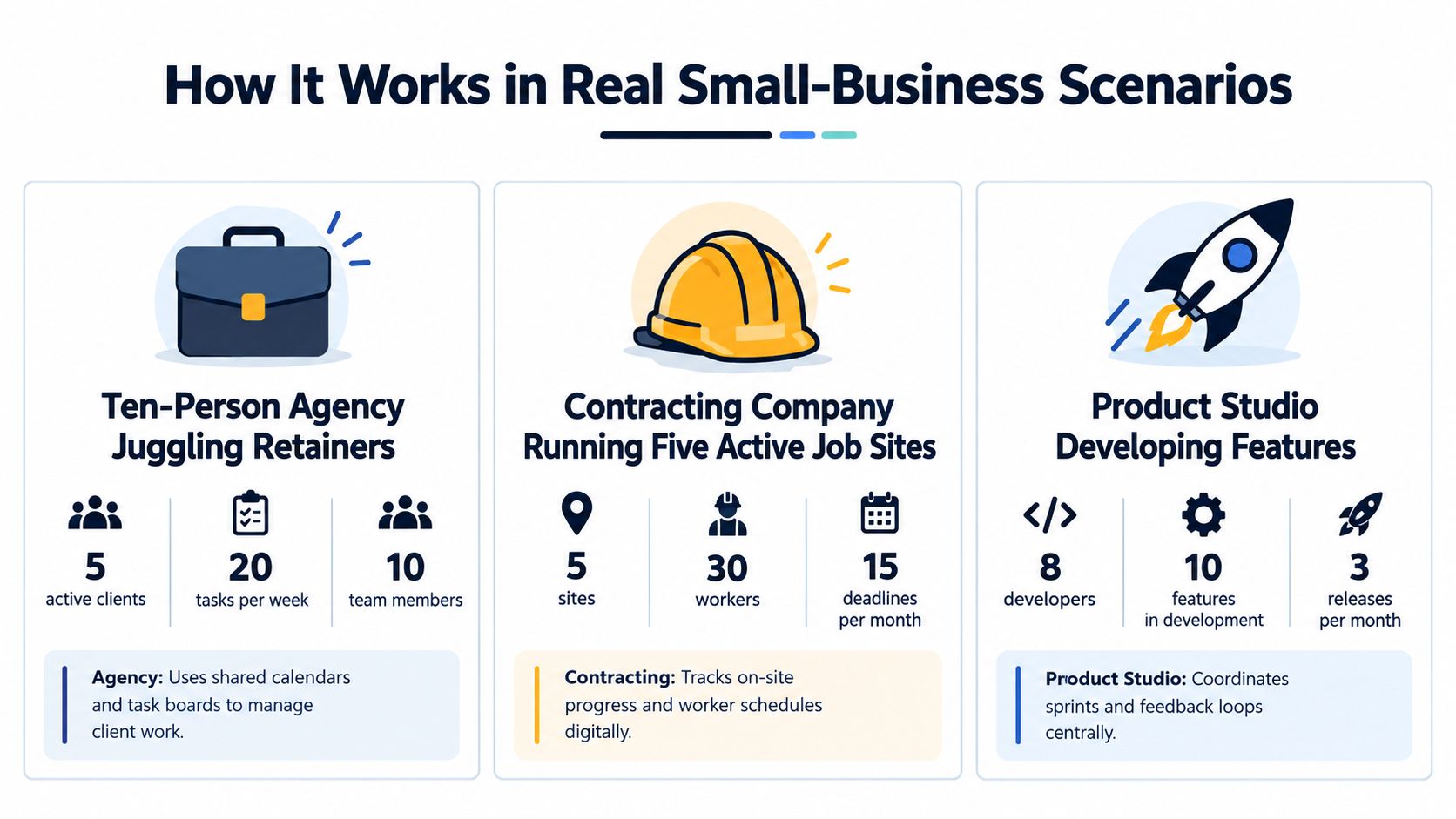
A ten-person agency managing retainers
The account manager creates recurring client tasks, assigns owners, and sets a review milestone. Team members log time against the actual deliverable rather than a generic client code. When approved hours approach the retainer allowance, the owner sees the exposure beside the work instead of waiting for a separate finance report.
If the agency relies on integrations, billable hour rollover can become a spreadsheet exercise. The project system knows tasks, while the finance system knows invoices, and the owner must decide which version is correct.
A contracting company running five active job sites
A site manager needs scheduled work, worker assignments, dependencies, notes, and evidence of completion. When a milestone slips, the office should see the impact on staffing and customer communication without waiting for a manually updated report.
A connected system can link the delayed task to the responsible crew, the relevant project cost, and the next billing event. It doesn't remove the need for a supervisor, but it gives that supervisor a current operating picture.
A product studio shipping client deliverables weekly
The studio creates feature tasks, connects them to a release milestone, and attaches feedback to the relevant deliverable. Approved time entries feed the project's cost view, while the manager watches whether the release is absorbing more effort than planned.
The useful moment comes when profitability appears beside the schedule. The owner can decide whether to reduce scope, move capacity, or discuss a change request without rebuilding a dashboard overnight.
Across these cases, the pattern is consistent. A task update changes the schedule, workload view, status summary, and financial context because the records belong to one system. With brittle integrations, each update becomes a message that may arrive late, fail, duplicate, or lose its relationship to the original work.
When project data and financial data live together, owners stop reconciling and start deciding.
That is the practical distinction between a project tool and an execution layer. One records activity. The other helps the business act on it.
Why AI Assistants Change the Equation
A generic chatbot can draft a status update, but it usually needs the user to paste the project context first. An embedded assistant starts with the context already inside the workspace, including the project, task owner, time entries, dependencies, documents, and open invoice.
That difference affects three areas.
Governance comes before convenience
A native assistant should respect role-based permissions. A project lead may see delivery details that a contractor shouldn't, while finance may need invoice and cost information that a creative contributor doesn't. An assistant that inherits those boundaries is safer than one that scrapes every chat channel and treats the entire company archive as available context.
Security controls also need to be visible. Serious project platforms commonly use role-based access control, audit logs, and references such as GDPR, SOC 2, or ISO 27001, as outlined in this overview of secure project management software.
Data residency and workflow context
European SMEs should ask where prompts and business records are processed, stored, and governed. Data residency isn't a footnote when project notes include customer information, employee details, pricing, or production plans.
An embedded assistant can summarise overdue work, identify missing time entries, prepare a project update, or flag an invoice that lacks supporting approvals because it can read the connected workflow. A bolt-on assistant asks the manager to assemble that context manually, which recreates the very friction the PM system was meant to remove.
The trade-off is real. AI is only as reliable as the underlying records, permissions, integrations, and status discipline. Recent survey coverage reports 41% of respondents cite AI adoption issues as their top software challenge, while another report says 39% of project managers are dissatisfied with PM software and that half of organisations lack access to real-time KPIs. Those figures appear in BuiltWorlds' project software coverage. The lesson isn't to avoid AI. It's to fix the data model before asking AI to operate on it.
Moving From a PM Tool to an AI-Native ERP
Switching doesn't need to be a migration cliff. Treat it as a controlled consolidation project with a representative pilot, clear ownership, and measurable checks.
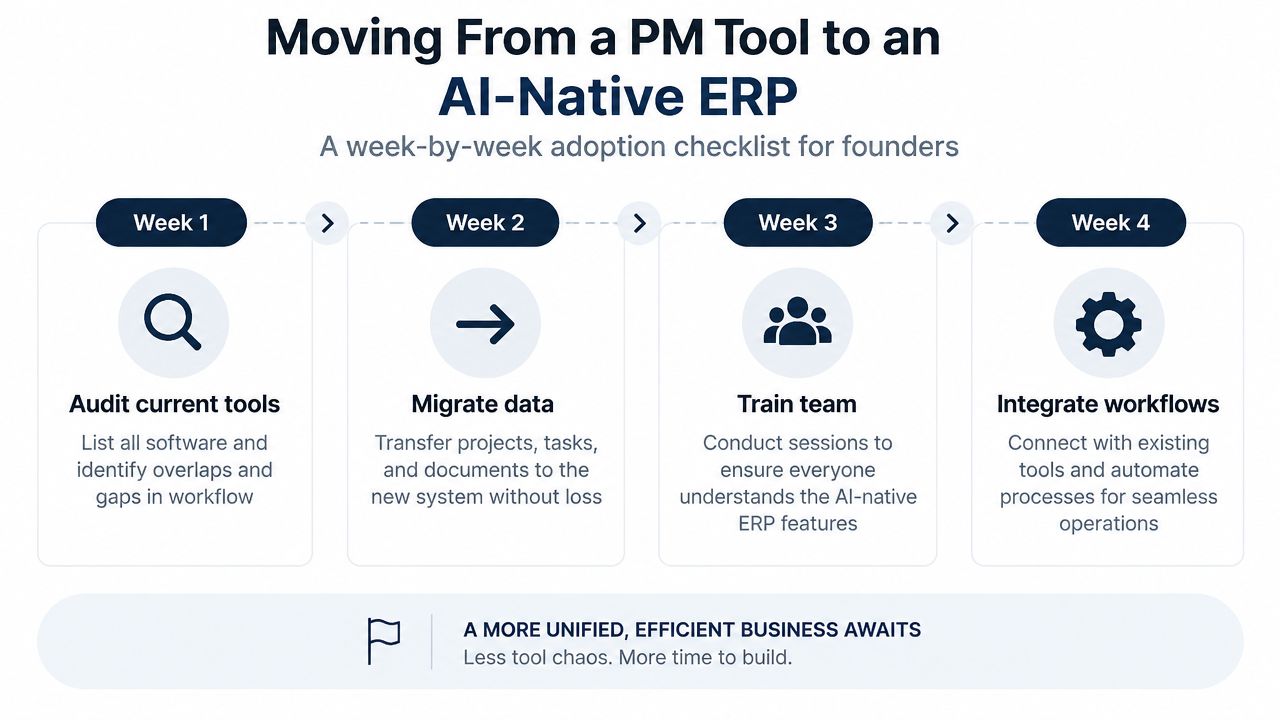
Week one, audit the current stack
List every tool used for tasks, schedules, time, documents, approvals, invoicing, reporting, and communication. Mark the data that the business relies on, then identify duplicate records, manual exports, and decisions that depend on the founder.
Don't migrate clutter just because it exists. Decide which project fields, historical milestones, time entries, customer records, documents, and financial references need to survive.
Week two, map the operating model
Choose a live project that represents normal work, not an unusually simple success. Map its tasks, dependencies, roles, resources, time categories, approval steps, documents, and billing events into the ERP structure.
Validate the vocabulary before importing everything. “Client revision,” “internal review,” and “billable change request” may look similar in a spreadsheet but need different statuses and rules in a connected system.
Week three, migrate and test
Transfer active projects first, then preserve historical milestones and time entries that establish useful reporting baselines. Check that each entry remains linked to the correct project and task, and that invoice drafts can be traced back to approved work.
Run permission tests using real roles. Ask whether a team member can see only the records they should, whether managers can approve hours, and whether finance can trace an invoice to its source activity.
Week four, train the team on decisions
Train people on the actions they perform every day, not every available feature. Replace the old weekly reporting ritual with prompts that ask for overdue tasks, workload conflicts, missing hours, or risks in a defined project.
During a 30-day pilot, validate permission boundaries, invoice traceability, reporting continuity, and AI suggestions when the underlying data is incomplete. If the assistant makes a recommendation from missing assignments or stale time entries, the system should make that limitation visible rather than presenting confidence without evidence.
Zynthoro is an AI-native ERP with connected areas for finance, operations, sales, marketing, HR, production, time tracking, and project management in an EU-hosted workspace. Its project module includes assignments and AI-generated status summaries, while its broader model is designed to keep operational and financial records connected.
Adoption principle: Migrate the workflow people need, not the clutter your old tools accumulated.
Questions Small Owners Ask Before Switching
Will migration cost more than staying put?
Use a phased rollout. Run the new ERP alongside the existing tools for 30 to 60 days, export historical tasks from spreadsheets and current platforms, and assign one accountable owner in each department. Keep the parallel period focused on a representative workflow, then retire redundant tools once the data and approval path are reliable.
The actual switching cost isn't importing task names. It's deciding which records are authoritative and teaching people where updates belong. A clear cutover owner prevents the founder from becoming the permanent referee between systems.
Will the team actually adopt it?
Give each role a focused dashboard that hides unfamiliar modules. A field worker needs assigned jobs and quick time entry, while a finance user needs approvals, invoices, and reconciliation. Keyboard-first interaction, short training sessions, and weekly office hours help reluctant users resolve friction before they create private workarounds.
Don't measure adoption by login activity. Check whether people assign owners, update status, submit time, attach decisions to deliverables, and complete approvals in the new workflow. Those behaviours show whether the system has become part of the work.
Who owns the data?
Ask about export formats, open APIs, encryption control, audit history, permissions, and data residency before signing. An AI-native ERP should make it possible to retrieve the records your business creates and understand how access is governed.
This matters for vendor lock-in and compliance alike. A platform with customer-controlled encryption keys, clear export paths, and role-based access gives the owner more control than a collection of unmanaged files and chat histories. Press-test those details during the evaluation call, not after migration.
Zynthoro brings project management, time tracking, finance, invoicing, operations, and embedded AI assistants into one EU-hosted workspace for SMEs. Visit Zynthoro to evaluate whether its connected execution model fits your current tool stack, then use a representative project to test permissions, reporting, and invoice traceability before switching.