



Your invoicing app says one thing, the spreadsheet says another, and the customer record in your CRM is missing the latest conversation. A team member has approved a purchase in a messaging thread, but nobody has updated finance. Meanwhile, you're spending part of the weekend reconciling information that should already agree.
That patchwork feels manageable while the business is small. It becomes an invisible operating tax as orders, employees, suppliers, and customer requests multiply. Process automation software can remove that tax, but only if you treat it as an orchestration layer across the business, not another isolated app.
Table of Contents
- The Eight-Tool Stack Most Small Businesses Are Quietly Running
- What Process Automation Software Actually Does
- Core Capabilities That Matter for SMEs
- Real Business Benefits You Can Measure
- Integration Patterns With ERPs and Connected Platforms
- Implementation Considerations Before You Buy
- Measuring ROI Without Spreadsheets That Lie to You
The Eight-Tool Stack Most Small Businesses Are Quietly Running
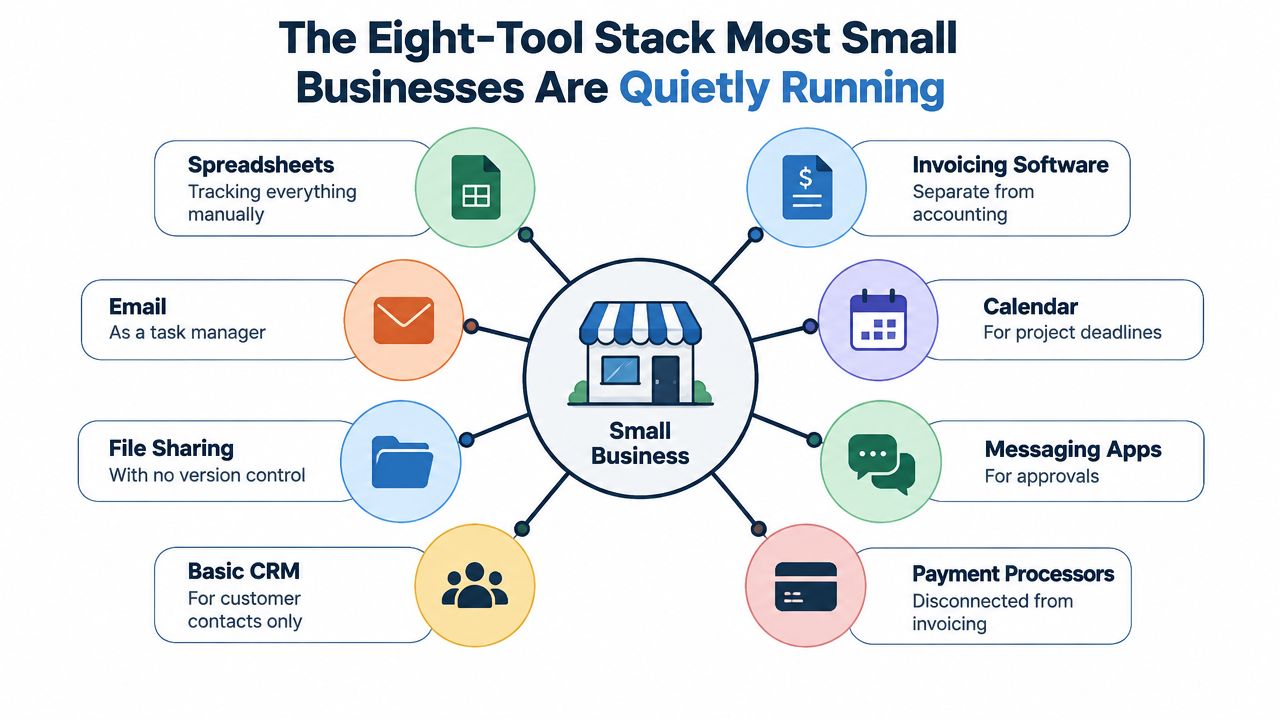
A 12-person company can accumulate a surprisingly complicated operating system without ever approving a formal technology strategy. Invoicing lives in one application. Time tracking sits somewhere else. The CRM stores basic contact details, while customer notes remain in shared folders. Approvals arrive through email or messaging apps, and a spreadsheet becomes the source of truth for everything that matters.
The problem isn't the number of tools by itself. The problem is the handoff between them.
A consultant finishes a project and records time in one system. Someone else copies those hours into an invoice. The owner checks a spreadsheet before approving it because the accounting record doesn't contain the full context. A customer then asks for an update, but the latest delivery note is in a project folder that the sales team rarely opens.
Where the friction shows up
Disconnected systems create repetitive work that rarely appears as a line item in the budget:
- Double entry: Staff retype customer, supplier, payment, and project information.
- Lost requests: An approval buried in chat depends on somebody remembering to act.
- Contradictory records: A customer's address, payment status, or project owner differs between platforms.
- Unclear accountability: Several people can see a task, but nobody owns the next decision.
- Late reconciliation: The owner or finance lead becomes the human integration layer.
That last point matters most. When a small business grows, the founder often becomes the person who resolves contradictions between applications. Sunday-night reconciliation isn't a sign of careful management. It's evidence that the operating model relies on memory and manual checking.
Practical rule: If an employee has to copy a value from one system into another to keep the business moving, treat that handoff as an automation candidate.
The market reflects how common this problem has become. A survey summary reports that 66% of organizations had automated at least one business function, up from 57% the prior year, while another estimate places adoption at roughly 60% of businesses with at least one automated workflow. The global workflow automation market was valued at $26.5 billion in 2024 and is projected to exceed $78 billion by 2030, according to the workflow automation statistics summary.
For an SME, the conclusion isn't to buy more software. It's to reduce the number of places where people must make the software agree.
What Process Automation Software Actually Does
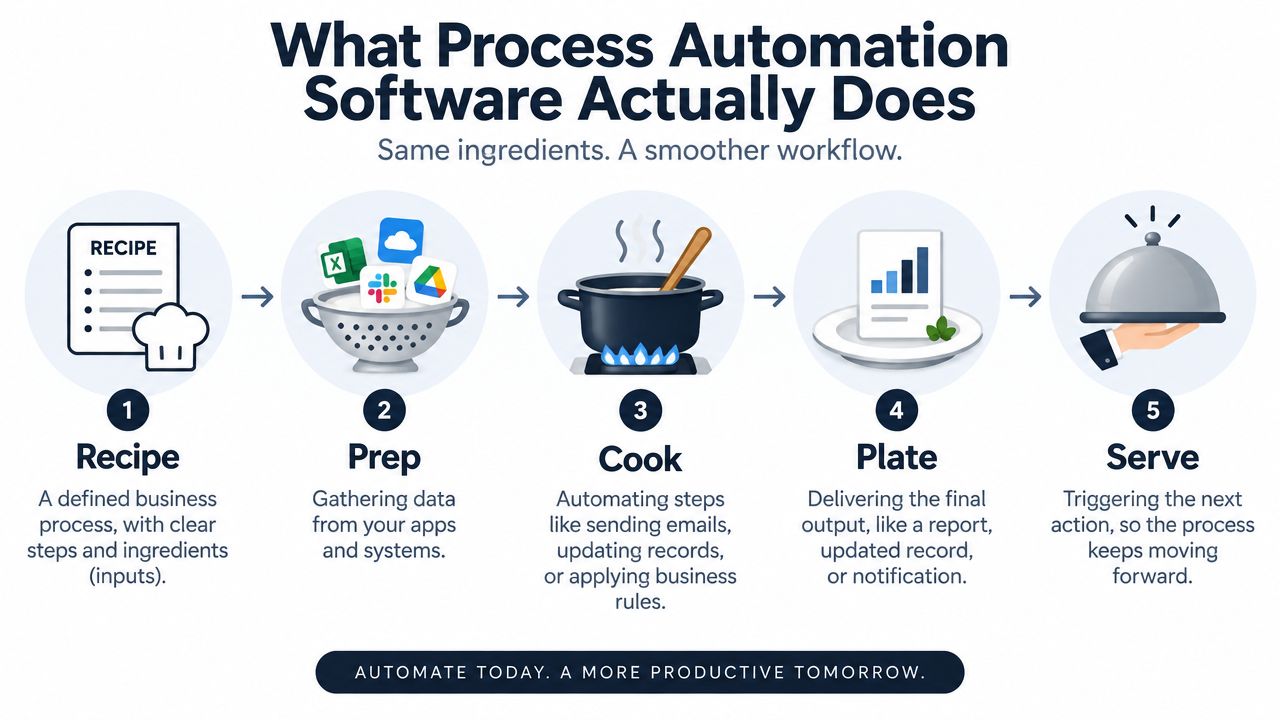
A sales order arrives, payment clears, and the operations team still waits for someone to update three systems. That delay is the problem process automation software addresses. It acts as an orchestration layer across the existing stack, coordinating data, decisions, and handoffs so a small business does not depend on memory or manual checking.
The four actions worth paying for
First, it defines the process. Map triggers, tasks, decisions, owners, and outputs in a clear sequence. A completed project could trigger a timesheet check, invoice draft, manager approval, customer delivery, and payment follow-up.
Second, it gathers the required information. The platform pulls data from finance, CRM, project management, HR, and inventory tools. It should match fields consistently, so employees do not re-enter customer or supplier details.
Third, it applies the operating rules. A low-value invoice may follow a standard approval route. An unusual amount, missing purchase order, or changed bank detail should pause the workflow and send it to a person for review.
Fourth, it records and monitors the outcome. Automation creates the relevant record, notification, report, or next task, then shows whether the process completed. Failed connections, incomplete fields, and exceptions must remain visible.
A task tracker tells someone to approve an invoice. An orchestration layer connects the invoice, supporting documents, approval authority, accounting entry, and follow-up. That distinction separates a reminder list from a controlled operating process.
AI adds value when business input is unstructured. It can interpret documents, summarize customer conversations, categorize transactions, and suggest next actions. Keep deterministic rules for approvals, compliance, and audit trails, where the business must explain why a decision occurred.
Before adding another point solution, assess whether an AI-native ERP such as Zynthoro can consolidate the workflow, records, and modules your team already maintains. For teams considering a customized internal workflow, internal tool building with Vision provides context on creating tools around business requirements. For a packaged option, Kickstarter lists Kickstart 1 with a one-time €79 price, AI Assistants with 50 credits per month, Planning & Time Tracking, a Communication module, and Canva Studio.
The buying test is straightforward: trace one process from intake to completion. If the platform cannot show where data comes from, which rule controls each route, who handles exceptions, and what record proves completion, it will add another layer of tool sprawl instead of removing it.
Core Capabilities That Matter for SMEs
A small team does not need another feature catalogue. It needs an orchestration layer that connects work, records, decisions, and exceptions without adding maintenance. That means consolidating tool sprawl where an AI-native ERP such as Zynthoro can cover the workflow and the underlying business data.
Visual workflow design
Process owners should be able to map a workflow, change an approval route, and test an exception without waiting for a developer. A visual builder works like a kitchen ticket rail. It exposes missing steps and gives finance, operations, and HR a shared view of how work moves.
For onboarding, one new-hire event can create an equipment request, assign account setup, collect policy acknowledgements, notify payroll, and schedule a manager check-in. Remote employees can follow a different equipment route from office-based hires. The important capability is control over the sequence, not decorative diagramming.
Cross-application data sync
Data should enter once and stay consistent. An approved purchase request should update the supplier record, purchasing status, inventory view, and finance queue without staff copying details across applications.
Set ownership for every major record before configuring integrations. Decide whether the CRM, ERP, or operational platform owns customer, product, supplier, and employee data. Without that decision, synchronization distributes conflicting information faster.
Conditional logic and approvals
Real processes include exceptions. A purchase approval may depend on amount, category, department, or supplier status. An accounts payable workflow can match an invoice with its purchase order and receipt, then send only mismatches to a person.
Role-based approvals and audit trails provide operational control. They show who approved a transaction, which information was available, which rule routed it, and what happened after the decision. For SMEs, automation becomes dependable enough to replace scattered inboxes and chat threads.
AI-assisted decision points
AI can summarize a supplier document, classify an expense, identify an unusual line item, or extract information from an email. Keep a human checkpoint for high-risk payments and payroll changes.
Use AI for interpretation and deterministic rules for control. The platform should let a non-developer understand, adjust, and audit each workflow. Teams designing configurable internal processes can review Vision's internal automation tool-building guidance, then apply the same evaluation to an ERP or automation platform.
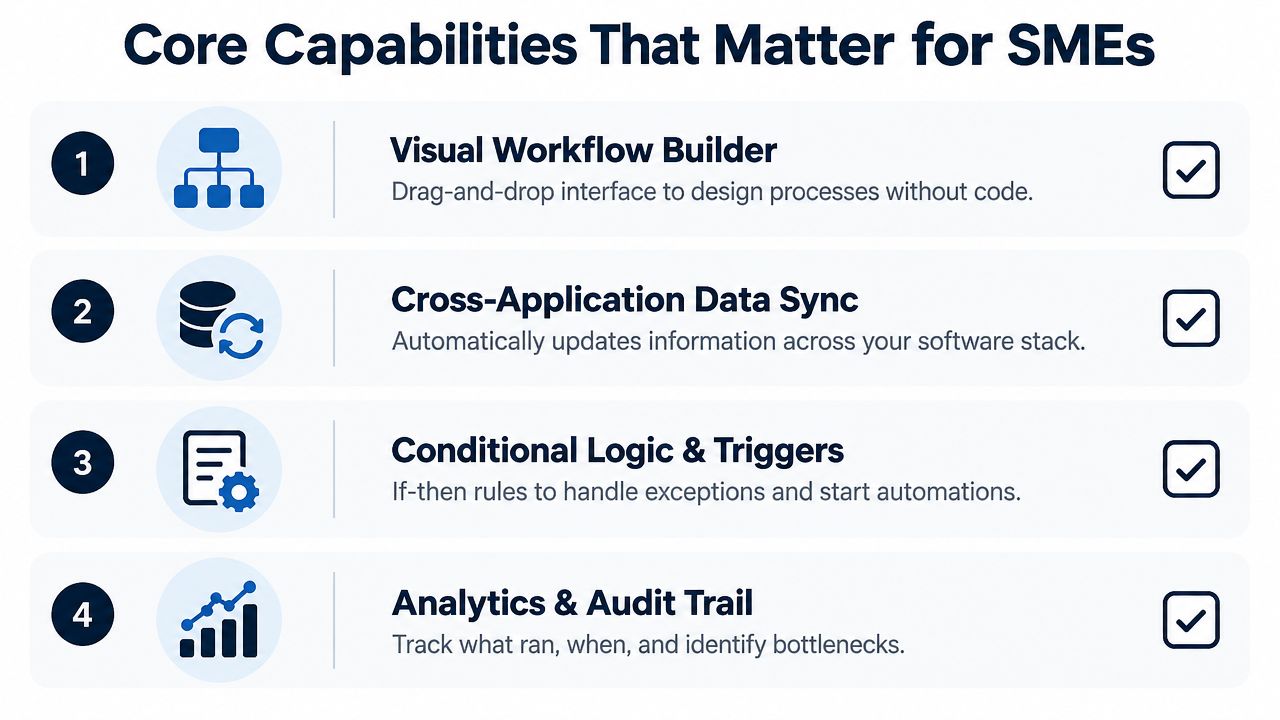
The strongest setup resembles a well-run kitchen. The recipe is visible, ingredients arrive from the right stations, rules handle ordinary orders, and a person steps in when the ticket looks wrong. That is the standard to use when replacing a patchwork of point solutions.
Real Business Benefits You Can Measure
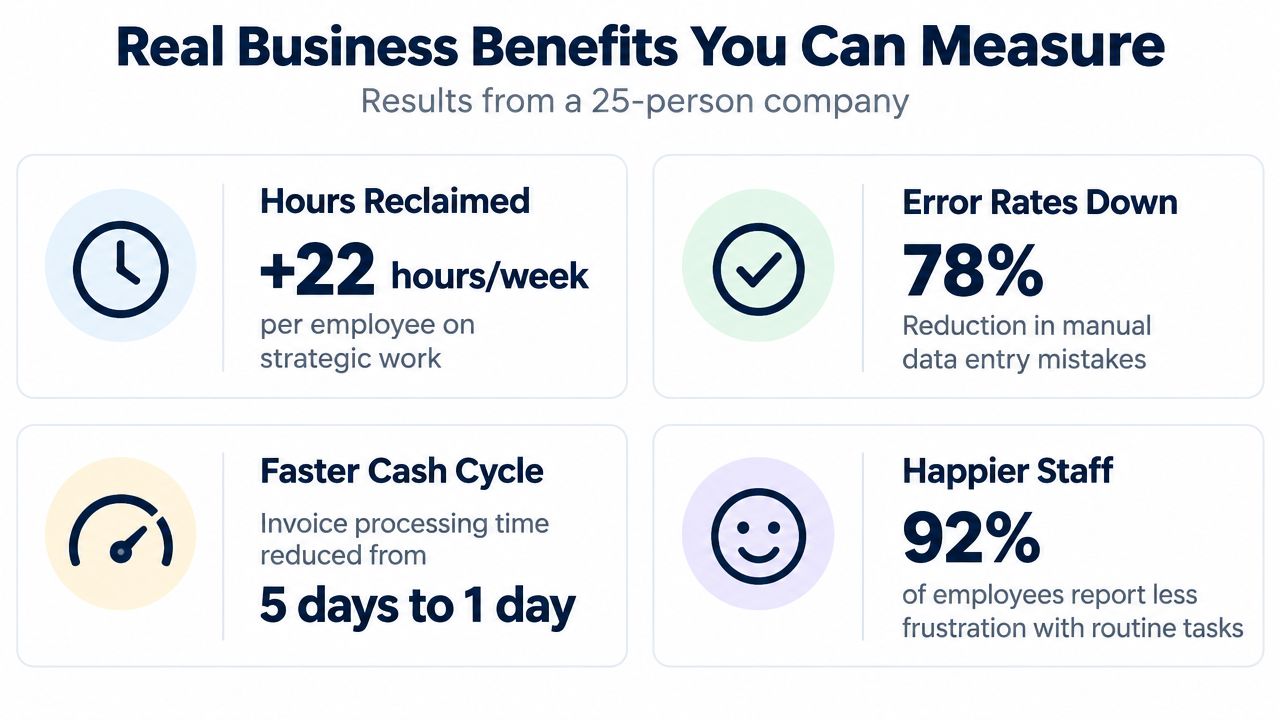
The business case should start with operational outcomes, not a software demo. Owners usually care about four things: hours reclaimed, fewer errors, faster cash movement, and less routine frustration.
A typical invoicing flow illustrates the connection. Approved timesheets and purchase orders feed an invoice draft, finance reviews the exceptions, the invoice goes to the customer, and rule-based reminders handle follow-up. Track invoice preparation time, approval delay, rework, overdue balances, and the number of invoices requiring manual intervention.
Approvals provide another clear test. A purchase request should reach the right manager based on amount and category, carry its supporting receipt, and leave an audit trail. The useful measures are approval cycle time, missing documentation, rejected requests, and time spent searching email or chat.
Onboarding should work from one event. HR enters the hire, then the workflow creates tasks for equipment, account access, payroll enrollment, contracts, and policy acknowledgement. Monitor time to readiness, incomplete records, and the number of manual follow-ups required by HR or the hiring manager.
What appears first
Some improvements show up quickly. Fewer status questions, cleaner approval queues, and less copying can be visible during the first week. Cash-cycle improvement, reliable reporting, and better staffing decisions usually require a longer observation period because they depend on volume and consistent adoption.
Workflow automation programs can deliver up to a 30% improvement in process efficiency, through fewer bottlenecks and less manual handoff friction, according to this business process management and workflow automation guide. Independent benchmarks commonly place payback in the 3 to 18 month range, with reported returns from about 30% to over 200%, driven mainly by labor savings, error reduction, and shorter cycle times, as summarized by business process automation ROI benchmarks.
Those figures are benchmarks, not a promise for your company. Measure your own baseline before you use them in a purchase case.
For a small operator comparing packaged options, Kickstarter 2 lists Kickstart 2 with a one-time €149 price, everything in K1, 150 credits per month, Finance & Invoicing, Sales, and an AI photo/video suite.
Integration Patterns With ERPs and Connected Platforms
There are three sensible ways to connect automation with an ERP. The right choice depends on how stable your current systems are, how much integration maintenance your team can absorb, and whether the business is ready to consolidate.
The bolted-on stack keeps the existing ERP and adds an integration or automation layer using APIs, webhooks, and connectors. This approach makes sense when replacing the ERP would disrupt critical operations or when a legacy application still handles a necessary function. Its weakness is maintenance. Every additional connection creates another place where fields, permissions, and error handling can drift.
The best-of-breed hub makes the automation platform the system of engagement while finance, CRM, HR, and other specialist tools remain connected around it. This can suit a cloud-first company with strong application choices and a clear data model. It still requires disciplined ownership of records and careful monitoring of integrations.
The unified platform keeps finance, inventory, projects, sales, and automation on a shared data model. An AI-native ERP such as Zynthoro fits this pattern, with connected modules for finance, operations, sales, marketing, HR, production, communication, and compliance in an EU-hosted workspace. The attraction isn't fewer logins. It's the reduction in synchronization work between core business records.
Three integration patterns compared
| Dimension | Bolted-On Stack | Best-of-Breed Hub | Unified Platform, e.g. Zynthoro |
|---|---|---|---|
| Setup effort | Lower disruption, but integration design is required | Moderate, with several systems to connect | Higher process-design effort, fewer core connections |
| Ongoing maintenance | Connector, API, and webhook upkeep | Hub and application upkeep | Concentrated around one platform and its configuration |
| Data consistency risk | Higher across many handoffs | Moderate, depending on ownership rules | Lower between connected core modules |
| Cost trajectory | Can rise as integrations multiply | Can rise with each specialist platform | More consolidated, subject to platform scope and plan |
European SMEs should add compliance to this decision. EU food law requires businesses to know who supplied them and to whom they delivered products, often called the “one step back, one step forward” rule, under Article 18 of Regulation 178/2002 and lot-number guidance. Lot marking is also legally required in food, pharmaceuticals, medical devices, cosmetics, and parts of automotive.
If you're evaluating a lightweight starting point rather than an ERP, Starter No Credits lists Starter at €499 per month with basic planning and time tracking, basic content and communication, one company workspace, one user, one email, and three aliases. It also states that there's no ERP.
Choose the bolted-on pattern when replacement isn't realistic. Choose the hub when your cloud stack is already deliberate. Choose the unified platform when tool sprawl, data conflict, and integration ownership have become the main operating problem.
Implementation Considerations Before You Buy
The purchase decision is less important than the implementation conditions. Automation fails when a business digitizes an unstable process, gives nobody ownership, or lets AI make decisions that should remain governed by people.
Start with process readiness. Document the current workflow from trigger to outcome, name one owner, identify the exceptions, and confirm that the process is stable enough to standardize. Automating chaos only produces faster chaos, with less visibility into why it happened.
Questions to answer before configuration
- Process ownership: Who can approve a change to the workflow?
- Data ownership: Which system holds the authoritative customer, supplier, employee, and product record?
- Exception authority: Who handles missing documents, unusual prices, duplicate records, or failed integrations?
- Audit requirements: Which decisions need a timestamp, user identity, supporting document, or change history?
- Legacy retirement: Which old tools will be switched off, and by what date?
AI needs its own controls. Decide which models can read financial, employee, customer, and production fields. Define how the team checks inaccurate extraction or classification, and require human approval for high-risk steps such as invoice approval, payroll changes, or corrective actions.
AI-first adoption remains narrower than many sales messages imply. Forrester's 2026 predictions say fewer than 15% of firms will turn on agentic features in intelligent automation suites, as described in its 2026 automation predictions. The practical lesson is simple. Use AI where interpretation helps, but retain deterministic rules, human review, and auditability where mistakes carry financial, legal, or safety consequences.
Vendor evaluation matrix
Score each vendor on:
- Security and residency: Confirm hosting location, access controls, audit logging, and relevant certifications.
- API openness: Check whether your data can move in and out through documented interfaces.
- Three-year cost: Include subscriptions, implementation, training, support, integrations, and internal administration.
- Exit clauses: Confirm export formats, data ownership, termination terms, and assistance with migration.
- Change management: Ask how employees learn the new process and who supports adoption after launch.
A credible vendor won't avoid these questions. It will help you define them.
Measuring ROI Without Spreadsheets That Lie to You
A spreadsheet can calculate ROI, but it can't rescue weak inputs. Start by recording the baseline for each process you plan to automate.
Measure time per transaction, error rate, cycle time, rework hours, approval delay, and volume. Capture this across invoicing, purchasing, customer onboarding, and any other process where people repeatedly move information between systems. Record seasonal effects, hiring changes, and volume shifts so you don't credit automation for improvements caused by unrelated changes.
A disciplined measurement sequence
- Capture the baseline: Record representative work before changing the process.
- Define the target: Choose operational measures, not vague productivity claims.
- Separate savings types: Distinguish reclaimed capacity, avoided errors, faster cash movement, and reduced external spend.
- Track adoption: A workflow that nobody uses has no return, regardless of its design.
- Review exceptions: Rising exception volume can reveal poor rules, bad data, or an unstable process.
The verified evidence includes a 2026 multi-sector case study in Lithuanian SMEs that reported implementation time falling 46.0%, defect rates falling 67.0%, and staff hours per functional module falling 42.8% after implementation, as reported in the study of integrated process software in Lithuanian SMEs. A separate lean ERP study in manufacturing reported traceability resolution time dropping from 3.5 days to 0.8 days, a 77.1% improvement, while inventory turnover rose from 4.2 to 6.5 turns per year, a 54.7% gain, in the manufacturing traceability study.
Those examples show what to measure. They don't replace your baseline.
ROI worked example for a 25-person consultancy on Zynthoro
| Line item | Year 1 value |
|---|---|
| Subscription | Record the contracted annual amount |
| Implementation | Record configuration, migration, and integration fees |
| Training | Record staff training and internal rollout time |
| Reclaimed hours | Value verified capacity using the affected employees' loaded cost |
| Error reduction | Count avoided rework, corrections, credits, and duplicate entry |
| Cash-cycle effect | Track invoice issue time, approval delay, and overdue balances |
| Payback window | Divide implementation and first-year costs by verified monthly benefit |
Review the numbers quarterly through three dashboard views: process performance, financial impact, and adoption and exceptions. The first shows cycle time and backlog. The second shows labor, rework, and cash movement. The third reveals whether employees bypass the workflow or require frequent manual intervention.
Product recalls make this discipline especially practical. Producers and distributors must immediately inform competent national authorities when they learn that a product is dangerous, and corrective-action systems need identifiers such as batch reference, manufacturing date, or barcode to support traceability, according to the European product recall process guide. For a production SME, the ROI of connected records may appear in faster investigation, clearer audit evidence, and less disruption during a corrective action.
The owner who retires the spreadsheet isn't buying convenience. They're removing a recurring control failure. Start with one process, measure it thoroughly, consolidate the surrounding records, and expand only after the team trusts the result.
Zynthoro brings finance, sales, operations, HR, production, communication, compliance, and embedded AI assistants into one EU-hosted workspace for SMEs. If your team is ready to replace disconnected tools with coordinated workflows and continuous data, visit Zynthoro and evaluate the platform against your highest-friction process.