


At 8:47 on a Monday, you're already behind.
A signed contract PDF is sitting in email. Holiday requests are buried in Slack. Someone updated a salary figure in a spreadsheet, but payroll hasn't seen it. A new starter arrives in two hours and still doesn't have a laptop, logins, or a clear first-day plan. Nobody did anything reckless. Your systems are just scattered, and every handoff depends on somebody remembering the next step.
That's how most small companies end up running HR. Not with one system, but with a patchwork of forms, inboxes, shared drives, chat threads, payroll portals, e-sign tools, and whatever the office manager built in a spreadsheet six months ago. It works until it doesn't.
Table of Contents
- The Monday Morning Every SME Owner Recognises
- What HR Workflow Automation Actually Means
- Where HR Workflow Automation Delivers the Most Value
- Why SMEs Win Big and How Zynthoro Fits In
- KPIs to Measure HR Automation Success
- GDPR and Compliance Considerations for EU SMEs
- A 90-Day Implementation Roadmap
- Your Next Steps to Replace the Tool Spaghetti
The Monday Morning Every SME Owner Recognises
If you run a small business, this probably feels familiar. You've got employee data in one app, leave requests in another, contracts in a folder, onboarding tasks in project software, and approvals floating around in chat. Every tool was bought for a sensible reason. Together, they create a mess.

What the mess looks like in real life
A manager sends “approved” in Slack, but HR never updates the leave tracker.
A founder tweaks contract wording in a PDF, but the saved copy isn't the one payroll reads.
An employee changes their address in one system, but the old address stays in another.
A new hire starts, and IT never gets the message because onboarding lived in email, not in a workflow.
None of that is an HR strategy problem. It's an operations problem.
Most SME HR issues aren't caused by bad people or weak intent. They're caused by too many disconnected steps and no single place where the process actually lives.
Why this keeps happening
Small companies usually don't wake up and choose complexity. They grow into it. One tool handles contracts. Another handles chat. Another handles payroll. Another tracks time off. Then someone adds task software to glue it together. Now you've got eight to fifteen tools touching employee data, and every one of them creates another place where context gets lost.
That's where HR workflow automation matters. Not as a luxury feature. Not as “AI transformation.” As a straightforward way to stop dropping routine work between systems.
A platform like Zynthoro matters. The point isn't to buy more software. The point is to stop bouncing HR work across disconnected software and run it inside one coordinated workspace.
What HR Workflow Automation Actually Means
Hearing “automation” often brings robots, scripts, or some giant enterprise setup to mind. That's not what matters here.
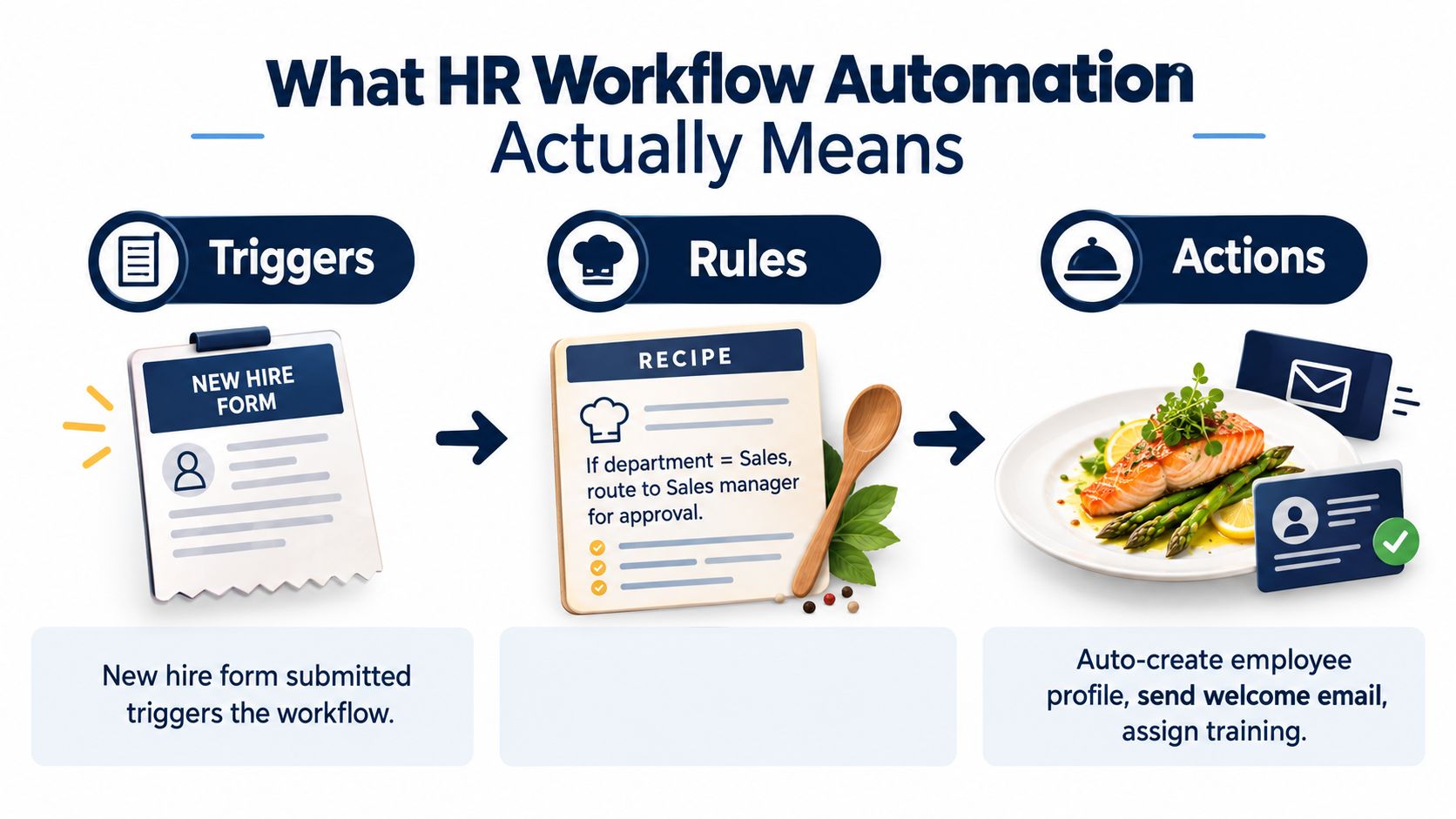
HR workflow automation is simple. A thing happens, the system checks the rules, and the next actions happen without someone chasing them manually.
Think of a busy kitchen.
The waiter pins an order ticket. That's the trigger. The chef follows the recipe. That's the rule. The dish goes out to the right table. That's the action.
HR works the same way.
The three parts that matter
Trigger
A trigger starts the workflow.
Examples:
- New hire created in your employee system
- Holiday request submitted by an employee
- Contract approved by a manager
- Probation review due on a set date
Rule
The rule decides what should happen based on data.
Examples:
- If department = Sales, route onboarding tasks to the Sales manager
- If leave dates overlap with a blackout period, escalate for review
- If employment type = contractor, use the contractor agreement template
- If hours change mid-month, flag payroll before the run closes
Action
The action is what the system does next.
Examples:
- Generate a contract
- Create an employee record
- Assign tasks
- Notify payroll
- Update leave balances
- Change status from “pending” to “complete”
What it is not
It's not generic task software with HR labels slapped on top. And it's not just robotic clicking.
Real HR workflow automation handles employee records, contracts, leave balances, approvals, payroll inputs, and audit trails. It works off HR data, not just checklists.
If you want a recruiting-focused example of workflow design, Talent Pronto workflow automation is a useful reference because it shows how repeatable hiring steps can be routed instead of managed through inboxes.
Practical rule: If the same steps happen for the same type of employee every single time, automate them. If the case needs judgment, keep a human in the loop.
That's the line. Automate repetition. Keep judgment for exceptions.
Where HR Workflow Automation Delivers the Most Value
You don't need to automate everything first. In small companies, five workflows produce most of the pain and most of the return.
One recent industry summary reports that 57% of companies use HR automation to improve employee experience, 56% use AI in HR to automate repetitive tasks, and 37% of human resource job functions are frequently automated. The same summary also notes 25% of organizations use HR automation, mainly for recruitment and hiring, while 36% of HR professionals say onboarding is hindered by a lack of onboarding automation. That tells you where the practical value sits first: hiring, onboarding, and repetitive admin tasks, not exotic HR theory (Deel HR automation statistics and trends).
The five workflows worth fixing first
| Process | Before Automation | After Automation |
|---|---|---|
| Onboarding | Email chains, missed tasks, duplicate data entry | One triggered checklist, auto-assigned tasks, cleaner handoffs |
| Leave management | Spreadsheet balances, inbox approvals, policy confusion | Policy-driven requests, balance checks, tracked approvals |
| Contracts | Manual PDF edits, version issues, repeated admin | Template-based generation, approval routing, e-sign flow |
| Payroll inputs | Last-minute reconciliation across tools | Continuous sync of approved changes, leave, and hours |
| Employee data | Records spread across folders and apps | One source of truth feeding downstream workflows |
Onboarding first
This is usually the biggest win. One benchmark-focused 2026 source reports that automated onboarding typically saves 5 to 15 hours per new hire, cuts missed steps by 80% to 95%, and can push compliance audit pass rates to 95%+, versus 70% to 80% in manual processes when workflow logic is configured well (automated onboarding ROI metrics).
Separate case examples show what that looks like in practice. One onboarding case reduced the process from 3 weeks to 3 days, while HR admin hours per hire dropped from 6 to 10 hours to 1 to 2 hours (Builts onboarding automation case study). Another reported onboarding time dropping from 12 business days to 1 structured day, with HR administrative time per hire falling from 14.2 hours to 2.8 hours and time to first productive work moving from 12 business days to 1 business day (US Tech Automations onboarding case study).
The quieter wins
Leave management is less dramatic, but it stops constant interruption.
Contracts get cleaner because the system uses templates and approval paths instead of old attachments.
Payroll becomes less chaotic because approved leave, employee changes, and attendance data stop living in separate places. If scheduling is part of the problem in your operation, a connected staff scheduling system helps close one of the most common payroll input gaps.
Employee data is the base layer. If that record is wrong or fragmented, every workflow above it breaks.
Why SMEs Win Big and How Zynthoro Fits In
Large companies can waste effort for a long time and survive it. Small businesses can't. Every extra tool, login, export, and handoff has a direct cost in owner attention and team time.
The market is moving toward automation, but maturity is still low. Recent benchmarks show only 39% of organizations use AI in HR functions, while 83% sit in low automation maturity ranges and only 5% have reached high automation (Phenom AI and automation report). That's useful for SMEs because it means you don't need a grand transformation plan. You need a sensible sequence and fewer systems.
The real business case
| Metric | Before (Tool Spaghetti) | After (Zynthoro) |
|---|---|---|
| Employee data | Re-entered across apps | Held in one connected workspace |
| Onboarding ownership | Split across HR, IT, managers, inboxes | Routed through one visible workflow |
| Approvals | Buried in chat and email | Logged with status and timestamps |
| Payroll prep | Manual cross-checking | Fed by approved HR changes |
| SaaS footprint | Multiple point tools | More work handled in one platform |
A 2025 study on HR operations using automation reported HR service time fell by 45%, performance review accuracy improved by 28%, and more than 60% of routine requests were automated (IJCTT study on HR operations automation). That lines up with what small companies need most. Faster service, fewer routine tickets, and less manual review traffic.
Why a single workspace matters
Zynthoro fits. It's an AI-native, EU-hosted workspace that combines HR and personnel workflows with finance, operations, documents, approvals, time tracking, and collaboration in one system. For an SME replacing disconnected tools, that matters more than another standalone HR app, because HR doesn't operate alone. Contracts affect payroll. Leave affects scheduling. Employee records affect operations and reporting.
If you're looking at entry points into the broader workspace, Kickstart 2 is listed as €149 one-time, with lifetime access, and includes Everything in K1, 150 credits/month, Finance & Invoicing, Sales module, and AI photo/video suite.
The decision most SMEs need to make isn't which new HR tool to add. It's which old pile of tools to stop depending on.
KPIs to Measure HR Automation Success
If you can't measure the change, you'll drift back to manual work.
You don't need a giant scorecard. You need a small set of indicators that show whether the workflow is moving faster, cleaner, and with fewer interruptions.
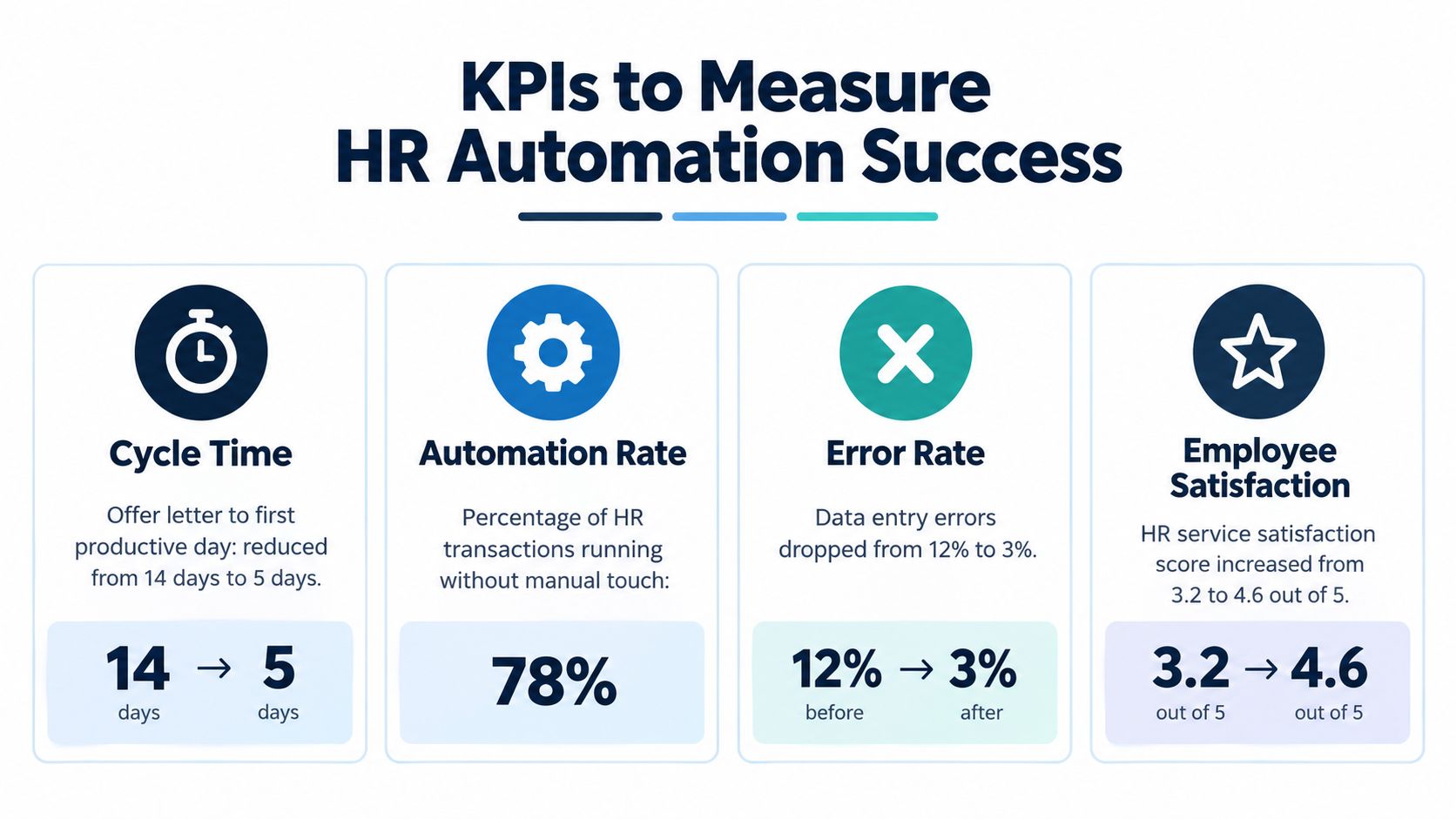
The KPI dashboard I'd use
Track these first:
- Cycle time: Measure from trigger to completion. For onboarding, that means offer accepted to first productive day.
- Automation rate: Track how many HR transactions run without manual intervention.
- Error rate: Count payroll corrections, wrong leave balances, duplicate records, and contract rework.
- Time to productive work: Measure how quickly new hires can do their job.
- HR service satisfaction: Ask employees whether HR interactions feel clear, fast, and reliable.
What good looks like
A useful benchmark is outcome-based, not vanity-based.
One source in the search results states that organizations using automated onboarding can achieve 54% greater new-hire productivity within the first 90 days, and that automating the administrative layer can save about 9.25 hours per new hire (employee onboarding automation in one day). That gives you a practical target. Not “more efficient.” Faster readiness and less admin load.
Track the lag between “approved” and “done.” That gap is where broken workflows hide.
Use system timestamps for every approval, task completion, and status change. If your workflow lives inside one platform, you don't need a separate BI project to prove what improved. You can read the logs directly.
For a 25 to 50 person company, I'd keep the dashboard tight. One page. Weekly review. If nobody looks at it, it isn't a KPI. It's decoration.
GDPR and Compliance Considerations for EU SMEs
Most SME owners don't need a legal lecture. They need operational controls they can run.
The first trap is assuming automation creates compliance by itself. It doesn't. Bad workflows can scale bad handling just as fast as good handling scales clean work.
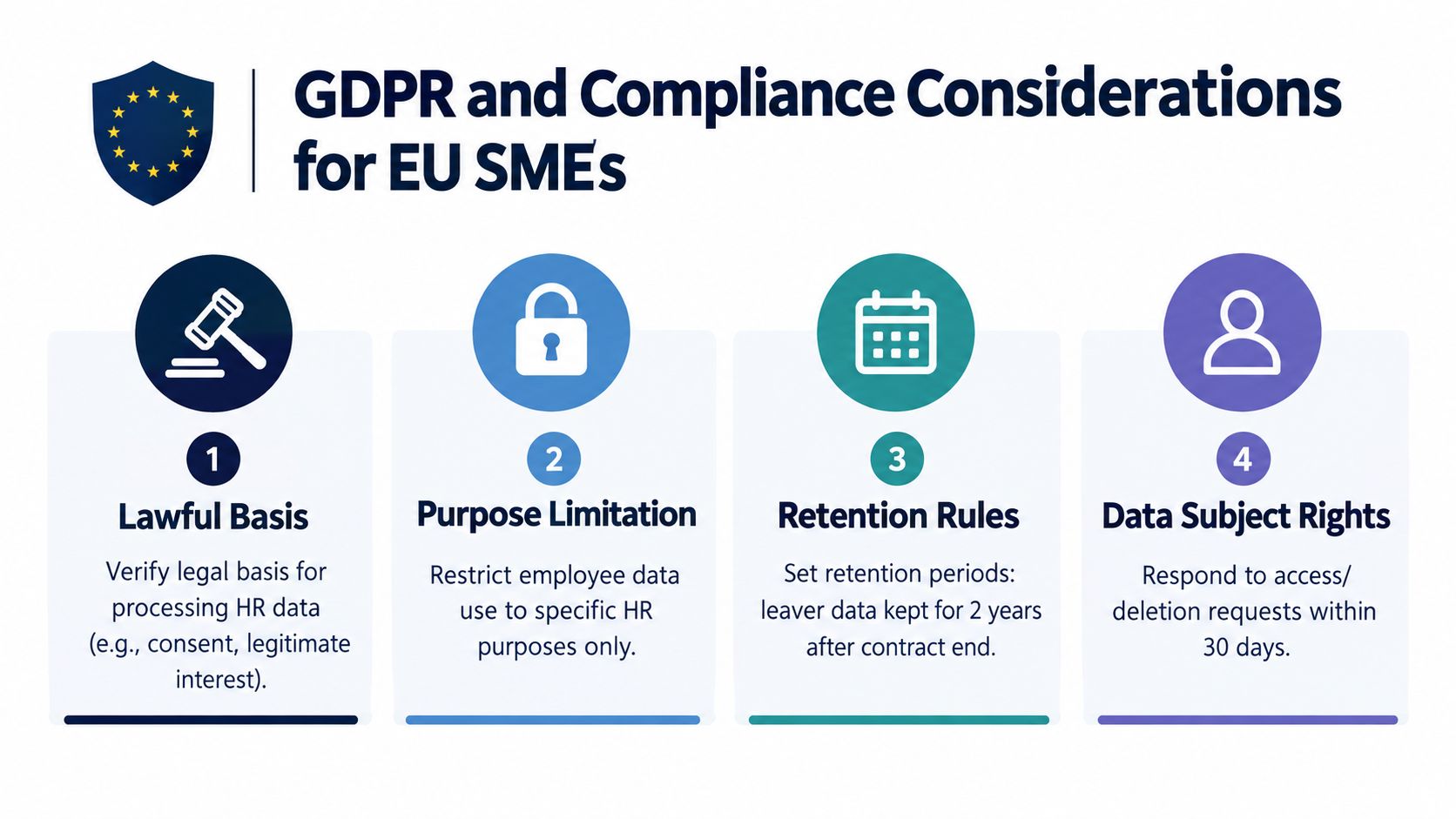
The checkpoints that matter
- Lawful basis: Know why you hold each category of employee data.
- Purpose limitation: Don't let payroll data, performance notes, and medical information float around loosely.
- Retention rules: Decide what happens to leaver data, and when records should be archived or deleted.
- Access rights: Make sure managers can only see what their role requires.
- Audit trails: Record who approved what, and when.
A practical training angle matters too. If your business needs to prove who learned what under which policy, you need training records tied to employee identity and policy history, not screenshots and email confirmations.
Why setup matters more than slogans
A 2026 workforce report found 51% of respondents said AI use in HR is limited, only 3% reported extensive use, and the main barriers included skill gaps, unclear ownership, and uneven change readiness. Another survey cited in the same report found compliance concerns at 35.6% and data quality or access at 32.2% as leading obstacles (HR technology workforce report).
That should sound familiar. Most SME compliance issues aren't abstract. They come from unclear ownership and scattered records.
This short explainer is worth a watch before you tighten your process:
An EU-hosted system with role-based access, retention controls, and approval logs is easier to govern than stitching together multiple tools with different defaults. If you're evaluating broader operating setups, Business is listed at €899/mo and includes More modules for growing SMEs and entrepreneurs, Everything in Creator, Full time tracking & sales, Basic accounting & operations, 3 company workspaces, 10 users, and unlimited emails.
Compliance gets easier when the process is visible. Hidden work is risky work.
A 90-Day Implementation Roadmap
Don't automate five workflows at once. That's how teams create expensive confusion.
Start with one painful process, get it working, then extend from there. The goal in the first 90 days isn't perfection. It's control.
Days 1 to 30
Pick one workflow. Onboarding or leave management is usually the right choice.
Map the current process on one page:
- List every step from start to finish.
- Name the owner of each step.
- Mark every handoff between systems or people.
- Identify the trigger, rules, and end state.
Then remove nonsense before you automate it. If a manager approval exists only because “we've always done that,” challenge it now.
Focus on one clean path:
- Choose one employee type: full-time staff is usually easiest.
- Use one form: don't collect the same information twice.
- Define one outcome: complete onboarding, approved leave, or issued contract.
Days 31 to 60
Run the workflow live with real users.
Watch where it breaks. Edge cases will show up fast. A manager approves late. A document is missing. Someone selects the wrong employment type. Good. That's the point of production use.
Use this month to tighten the workflow:
- Fix routing errors
- Clean up templates
- Clarify ownership
- Train managers on approvals
- Review timestamps and completion delays
If the workflow needs constant manual rescue, don't add a second one yet.
Days 61 to 90
Add the next connected process. If you started with onboarding, move into contracts or payroll inputs. If you started with leave, connect it to payroll and scheduling.
Small companies usually win or lose here. Don't create separate automations that still require re-entry. Build connected flows so the employee record feeds the contract, the contract feeds payroll status, and approved leave feeds payroll and staffing visibility.
Write a short runbook with:
- Trigger definitions
- Approval rules
- Exception handling
- Ownership by role
- What to do when the workflow fails
One more practical point. HR automation didn't start with AI. It evolved from earlier HRIS and personnel systems in the late 20th century into broader HRMS-driven digital workflows in the 2000s, with milestones like 1979 for early ERP HR modules, 1988 with PeopleSoft's HR solution, and the 1990s acceleration of job boards in talent acquisition (historical HR automation timeline). That matters because the best rollout mindset is still operational, not fashionable. Build dependable workflows first. Add AI where it removes repetitive work.
Your Next Steps to Replace the Tool Spaghetti
Stop thinking about HR as a software category. Start thinking about it as a chain of operational decisions that currently breaks between tools.
This week, do three things:
- List every tool that touches employee data
- Count the handoffs between those tools
- Write down the two workflows that create the most chasing, confusion, or rework
This month, do two things:
- Choose one workspace where HR records, approvals, and documents can live together
- Launch one automated workflow for the biggest pain point first
This quarter, do one thing:
- Measure the change, retire the tools you no longer need, and move to the second workflow
One market signal is worth keeping in mind. Workflow benchmark reporting in search results shows HR automations rose 235% in one year and 599% over two years, and HR automations accounted for 11% of total automations built in organizations (Workato HR automation statistics). HR isn't a side process anymore. It's one of the main places businesses are cleaning up operational waste.
Small businesses don't need more apps for HR.
They need fewer tools, cleaner ownership, and one place where the process runs.
Zynthoro gives SMEs one EU-hosted workspace for HR, approvals, documents, finance, operations, and the connected workflows that usually get scattered across too many tools. If you're replacing manual handoffs and tab overload with a single operating system for the business, visit Zynthoro and see how the workspace is structured.