




You're probably already living this problem.
One tab has your helpdesk. Another has your CRM. Someone on the team keeps an AI chat open in a browser. Finance works in a separate system. Notes, transcripts, and customer replies sit in different places. Then someone installs a local model on a workstation and calls it your AI strategy.
That setup doesn't save a small business. It adds one more moving part.
Running a local LLM only matters if it takes work out of the mess. If it drafts replies from your own documents, answers internal questions without sending customer data outside your office, and plugs into the tools your team already touches all day, it's useful. If it sits beside everything else as a side chatbot, it's a hobby.
Table of Contents
- Why Running a Local LLM Matters for a Small Business
- Sizing Hardware and Memory for a Local LLM
- Quantization and What It Does to Your Local LLM
- Choosing a Local LLM Runtime for SME Workloads
- Privacy, EU Data Residency, and On-Prem Inference
- Wiring a Local LLM Into Voice and Assistant Workflows
- Turning a Local LLM Into Your Real Operating System
Why Running a Local LLM Matters for a Small Business
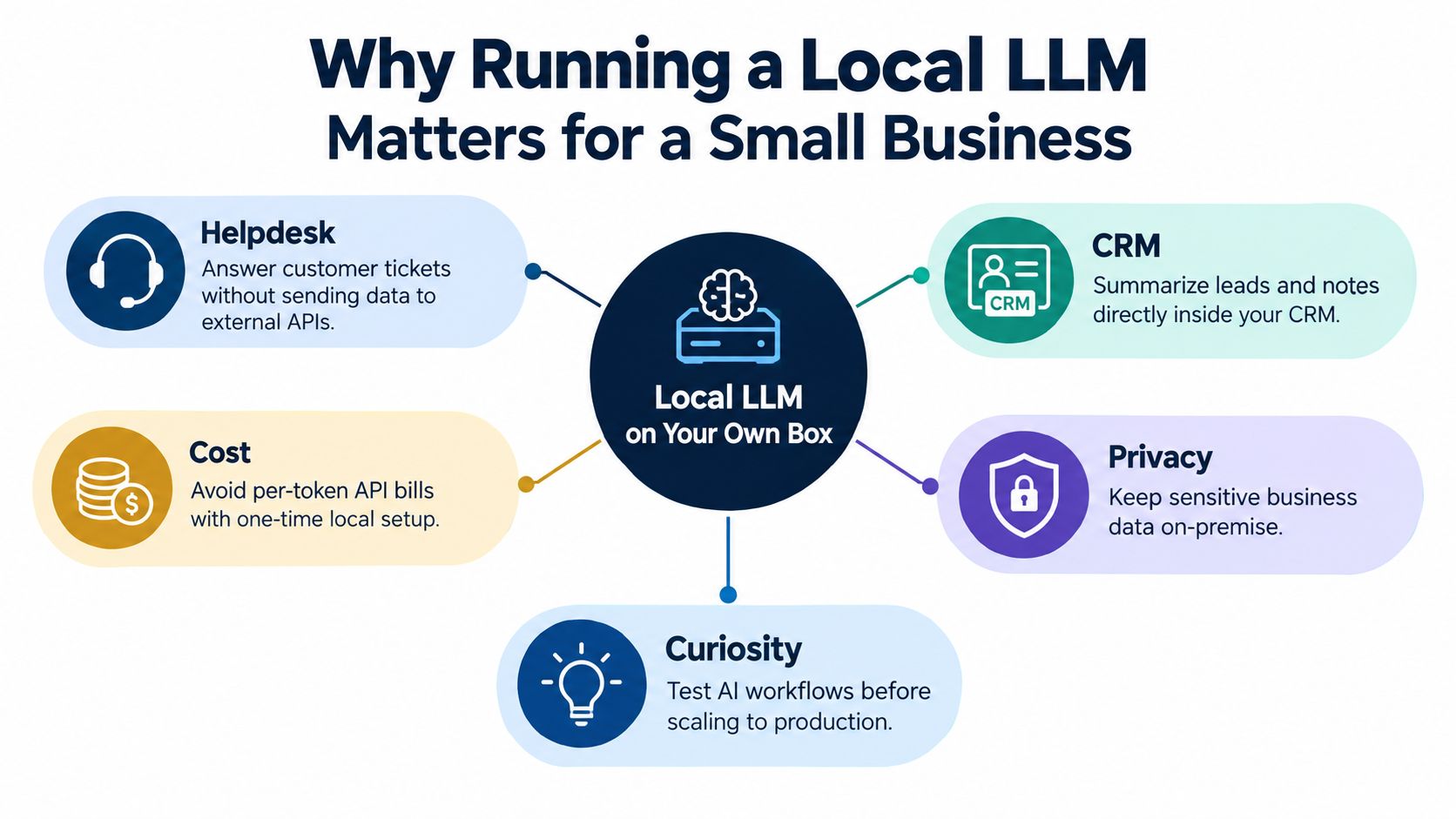
At 9:12 a.m., support is in the helpdesk, sales is updating the CRM, finance is chasing invoice context, and somebody is pasting customer text into a public chatbot because it is faster than asking around internally. That is the operating problem a local LLM can fix.
For a small business, the point of running a model locally is control. Control over where customer data goes. Control over response times when an API vendor rate-limits you. Control over how AI shows up in daily work, instead of letting another standalone tool compete for attention and budget.
Local inference also crossed the line from hobby project to practical office setup. A 7B-class model at Q4 quantization can run on modest hardware, and common local setups are now good enough for drafting, summarizing, and internal question-answering without sending every prompt to an outside provider, as described in this local LLM hardware guide.
What changes when it runs locally
The best use case is boring work your team repeats all week.
Support can draft replies from your own policies and past tickets. Sales can turn rough call notes into usable CRM updates. Operations can query SOPs, order history, and internal docs without feeding that material into a third-party chat app. If you want to deploy local agents with Sokko, that is a useful reference for moving from one-off prompts to task execution.
That is where small businesses usually get this wrong. They treat the local model as a private chatbot and stop there. A private chatbot is fine. It does not justify the effort.
Practical rule: If your local model does not remove one paid AI tool, cut one manual step, or keep one sensitive workflow in-house, it is not solving a business problem.
The SME question that matters
VRAM matters. Model choice matters. Neither decides whether the project works.
The deciding question is simpler. Does the local model replace scattered work across support, sales, operations, and internal knowledge, or does it become one more tab that nobody owns? Small firms do not need another AI surface. They need one place that ties the model to documents, communication, planning, finance, and routine execution.
Zynthoro is useful in that role because it gives the local model a home inside the business system instead of leaving it stranded as a separate window. That is the difference between running a model and getting operational value from it.
Sizing Hardware and Memory for a Local LLM
Monday morning is when bad sizing shows up. Support has a queue, sales wants notes cleaned up, someone pastes a long policy document into the prompt, and the local model stalls because the box was sized for a weekend test, not for office work.
Start with the workload. Then buy the machine.
For a small business, hardware planning should follow one rule: size for the jobs you want the model to absorb from other tools. If the model is only drafting emails for one person, modest hardware is enough. If it is meant to sit behind shared support replies, internal document Q&A, and assistant workflows inside Zynthoro, memory headroom matters more than squeezing out a few benchmark points.
A practical hardware reference places 7B to 8B models in the 6 to 8 GB VRAM range, 13B models in the 12 to 16 GB range, and 70B+ models at 48 GB+ VRAM or CPU offloading in common deployment setups, as summarized in this model deployment tooling guide.
Local LLM hardware tiers for SMEs
| Model size | Min VRAM | Comfortable VRAM | RAM fallback | Suggested GPU | Typical SME fit |
|---|---|---|---|---|---|
| 7B to 8B | 6 GB | 8 GB | System RAM can work for small deployments | Entry-level or midrange consumer GPU | Drafting, summaries, internal search, light helpdesk |
| 13B | 12 GB | 16 GB | Possible with offloading, but slower | 12 GB to 16 GB consumer GPU | Better writing quality, deeper internal Q&A |
| 70B+ | 48 GB+ | 48 GB+ with headroom | CPU offloading if needed | High-memory workstation GPU | Specialized use, shared inference, heavier reasoning |
Here is the recommendation I would give.
A solo operator or very small team should start with a 7B or 8B model on an existing workstation if that machine has enough memory to stay usable during normal office work. A local RAM guide notes that 16 GB is the bare minimum for a 7B model, while 32 GB is strongly preferred if the machine is also running regular desktop apps in this RAM sizing guide. That is the right way to think about it. The model does not run alone. It shares the box with browsers, documents, sync clients, and whatever your staff forgot to close.
If one person relies on the model all day, buy a dedicated workstation before you add another AI subscription.
If several employees will use it, buy for concurrency and context length, not just model size. Teams usually underestimate how fast memory disappears once users start pasting long prompts, searching internal documents, and hitting the model back to back. The common failure is not that the model cannot start. It starts fine, then slows down enough that everyone goes back to scattered SaaS tools.
Use a two-pass sizing check
Do this in order.
First, verify that the model weights fit in VRAM or in your planned GPU plus RAM split. Second, test the longest prompts and documents your team will send, because the KV cache often becomes the limit. A practical planning formula is VRAM(GB) ≈ (parameter count in billions × quantization bits) / 8, then extra headroom for KV cache and runtime overhead, from this quantization planning guide.
Use these checks:
- Boot failure at launch: the weights do not fit. Use a smaller model or lower-bit quantization.
- Out-of-memory after long prompts: the KV cache is the bottleneck.
- Good single-user speed, bad team experience: you bought a demo machine, not a shared work machine.
That last point decides whether local AI becomes useful or becomes shelfware. A small business does not need a workstation that can impress technical staff for ten minutes. It needs one that can sit inside daily operations and replace a few scattered tools with one controlled local model workflow.
If you run a service business with multiple client workspaces, it's worth comparing your software stack too. Agency is listed as €1,199/mo and described as a full non-ERP suite for agencies and multi-client teams, with full accounting & inventory, pro project management & marketing, 5 company workspaces, and 25 users · team structures. That operating setup affects whether your local model serves one operator or supports a team that needs shared access.
Quantization and What It Does to Your Local LLM
A common SME failure looks like this. The team gets a local model running, the first demos look fine, then daily use starts and output quality slips just enough that staff go back to old tools. At that point, the local LLM has not replaced anything. It has added one more system to manage.
Quantization decides whether that happens.
At a practical level, quantization shrinks model weights so the model fits on hardware a small business can own and operate. The cost is some loss in precision. The question is not whether quality drops in theory. The question is whether the drop shows up in your work: quotes, summaries, ticket triage, internal search, or structured extraction.
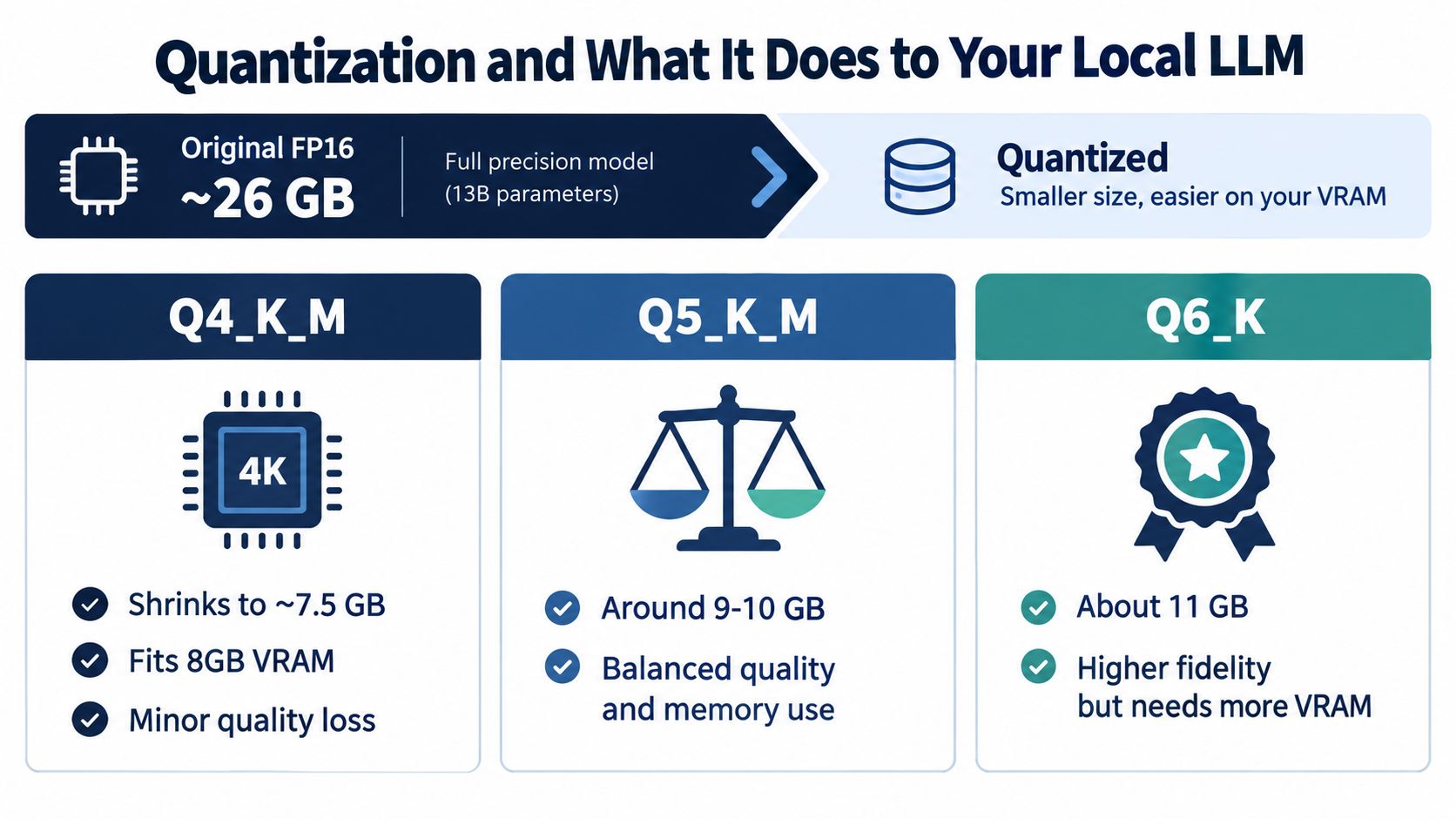
One clear reference point from this quantization explainer is that moving from FP16 to 4-bit weights can cut memory use sharply, and a 7B model can fall from roughly 14 GB to about 4.5 GB at Q4_K_M with only a modest quality hit. That is why quantization matters so much for SMEs. It turns local AI from a lab setup into something you can put on a normal workstation or modest GPU box.
What I'd actually choose
For SME text workflows, start with Q4_K_M.
It is usually the right balance of memory savings, speed, and output quality for drafting, summarization, internal Q&A, and light extraction. Q5 and Q6 can help on harder tasks, but they also consume the headroom that keeps the system responsive for real staff use. Stability matters more than benchmark bragging rights.
That trade-off gets ignored too often. A slightly sharper model that slows down, stalls under concurrency, or forces constant prompt trimming is a bad business choice. You want a model your team will keep using at 4 p.m. on a busy day, not one that looked clever in a test window.
There is also a task-level reality here. An independent analysis of Llama 3 8B found one classification workload where FP16, Q8_0, and Q4_0 all reached the same accuracy, while the lower-precision version ran faster and used less memory, as shown in this benchmark analysis. The same analysis also points out the obvious catch. Equality on one narrow task does not mean equality on reasoning-heavy, context-heavy, or instruction-following work.
That is the SME angle many local-LLM guides miss. Quantization is not just a hardware trick. It affects whether the local model can replace scattered tools reliably enough to become part of operations. If output drift forces people back into separate chat apps, spreadsheets, or manual review queues, you saved VRAM and lost the business case. If you pair the local model with a consolidation layer such as Zynthoro, lower-bit quantization becomes much more useful because the model sits inside one controlled workflow instead of becoming one more disconnected interface.
Test quantization against work, not hype
Use your own prompts.
Check these before you standardize on a quantized model:
- Keep the prompt fixed: Same context length, same prompt, same sampling settings.
- Test the actual job: Quote drafting, CRM note cleanup, support classification, contract summary, or whatever staff do every day.
- Verify structured output: If the model must return JSON, form fields, or ticket metadata, test that directly.
- Review failure cases: Long context, nuanced client language, and policy-heavy instructions show quality loss fast.
A cheaper quantized model only helps if staff can trust the output enough to stay inside the workflow.
Choosing a Local LLM Runtime for SME Workloads
A small business usually feels runtime mistakes before it understands them. The model answers well in a test window, then staff hit timeouts, outputs arrive out of order, or the machine locks up when two people use it at once. At that point, the local LLM has not replaced anything. It has become one more tool someone has to babysit.
Pick the runtime based on how the business will use the model day to day. For SME workloads, that matters more than benchmark talk.
Local LLM runtimes for SMEs at a glance
| Runtime | Best Fit | Concurrency | Setup Effort |
|---|---|---|---|
| Ollama | Small teams, quick setup, OpenAI-compatible local API | Light to moderate | Low |
| llama.cpp | Low-RAM systems, edge devices, CPU-only fallback | Low | Medium |
| vLLM | Shared GPU servers, heavier team usage, batch jobs | Higher | Higher |
| SGLang | Structured-output experimentation and advanced workflows | Uneven in practice | Higher |
What I recommend
Ollama is the right default for most SMEs. It installs fast, exposes a familiar API, and gives you the shortest path from local model to actual staff use. If you need one internal endpoint for drafting, summarizing, ticket help, or CRM cleanup, start here.
llama.cpp is the practical choice when hardware is tight or you need CPU-first deployment. Use it for older workstations, edge devices, and fallback systems where reliability on modest hardware matters more than convenience.
vLLM fits a different job. Use it when the model is becoming shared infrastructure. If several employees, automations, or background jobs will hit the same GPU server, vLLM is usually the better serving layer.
SGLang is worth testing for structured-output heavy flows, but not as your first production standard. A small business should earn complexity only after it has a stable internal use case.
Choose the operating mode, not the brand
Runtime selection is really a choice about operating mode.
If one owner or one ops lead uses the model directly, optimize for setup speed. If a team shares it across helpdesk, sales ops, and admin work, optimize for concurrency and predictable serving. If the goal is to embed the model inside repeatable workflows, optimize for API stability and structured output.
That last point is where many local-LLM setups fail. The team gets a runtime running, but the model still lives in a separate chat box. Staff keep switching between email, spreadsheets, CRM records, voice notes, and the local model UI. Nothing is consolidated. The local LLM exists, but operations do not improve.
For an SME, the better pattern is simple. Run the model locally, then put it behind one controlled workflow layer. Zynthoro is useful in that role because it lets the local model sit inside voice, assistant, and business-process flows instead of becoming another disconnected interface.
What breaks in real use
Raw model quality is only part of runtime choice. The problems are usually queueing, memory pressure, process stability, and ugly failure modes under repeated use. Analysts at Agent Native note in their local LLM operations guide that local performance limits often come from memory movement and fragmentation, and that common serving stacks can still get unstable under sustained load.
That is why I would keep the decision rule blunt:
- One person or a very small team: Ollama
- Older hardware or CPU-only deployment: llama.cpp
- Shared internal endpoint with multiple users or jobs: vLLM
- Structured-output experiments: SGLang, after hard testing
If budget pressure is driving the decision, this cost performance model guide is worth reading because it frames the trade-off correctly. A runtime is a good choice only if it lowers tool sprawl and supports the work people already do. If it adds one more console to manage, it misses the SME business case.
Privacy, EU Data Residency, and On-Prem Inference
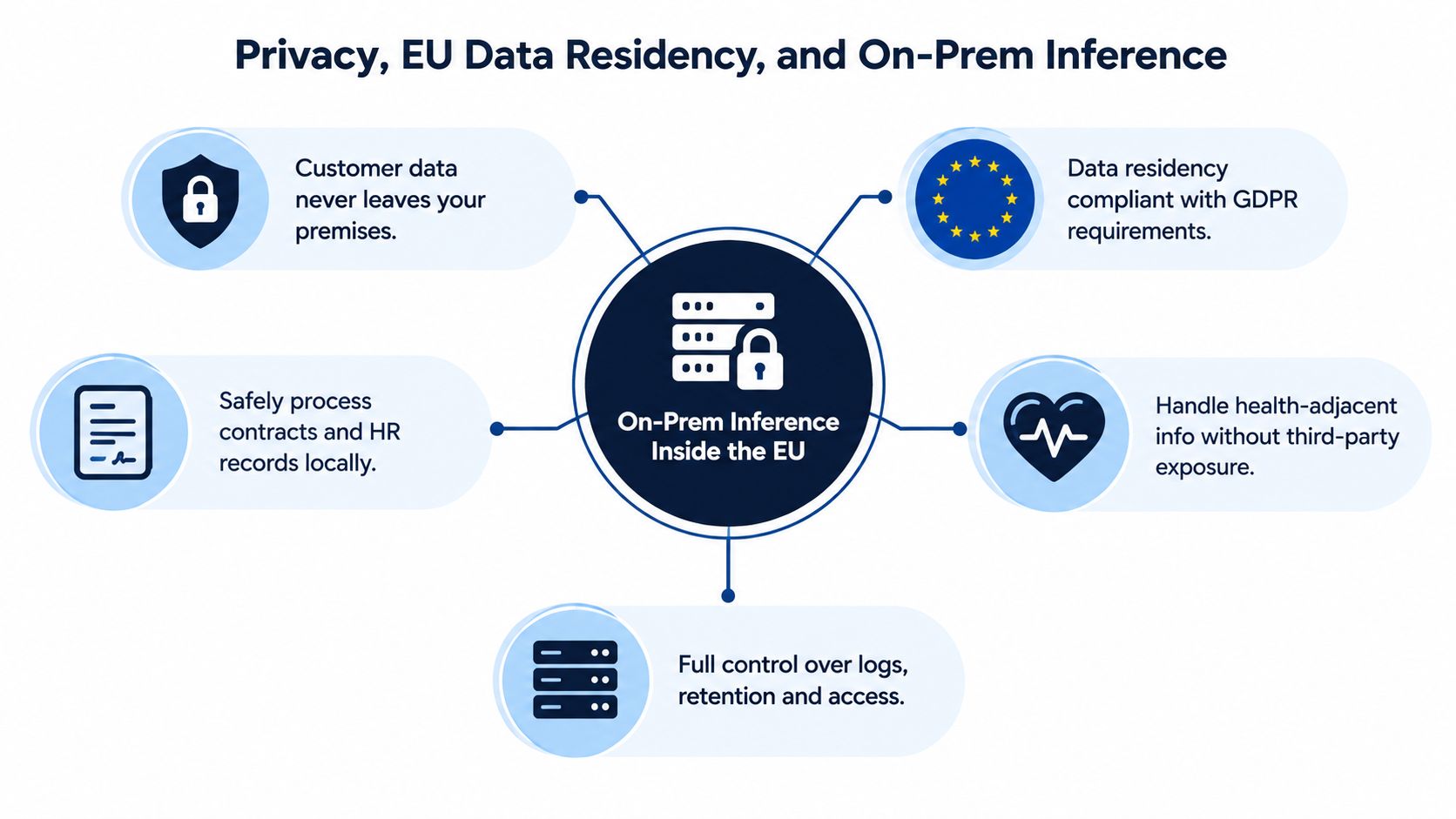
If your business handles contracts, employee records, customer messages, or health-adjacent information, privacy isn't a feature. It's operating discipline.
A local or EU-hosted inference setup gives you tighter control over where prompts go, how logs are stored, and who can access outputs. For an SME, that matters because “we pasted it into a public AI tool” is not a policy. It's a liability.
Privacy is also a systems design issue
Keep the inference server close to the business system that uses it. Don't bounce sensitive prompts across a chain of plugins, browser extensions, and third-party connectors unless you've audited every step.
That means:
- Run inference on your own hardware or an EU-hosted private server
- Use private endpoints instead of public chat apps
- Disable any training-on-prompts behavior by default
- Restrict logs and retention to named business needs
This isn't bureaucracy. It's clean architecture.
Why many “private AI” setups still leak
A lot of teams say they want local AI, then keep speech processing, documents, and action triggers in separate cloud tools. That defeats the point. Even when the language model itself is local, the workflow can still spray data into external services.
Keep prompts, context, retrieval, and generated output inside one controlled path. That's what makes local inference worth the effort.
For European SMEs, the practical win is confidence. You know where customer data lives. You know which staff can reach it. You know what gets logged. That's much easier to defend than a pile of disconnected AI subscriptions with conflicting terms and unclear retention.
Wiring a Local LLM Into Voice and Assistant Workflows
A local model starts carrying real work when people can talk to it and get answers inside the flow of the job.
For many SMEs, that means voice. A technician, warehouse lead, or account manager often can't stop to type long prompts. They need to ask for the work order, stock status, customer note, or next step and get an answer back immediately.
The local voice stack that makes sense
The pattern is straightforward.
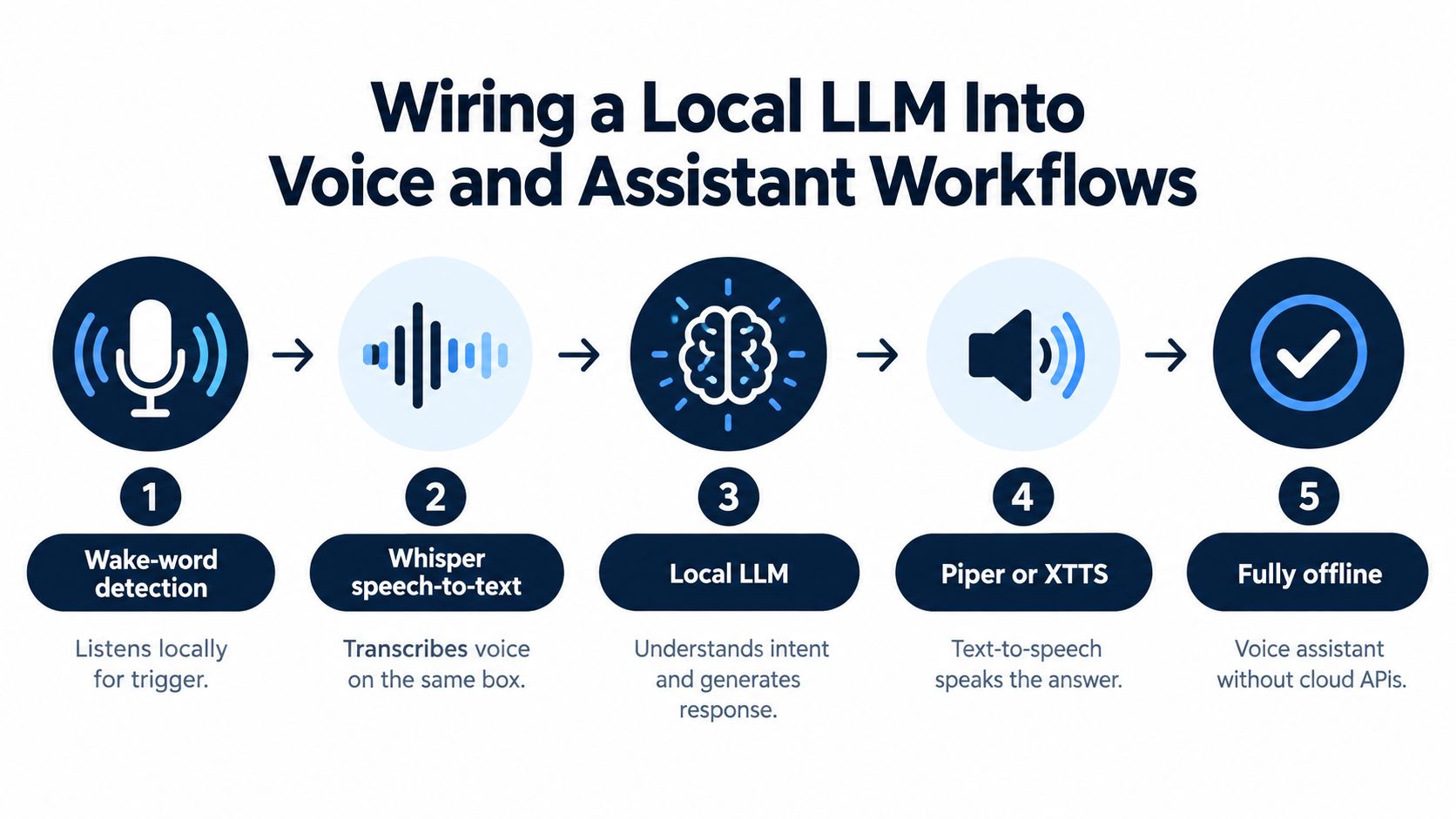
Use Whisper for speech-to-text on the same machine if you can. Use Piper or XTTS for text-to-speech. Add a wake-word layer so the assistant doesn't require keyboard focus. Then route the transcription to the local model, pass the result through the relevant business tools, and speak the answer back.
Keep that whole path on the same host or the same controlled environment. Don't localize the model and then ship raw audio to an outside speech API.
A practical field example
A technician is standing in front of a machine with both hands occupied.
They trigger the assistant by voice. The system transcribes locally, passes the request to the local model, pulls the work order and parts context from the business system, and reads the answer back. No browser switching. No phone juggling. No copied prompt from one app to another.
That's the right shape for assistant design in a small business.
If live multilingual conversations matter to your team, this guide on how to use BubblyPhone for live translation is worth reading because it highlights the operational side of voice workflows, not just the demo layer.
Where assistants fit in practice
A useful assistant stack usually separates roles:
- Zyntha handles conversational chat and everyday back-and-forth.
- Thoro handles heavier reasoning and tool use.
- Zyona is the voice-first path when hands-free access matters.
- Assist is the employee entry point that keeps usage simple.
That structure matters because voice and text don't behave the same way in real operations. A production floor query, a sales summary, and a finance lookup need different interaction patterns even if they hit the same local model underneath.
A lightweight entry point also matters for adoption. Kickstarter is listed as Kickstart 1, €79 one-time, with 40% of Starter · lifetime access, plus AI Assistants · 50 credits/month, Planning & Time Tracking, Communication module, and Canva Studio. That kind of package tells you whether voice and assistant usage will stay experimental or become part of routine work.
Tune for latency, not just intelligence
CPU-only local inference is viable for smaller models, but speed is limited. One guide estimates about 5 to 15 tokens per second on a modern desktop CPU with AVX2, while a midrange GPU can reach 40 to 80+ tokens per second in this practical local LLM guide. In voice workflows, that difference changes whether the assistant feels useful or annoying.
There's another hardware issue that gets ignored. A local hardware guide states that a 7B model at INT4 needs about 3.5 GB of weight traffic per token, so sustaining 10 tokens per second requires at least about 35 GB/s of memory bandwidth, with 50 to 80 GB/s recommended for comfortable interactive use, from this edge AI hardware guide.
That's why two machines with similar RAM can feel completely different once speech, retrieval, and generation all happen together.
Turning a Local LLM Into Your Real Operating System
Monday starts with the usual mess. Support has one AI tool for replies, sales has another for call notes, operations still searches three systems by hand, and nobody trusts where any of that data goes. Adding a local LLM on top of that stack does not fix the problem. It gives you one more tool to manage.
A local model starts paying for itself when it becomes the controlled language layer behind the work your team already does. Staff should not hop between chatbot tabs, transcription apps, note summarizers, and internal search workarounds. They should work in one place, with one assistant layer, tied to the systems that already run the business.
That is the difference between a demo and an operating system.
What good consolidation actually looks like
The winning setup is boring in the right way. A salesperson updates an account after a call. Support asks for a policy-backed reply. Operations checks an order status. A manager reviews a meeting summary and turns it into tasks. The same local inference layer handles all of it, with the right prompt, permissions, and tool access behind the scenes.
That matters more than model benchmarks for most SMEs. If the local LLM cannot read business context, trigger actions, and return answers inside the workflow, employees will fall back to copy-paste habits and scattered SaaS tools.
Use one workspace. Route typed and voice requests into the same backend. Keep identity, permissions, and audit trails in the same place too.
The pattern to aim for
- Support uses one assistant: It drafts responses from internal policy, prior conversations, and approved knowledge.
- Sales stays in the same workspace: Call notes, follow-ups, and proposal drafts remain attached to account records.
- Operations queries live systems: Staff ask for order, stock, invoice, or workflow status without opening separate dashboards.
- Voice uses the same control layer: Spoken requests, transcripts, and typed prompts follow the same rules and data access.
Separate department chatbots look flexible at first. In practice, they create prompt drift, inconsistent permissions, duplicate subscriptions, and no shared operating model.
A simple readiness test
Ask five direct questions before rollout.
| Decision area | What to confirm |
|---|---|
| Workflow fit | The assistant shows up inside the tools your team already uses |
| System access | It can read from and write to the business systems that matter |
| Permissions | Users only get the data and actions their role allows |
| Logging and review | You can inspect outputs, failures, and sensitive interactions |
| Tool reduction | The local LLM replaces existing tools instead of sitting beside them |
If you cannot point to tools you will remove, you are not consolidating. You are adding overhead.
The practical goal is simple. One local model endpoint. One workspace for staff. Clear actions connected to CRM, ERP, documents, voice, and internal knowledge. Fewer AI products, fewer handoffs, and less context lost between systems.
Zynthoro fits that job well because it gives SMEs a single workspace to connect assistants, business data, and daily operations around the local model instead of spreading AI across separate apps. If you want local LLM workflows to become part of finance, sales, operations, HR, and voice work, visit Zynthoro.