



You're running the business through a collection of tabs, logins, spreadsheets, and hopeful memory. Invoicing lives in one system, stock in another, employee details in a payroll portal, and the latest customer promise sits somewhere in a chat thread. Everyone is busy, but nobody has the same version of the truth.
That's the point at which SME ERP software becomes worth serious consideration. Not because your company needs an impressive dashboard, but because disconnected tools make ordinary work harder than it should be. I've replaced a fragmented stack myself, and the painful lesson was clear: the software migration matters, but choosing what to connect, what to preserve, and how to get people using the system matters more.
Table of Contents
- The Tool Stack Tangle Most Small Businesses Live In
- What SME ERP Software Really Means Today
- Why Fragmented Tools Quietly Cost You Money
- The SME ERP Buying Checklist You Should Run Through First
- How Zynthoro Lines Up Against the Checklist
- Rolling Out SME ERP Software Without Sparking a Revolt
- Your Next Move Toward One Connected Workspace
The Tool Stack Tangle Most Small Businesses Live In
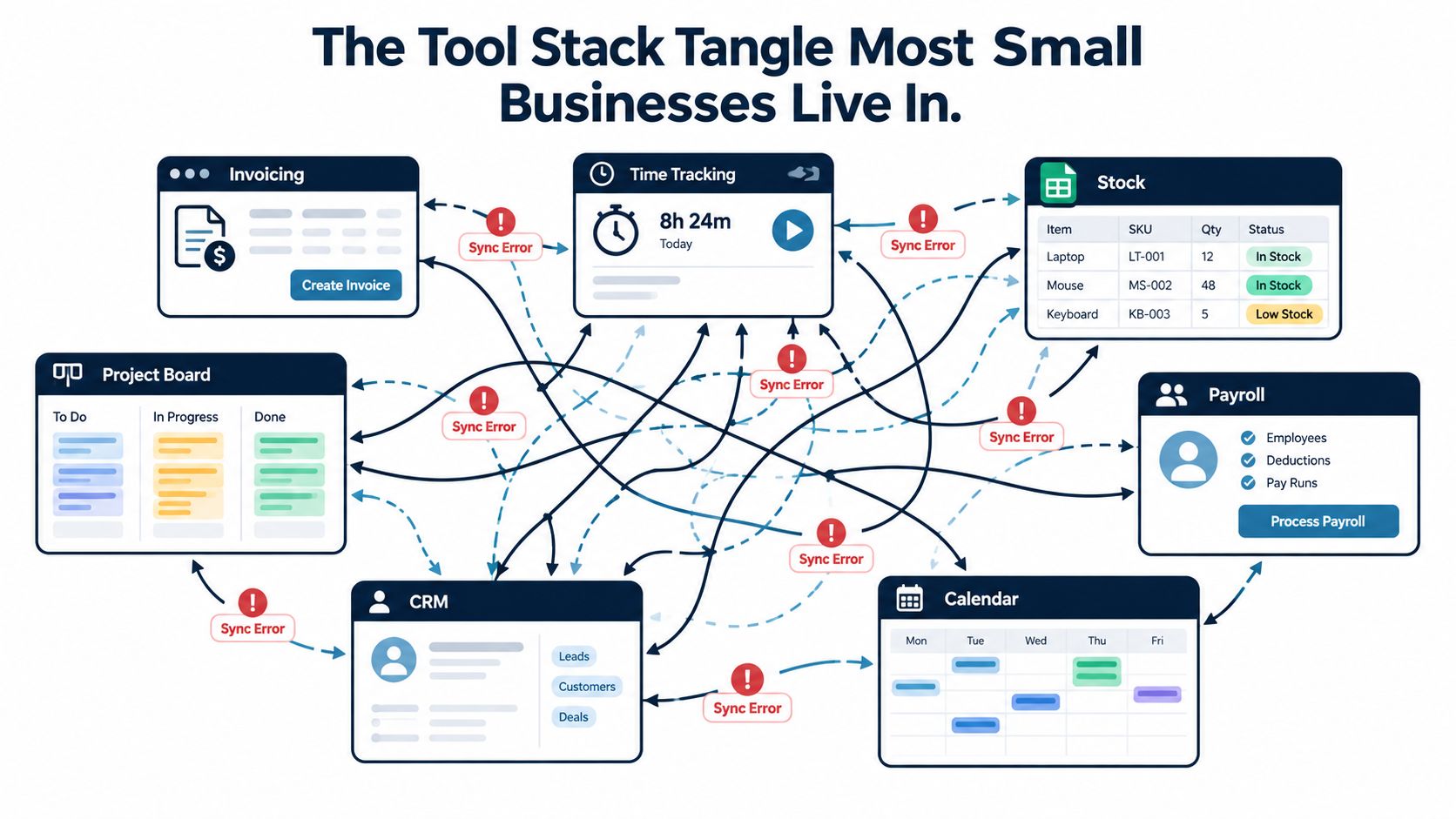
It's Tuesday morning at a 12-person company that combines client services with light manufacturing. The finance lead has one tab open for invoicing. A project manager is checking time entries in another system. Stock levels sit in a shared spreadsheet that three people edited yesterday. Payroll has its own portal, projects run through a board, internal decisions are buried in chat, and the CRM hasn't been updated since the last sales meeting.
The same customer appears in several places, with slightly different addresses, payment terms, contacts, and order notes. Sales has promised a delivery date based on an old stock figure. Operations is working from a production sheet that doesn't include the latest order change. At month-end, someone exports CSV files, copies figures between worksheets, and asks the founder which number is correct.
That founder becomes the human API. They remember which customer record is current, which supplier invoice is still pending, and whether the production team can meet the date sales promised. The company isn't short of software. It's short of a shared operating record.
The fix isn't automatically “buy the biggest ERP.” A small company needs enough depth to connect finance, customers, purchasing, operations, people, and production without inheriting an enterprise implementation project. It also needs to understand which integration metrics matter, including the practical KPIs for accounting integration, before comparing vendors.
This guide takes that route. It defines what SME ERP software should do, identifies the costs that disconnected tools hide, gives you a buying checklist for European businesses, assesses Zynthoro against it, and lays out a rollout plan that won't turn your team against the project.
What SME ERP Software Really Means Today
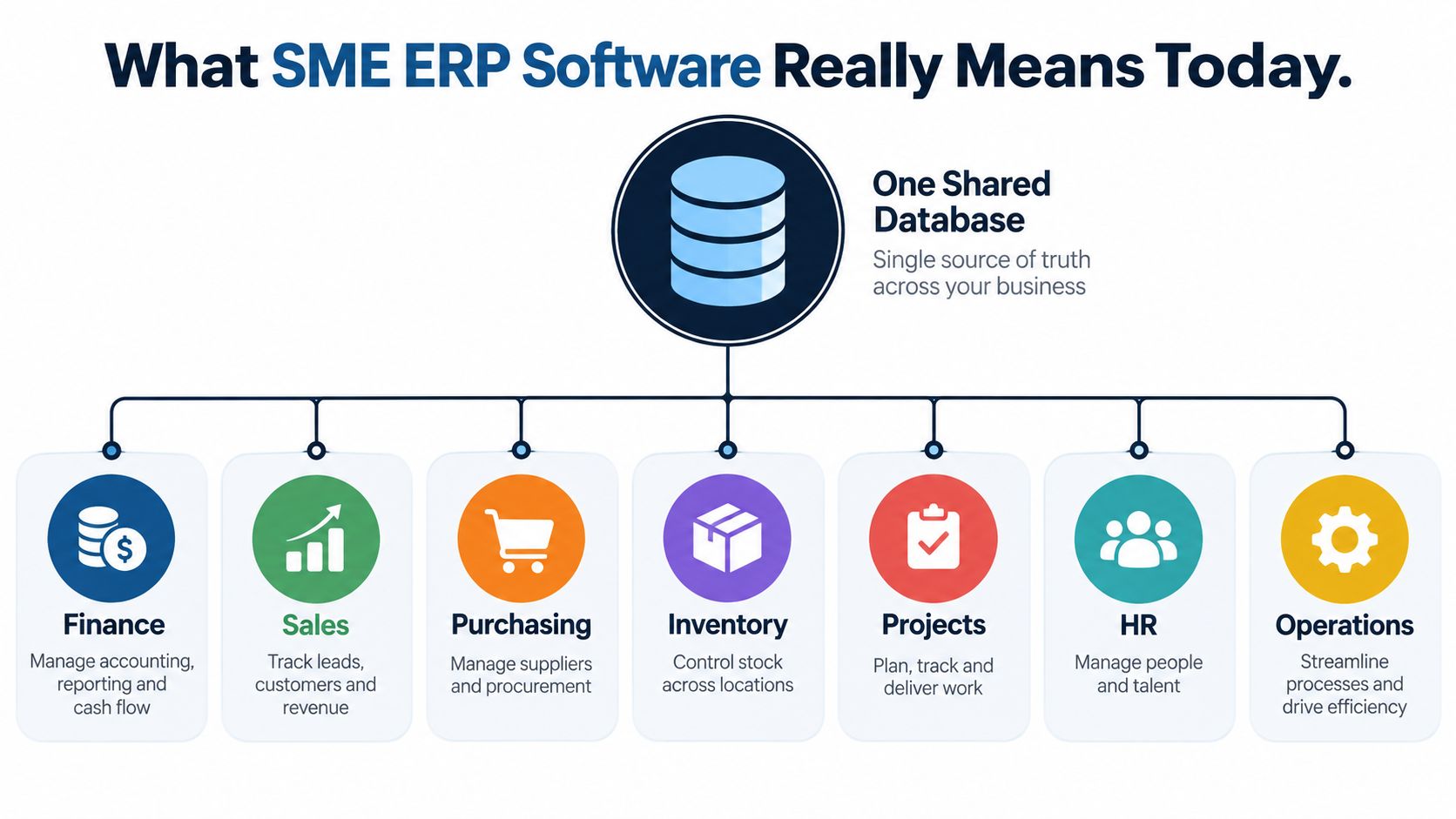
SME ERP software is a shared business system, not accounting software with extra screens. It gives finance, sales, purchasing, inventory, projects, HR, and operations access to connected records in one database. That database becomes the source of truth for customers, suppliers, employees, products, orders, costs, and transactions.
The right system should cover the essentials:
- Finance: General ledger, accounts receivable, accounts payable, VAT handling, invoicing, reconciliation, and reporting.
- Commercial work: Leads, customers, quotes, sales orders, pricing, pipeline activity, and fulfilment.
- Supply and stock: Supplier records, purchase orders, approvals, stock movements, reorder decisions, and inventory valuation.
- Delivery and production: Job costing, work orders, recipes, bills of materials, routings, quality checks, and production status.
- People and projects: Timesheets, assignments, project tracking, contracts, leave, payroll hand-off, and HR records.
- Management information: Role-based dashboards, cash forecasts, operational reports, and audit history.
A connected record should remove repeated entry. A customer order should pull the approved price from the sales catalogue, reserve or update inventory, schedule the required work, generate a pick list, create an invoice, and feed the cash forecast. Nobody should need to retype the same order into finance, stock, and production tools.
The shared database is the important part
Modern systems may add mobile apps, embedded AI assistants, voice input, and dashboards, but those features only matter when they work against the same underlying records. An AI assistant that can summarise a project, identify a delayed approval, or help schedule work is more useful when it can access current operational data rather than a separate document store.
That's why an ERP can become a managed growth system for SMBs, a concept explored in this managed growth system for SMBs resource. The value comes from making repeatable processes visible and consistent, not from collecting every possible feature.
Don't confuse a starter business workspace with ERP. Starter No Credits is listed as a €499 per month Starter plan with basic planning and time tracking, basic content and communication, one company workspace, one user, one email, and three aliases. Its snapshot explicitly states No ERP, so it isn't the right benchmark for a company trying to consolidate finance, sales, inventory, and production.
Why Fragmented Tools Quietly Cost You Money
The invoice is only the visible cost of a software stack. The larger bill arrives through repeated data entry, reconciliation, rework, delayed decisions, and mistakes that nobody assigns to software.
A sales coordinator enters an order in the CRM, then finance rekeys it for invoicing. A purchasing manager updates stock in a spreadsheet, while production checks a different file. An employee changes their address in the payroll portal but not in the HR record. Each handoff creates an opportunity for a missed field, an outdated figure, or a duplicate record.
The finance impact is especially easy to underestimate. Month-end close stretches because the team has to reconcile separate systems before it can trust the result. A supplier may be paid twice, an invoice may be missed, or cash flow may look healthier than it really is because operational commitments haven't reached the finance view.
Owner's test: Count the hours spent reconciling systems, not just the subscriptions appearing on your bank statement.
Compliance adds another layer. Customer, employee, and supplier information may sit across vendors with different access controls, retention settings, and audit capabilities. For European businesses handling personal data, GDPR readiness requires more than a privacy statement. Teams need practical controls such as role-based permissions, MFA, prompt access removal, no shared logins, and restricted public sharing, as outlined in this cloud data protection and GDPR compliance guidance.
Production creates a separate operational risk. When sales data lives in a CRM and production data lives in a spreadsheet, planners work from different assumptions. Sales promises a date, operations discovers a material shortage, and the customer learns about the delay after the commitment has already been made.
| Pain Point | Hidden Cost Type | Typical SME Impact |
|---|---|---|
| Duplicate data entry | Labour and rework | Staff copy customer, order, and supplier data between systems |
| Spreadsheet-led stock control | Operational waste | Planners work from stale quantities and miss purchasing needs |
| Delayed reconciliation | Finance cost | Management decisions rely on late or incomplete cash information |
| Scattered personal data | Compliance risk | Access reviews and audit trails become difficult to manage |
| Separate production and sales records | Customer and delivery risk | Promised dates fail to reflect actual capacity or materials |
| Too many vendors and logins | Administration | Owners spend time maintaining tools instead of improving processes |
A consolidated workspace won't eliminate every mistake. It does remove many unnecessary handoffs. For a lightweight entry point, Kickstarter is listed as a one-time €79 Kickstart 1 offering with AI Assistants, 50 credits per month, Planning and Time Tracking, Communication, and Canva Studio. That snapshot doesn't describe a full ERP, so treat it as a separate starting product rather than evidence of manufacturing or finance coverage.
The SME ERP Buying Checklist You Should Run Through First
Don't start with a vendor's feature tour. Start with questions that expose whether the system fits your business.
Ask where your data is hosted
Can the vendor show you where EU customer and employee data is stored, which subprocessors are involved, how backups are handled, and how the platform supports GDPR obligations? “Cloud-based” doesn't answer those questions. European owners should also ask how data export, deletion requests, breach handling, and retention work in practice.
Ask how access follows roles
Can a contractor see only the projects they need? Can a seasonal worker access stock without seeing payroll? Can finance work with accounting and invoicing while HR remains restricted to personnel records?
Role-based access control should apply across workspaces, modules, and resources. The platform should record who changed an approval, invoice, configuration, or employee record, with enough context to support accountability. Shared logins are a warning sign.
Ask what the embedded AI can actually use
Is the AI assistant connected to your own customers, projects, orders, and financial records, or is it merely a separate chatbot? Ask the vendor to demonstrate a real workflow, such as summarising a delayed project, identifying an overdue approval, or helping create a schedule from current assignments.
Also ask what data the AI sends outside the platform, how permissions are respected, and whether users can review generated actions before they affect a customer or transaction.
Ask for manufacturing depth
If you make products, “inventory” isn't enough. Require a live demonstration of recipes or multi-level BOMs, routings, work orders, quality control, lot tracking, material consumption, finished goods, and cost roll-ups.
For manufacturing SMEs, lot traceability means connecting the raw-material batches issued to a production run with the finished batch produced. The full chain should also show which customer received that finished lot, as explained in this MRP, BOM, and lot traceability guide for small manufacturers.
Ask whether people can use it where work happens
Office staff may tolerate desktop workflows. Operators, field teams, and supervisors need mobile coverage across iOS, Android, tablets, and desktop. Test barcode entry, approvals, time capture, work-order updates, and voice input on the devices your team uses.
Ask for the complete cost
Price the whole project, not the licence alone. Include implementation, migration, integrations, training, testing, support, reporting changes, and the cost of running old tools during transition.
Use a simple scorecard before a demo:
| Criterion | Must-Have | Nice-to-Have |
|---|---|---|
| Data residency | Clear EU hosting and GDPR-ready controls | Regional hosting choices |
| Access control | RBAC, MFA support, audit trail, no shared accounts | Advanced SSO policies |
| AI | Embedded assistant connected to permitted business records | Voice interaction and generated summaries |
| Manufacturing | BOMs, routings, work orders, QC, lots, costing | Advanced optimisation |
| Mobile | Core workflows work on field and shop-floor devices | Offline capability |
| Total cost | Transparent licence and implementation scope | Flexible enterprise commercial terms |
| Integration | APIs or documented connectors for critical legacy tools | Broad marketplace coverage |
A system that fails a must-have should leave the shortlist, even if its demo looks polished.
How Zynthoro Lines Up Against the Checklist
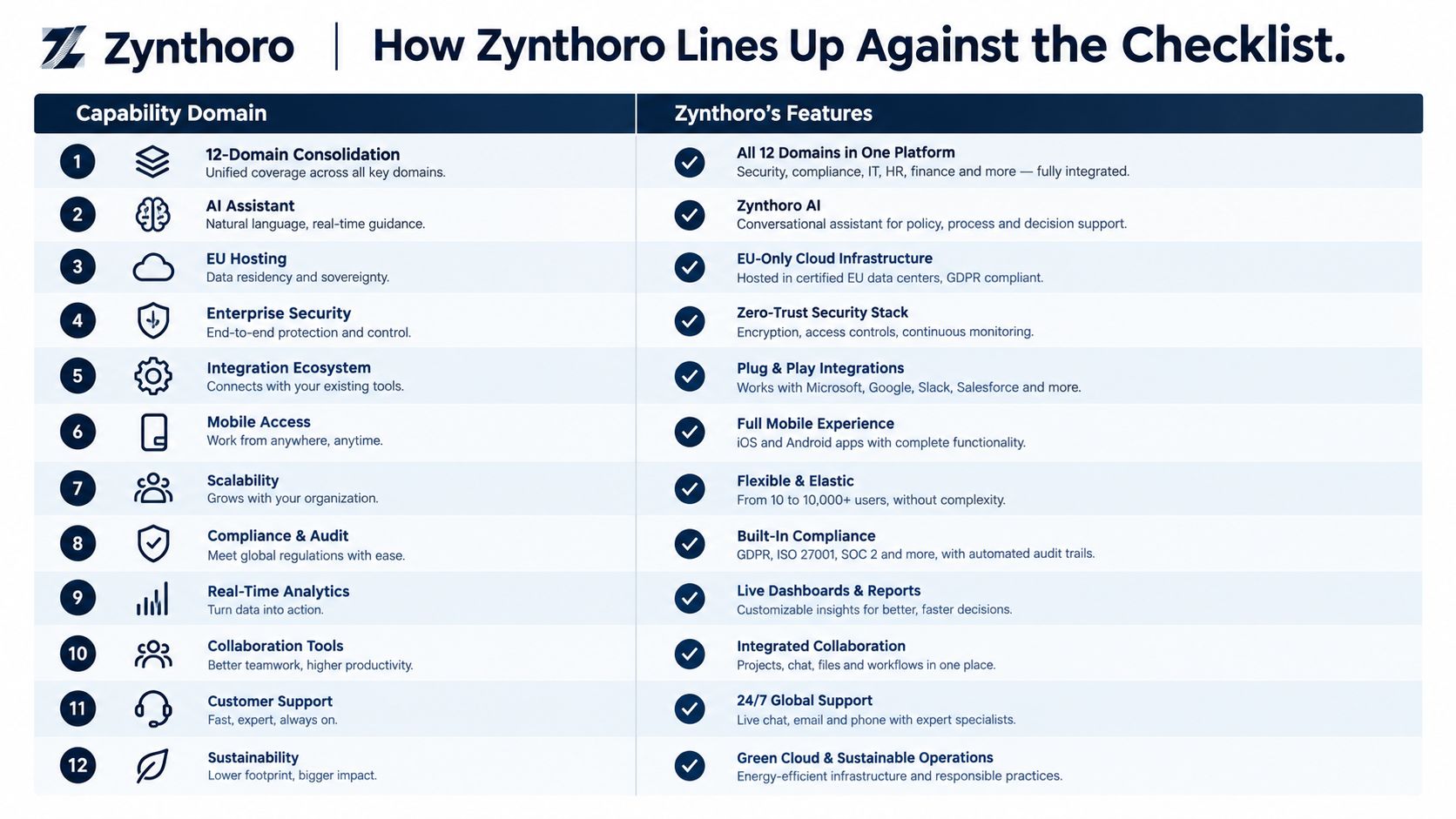
Zynthoro is an AI-native ERP platform for SMEs and growth-stage teams. Its stated scope covers twelve business domains in one EU-hosted workspace, including planning, time tracking, purchasing, sales, accounting, invoicing and finance, projects, HR, operations, marketing, communication, and compliance.
Against the checklist, the fit is concrete:
- Consolidation: Finance, sales, purchasing, inventory-related administration, projects, HR, operations, communication, and content work from connected records rather than isolated applications.
- AI: Zynthoro includes embedded assistants powered by Anthropic Claude, including Zyntha, Thoro, Zyona, and Zynthoro Assist.
- Security: The platform is described as EU-hosted, with GDPR-ready controls, audit trails, and role-based access.
- Manufacturing: Its production scope includes recipes, multi-level BOMs, work orders, quality control, lot traceability, and cost roll-ups for food, cosmetics, pharma, and light manufacturing.
- Mobility: The same data model is available across iOS, Android, tablet, and desktop, with hands-free voice input positioned for production and field use.
- Workflow coverage: Planning, approvals, invoicing, reconciliation, assignments, status summaries, contracts, leave, onboarding, process mapping, and monitoring sit within the broader platform.
That combination addresses the specific failure point many SMEs face. You're not choosing between an accounting package and an operations tool, then hoping the integration behaves. You're assessing whether one workspace can carry a transaction from customer request through purchasing, production, delivery, invoicing, and reporting.
The trade-off is breadth. A broad platform needs disciplined configuration, clean permissions, and a rollout that matches how your team works. Don't sign because a sales demo shows twelve domains. Ask Zynthoro to demonstrate your own order, your own approval chain, and your own production scenario.
Pricing also needs careful interpretation. The available catalogue snapshot lists a Business plan at €899 per month with more modules for growing SMEs and entrepreneurs, full time tracking and sales, basic accounting and operations, three company workspaces, and ten users. It states No ERP, so you should confirm which plan and configuration provide the ERP and manufacturing functions you need.
Pilot before commitment: Make the vendor prove one complete finance flow and one complete production flow using realistic records.
Use the walkthrough below as a supplementary product reference, then run your own questions against it.
Rolling Out SME ERP Software Without Sparking a Revolt
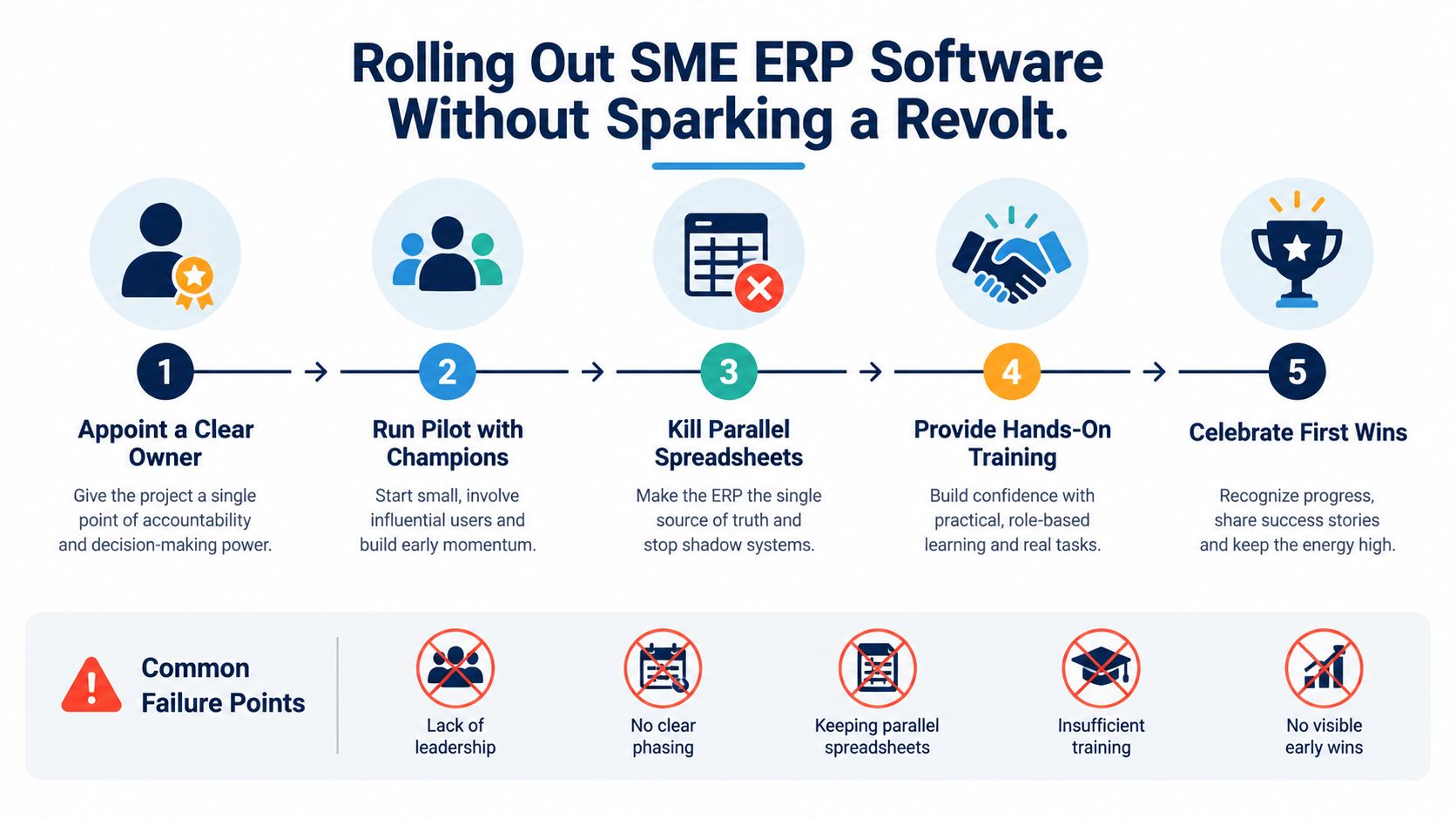
Licence price doesn't decide whether an ERP rollout succeeds. People and process decisions do. Resistance to change, weak management support, poor communication, and limited user involvement repeatedly undermine projects, while a 2026 manufacturing survey cited staff and management resistance at 42%, compared with 31% for software cost as a main barrier, according to the ERP adoption report.
Start with one owner. That person should have authority to resolve process disputes, remove duplicate spreadsheets, coordinate training, and report progress every week. A committee can advise, but a committee can't own the messy decisions.
Use a phased sequence
For a company with 10 to 50 people, I'd use this order:
- Finance first: Establish customers, suppliers, invoices, approvals, payments, and reporting.
- Sales and purchasing next: Connect quotes, orders, supplier commitments, and customer terms.
- Operations and production after that: Add stock, BOMs, routings, work orders, quality checks, and traceability.
- HR and projects once the transaction core is stable: Bring in contracts, leave, time, assignments, and project reporting.
- Remove parallel tools: Keep only integrations that serve a clear purpose. Don't preserve a spreadsheet merely because someone is comfortable with it.
Run a small pilot with people who understand the work and can explain it to colleagues. Give them hands-on training, publish a short weekly list of wins and unresolved issues, and fix visible friction quickly. A team will tolerate change when it sees that the new workflow removes an annoying task.
The target isn't to create another central dashboard that nobody trusts. It's one source of truth, with clear ownership and enough practical support that people stop opening the old tools.
Your Next Move Toward One Connected Workspace
You can decide whether consolidation deserves a trial by answering five questions:
- Are you paying for three or more overlapping tools?
- Can your accountant pull a trial balance without exporting CSV files?
- Do operators know in real time whether a job is on schedule?
- Is your current stack GDPR-clean, with appropriate EU data residency?
- Will the vendor show a working production order from material issue through finished goods and customer delivery?
If you answer “no” to several, don't begin with a company-wide transformation. Run a two-week trial using one finance flow and one shop-floor flow. Use a real customer, a real supplier, a real approval, and a realistic production order. Test permissions, mobile use, audit history, reporting, and the handoff from operations to invoicing.
Choose the first module by visible payoff. Finance is often the best starting point for services businesses because it exposes duplicate records and manual reconciliation quickly. Production may be the better first flow for a manufacturer because BOMs, material availability, work orders, and traceability reveal whether the system has genuine operational depth.
Once the first user group stops opening the old tools, add CRM and HR. Treat the decision as a quarterly operating review, not a three-year transformation promise. The right SME ERP software should earn its next module by making the current workflow more reliable.
If you're comparing broader HR and IT consolidation as well, this overview of Rippling for streamlined operations offers useful context for evaluating where specialist platforms may still fit beside an ERP.
Zynthoro brings finance, sales, operations, HR, projects, communication, embedded Claude-powered assistants, EU-hosted controls, and manufacturing workflows into one connected workspace for SMEs. Visit Zynthoro to review the platform, then ask for a two-week test built around one real finance process and one real production or delivery process.