



You're counting stock in a spreadsheet while sales happen through a POS, an online shop, and a warehouse team. A supplier shipment arrives, someone exports a report, and the numbers still don't match. By the time you find the missing units, a customer has already been promised an item you can't ship.
That's the daily reality behind many searches for small business inventory software. The problem usually isn't a lack of effort. It's that each tool records only part of the movement, leaving people to reconcile receiving, sales, transfers, returns, and physical counts by hand.
A widely cited survey summarized in industry inventory management reporting found that only 18% of small businesses use inventory management software, while 43% either don't track inventory at all or rely on manual methods. Those figures point to a practical truth: software adoption competes with spreadsheets, habits, and the fear of disrupting operations.
I've seen the same pattern in retail and light manufacturing. A shop owner wants better stock visibility, but the requirement is broader: one dependable record, clean purchasing, traceable adjustments, and a path into finance and production when the business grows. Resources such as restaurant inventory management by OrderOut can help owners think through the operational basics, but the buying decision should start with your actual workflow.
This comparison focuses on that decision. It looks at the capabilities that matter, where popular platforms diverge, when EU hosting and lot traceability become decisive, and when inventory software should give way to ERP-style integration. Zynthoro belongs on the shortlist when disconnected inventory, purchasing, accounting, and production tools are becoming one expensive operating problem.
Table of Contents
- Introduction Why Inventory Still Breaks for Small Businesses
- What Small Business Inventory Software Must Do Today
- Detailed Comparison of Leading Options by Capability
- Hosting Residency and GDPR Readiness for European SMEs
- Pricing Licensing and the True Cost of Implementation
- Use Cases and Situational Recommendations for SMEs and Manufacturers
- Implementation Roadmap to Replace Spreadsheets Without Disruption
Introduction Why Inventory Still Breaks for Small Businesses
A small retailer may have one spreadsheet for opening stock, a POS report for sales, and a shared document for purchase orders. The warehouse team counts cartons separately. Returns sit in an email inbox. Nobody has a reliable answer to a simple question: what can we sell right now?
Manufacturers face a different version of the same problem. A cosmetics maker may track raw oils in one file, finished batches in another, and production consumption on paper. The business knows what it made, but not always which supplier lot went into which customer shipment. That uncertainty becomes expensive when a component runs short or a customer asks about product origin.
The adoption gap is especially pronounced among smaller firms. Research on SME inventory practices reported that only 13.5% of micro firms adopted EOQ-based inventory practices, compared with 69.2% of medium enterprises, while 62.5% of micro-enterprises relied mainly on manual inventory methods. The same study found that only 12.1% of micro-enterprises used cloud-based inventory systems. These figures are reported in the enterprise-size study on SME inventory adoption.
The reason isn't that owners don't value control. Smaller companies often lack dedicated IT staff, process specialists, and time for a complicated rollout. A system that demands extensive configuration can feel more dangerous than the spreadsheet it replaces.
Operational rule: Don't buy another app to patch one broken handoff. Replace the handoff with a shared record.
Good small business inventory software records the event that changes stock, not merely the final quantity. Receiving should increase available stock. A sales order should reserve or reduce it according to the workflow. A transfer should show where units moved. A count should preserve the reason for the adjustment.
That's the difference between visibility and control. Zynthoro is designed for businesses that want inventory connected to purchasing, sales, finance, and production instead of isolated in another tab.
What Small Business Inventory Software Must Do Today
Inventory control starts with a reliable event trail. A system should update on-hand quantities when your team receives goods, creates sales orders, transfers stock, completes counts, or makes an approved adjustment. The record should show what changed, when it changed, and which user or transaction caused it.
That central source matters because disconnected records create reconciliation work. If a retailer sells through a shop and an online channel, both channels must feed the same stock position. If a manufacturer consumes components in a work order, the finished product and raw-material balances need to reflect that production event.
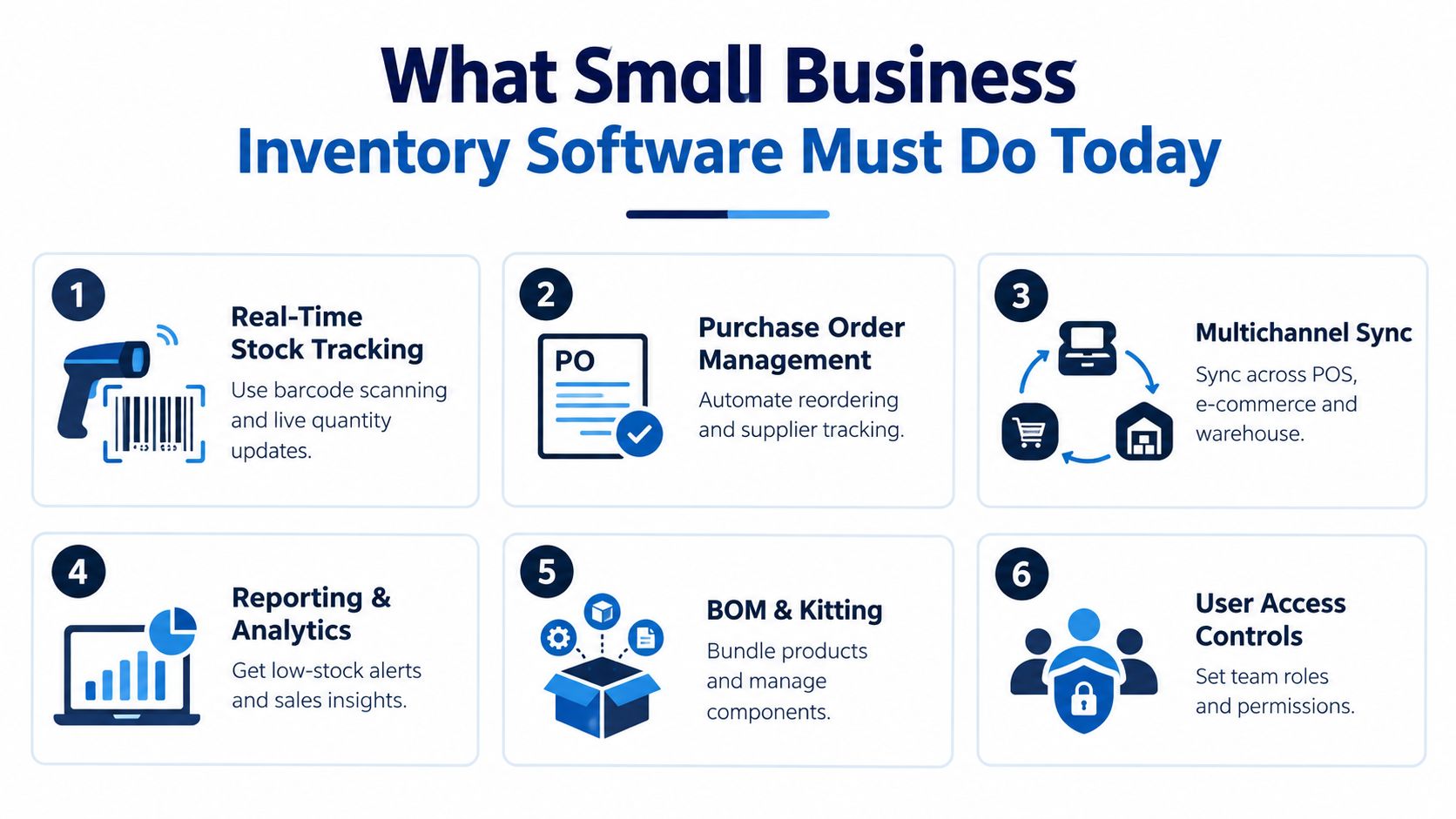
The baseline checklist
Use this test before comparing brands:
- Real-time stock tracking: Staff should update quantities through barcode scans, receipts, sales, transfers, and counts without waiting for an end-of-day spreadsheet export.
- Purchase order management: Buyers need to see what was ordered, what has arrived, and what remains outstanding. Reorder points should trigger action, not just display a warning.
- Channel and location continuity: POS, e-commerce, warehouse, and store records should share one stock model. Multilocation teams need transfers and counts that preserve location-level accountability.
- Reporting and alerts: Owners need low-stock visibility, movement history, inventory valuation, and sales context. Reports should support decisions rather than decorate a dashboard.
- BOM and kitting support: A maker selling bundles or producing finished goods needs components, recipes, assemblies, and consumption tied together.
- User access controls: A counter assistant shouldn't have the same permissions as the finance manager. Roles, approvals, and audit trails protect both accuracy and accountability.
Lot management adds another layer. A traceable batch should let you follow a lot forward to customers and backward to suppliers. For recall readiness, a practical control is the ability to produce a full trace for a chosen lot within one hour, as described in lot management guidance for recalls.
Basic stock counting ends when the business must explain why stock changed. Workflow automation begins when the system can create the next action, such as a purchase order, approval request, production task, or quality check. For a deeper perspective on reducing excess stock through software, see ottimizza giacenze con il software.
For owners seeking a broader commercial workspace, Kickstarter 2 is listed as a €149 one-time option with lifetime access, everything in K1, 150 credits per month, finance and invoicing, a sales module, and an AI photo/video suite. It's a catalog option, not a substitute for checking whether your production and traceability requirements fit.
Detailed Comparison of Leading Options by Capability
A feature list can make very different products look interchangeable. They aren't. Zoho Inventory and Square are built to feel approachable for smaller teams, while Cin7 and Odoo reach further into warehouse, costing, purchasing, and operational workflows.
The useful question isn't which platform has the longest list. Ask how much control your operation needs today, and whether the software can support the next process you're likely to formalize.
| Platform | Strengths Highlighted | Complexity Signal |
|---|---|---|
| Zoho Inventory | Batch and serial tracking, reorder points | High SMB fit, structured workflows without manufacturing depth |
| Square | Mobile inventory counts, real-time multilocation tracking | Retail-friendly and accessible |
| Cin7 | Mobile WMS app, job costing | More advanced, less SMB-simple |
| Odoo | Automated purchase orders, broad business coverage | Complex despite strong automation |
These capability and rating comparisons are summarized in small-retail inventory software comparisons, where Zoho Inventory is rated 4.39/5, Square 4.37/5, Odoo 4.23/5, and Cin7 4.10/5.
The practical distinction: Batch and serial control indicate traceability maturity. Multilocation syncing and mobile counts indicate operational speed. BOMs and job costing indicate that inventory is becoming part of production management.
Where each option fits
Zoho Inventory is a sensible choice for an SME that needs reorder points, batch tracking, serial numbers, and structured purchasing without immediately adopting a full ERP. It suits distributors and product businesses that need discipline around stock movements but don't yet require complex shop-floor control.
Square makes more sense for retail teams that live on the sales floor. Mobile counts and multilocation visibility matter when staff move between store, stockroom, and fulfillment work. Its strength is operational accessibility, not deep manufacturing control.
Cin7 becomes relevant when warehouse workflows, job costing, and broader operational coordination matter more than a simple interface. That depth can be valuable, but it also increases the implementation burden.
Odoo can connect inventory to wider business processes and automate purchase orders. Its complexity signal matters, especially for a small team without an internal implementation owner.
Use the best inventory app for small business as a secondary comparison, but test every platform with your own receiving, transfer, return, and count workflows. Ratings help narrow the field. They shouldn't make the decision for you.
Hosting Residency and GDPR Readiness for European SMEs
European SMEs shouldn't treat hosting location as a footnote. Inventory data often sits beside supplier records, customer details, employee access logs, pricing, invoices, and production information. Once those records move through several disconnected services, it becomes harder to understand who can access them, where processing occurs, and how long information remains available.
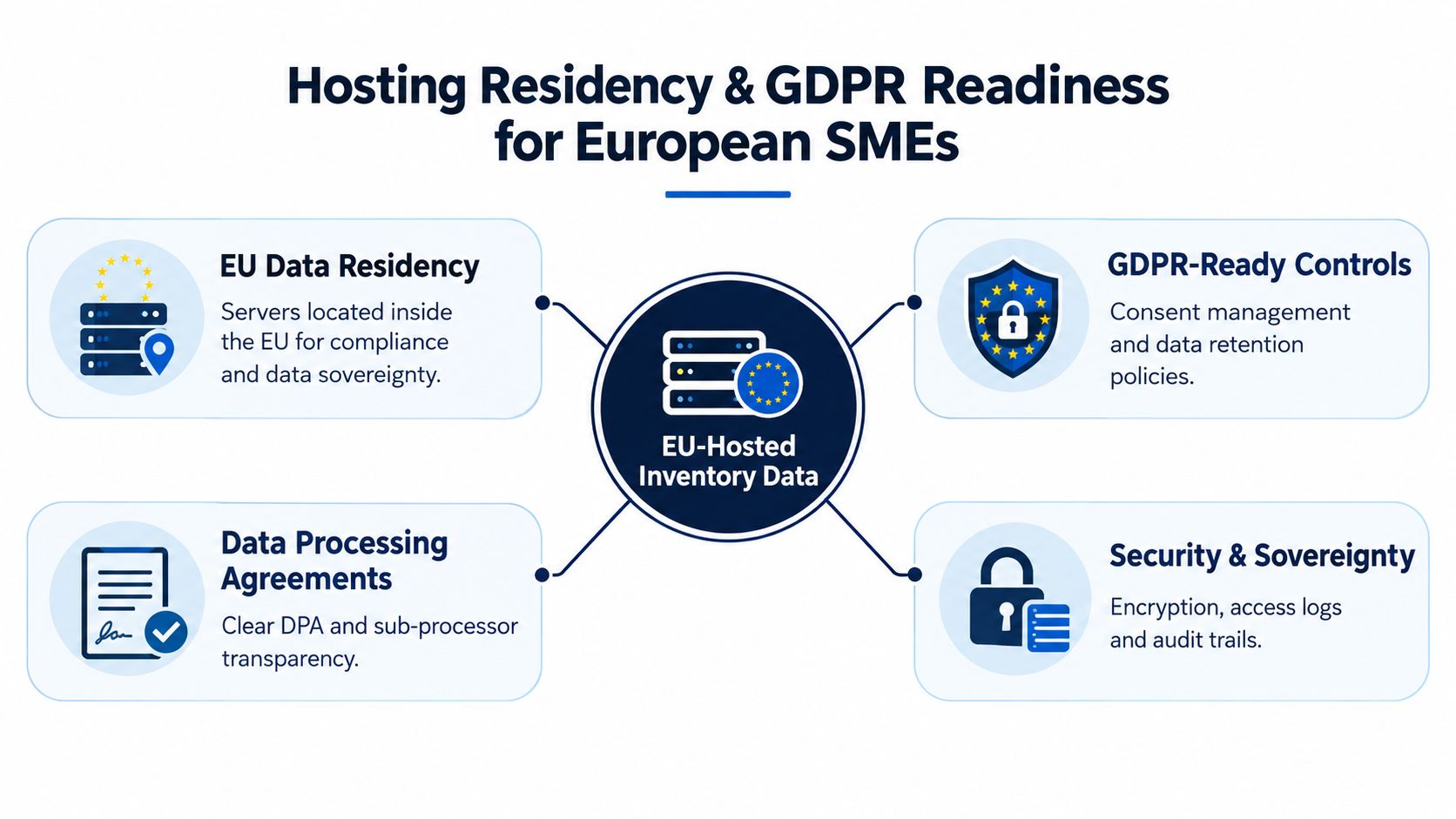
EU residency doesn't eliminate every compliance responsibility. It does give a European business a clearer starting point for governance, especially when the vendor explains its infrastructure, subprocessors, retention practices, access controls, and audit capabilities.
Questions to ask before signing
Ask vendors to answer these questions in writing:
- Where is operational data hosted? Look for a clear statement about EU infrastructure rather than a general “secure cloud” claim.
- Who can access the workspace? Role-based permissions should match responsibilities across warehouse, purchasing, finance, and production.
- What gets logged? Inventory adjustments, approvals, exports, and administrative access should leave an audit trail.
- How are subprocessors disclosed? A clear data processing agreement and subprocessor list make accountability easier.
- How does retention work? Understand deletion, export, backup, and account-closure policies before migration.
This matters most when inventory links to finance and production. A food, cosmetics, or pharmaceutical business may need to connect supplier lots, quality checks, manufacturing events, customer shipments, and recall records. Splitting those records across tools creates more than inconvenience. It creates an audit problem.
Zynthoro provides an EU-hosted workspace with GDPR-ready controls, audit trails, role-based access, finance, operations, purchasing, sales, and production modules in one connected environment. That architecture is relevant when a business wants inventory movements to remain connected to approvals, accounting, work orders, and lot traceability.
For a European SME, residency should filter the shortlist before price comparisons begin. If a vendor can't explain where data lives and how access is recorded, don't proceed to a feature demo.
Pricing Licensing and the True Cost of Implementation
Monthly pricing tells only part of the story. A retail business may need stock counts, alerts, and purchase orders. A manufacturer may need recipes, BOMs, kitting, work orders, quality checks, and multichannel synchronization. Those are different operating models, so their software costs and implementation demands won't be comparable.
The available pricing examples show that segmentation clearly. A 2026 comparison lists Zoho Inventory from $29 per month, with a free tier capped at 50 orders per month. It lists Square for Retail at $49 per month per location with a free plan, Katana at $299 per month with a free tier limited to 30 SKUs, and Cin7 Core at $349 per month with no free plan. These figures come from SMB inventory software pricing comparisons.
Match price to workflow depth
A low entry price is useful only when it covers the work your team performs. If you only need retail counts and reorder alerts, paying for manufacturing functions creates waste. If you consume components into finished goods, a cheap stock ledger can leave you rebuilding production control in spreadsheets.
Use this mapping:
- Basic retail control: Stock levels, barcode counts, sales integration, alerts, and purchase orders.
- Distribution control: Multiple locations, transfers, supplier tracking, batch or serial records, and order allocation.
- Manufacturing control: BOMs, recipes, kitting, work orders, material consumption, quality checks, and cost roll-ups.
- ERP-style control: Inventory connected directly to purchasing, sales, finance, production, approvals, and compliance.
The hidden cost is adoption. Research on MSMEs identifies lack of knowledge, limited technology access, implementation and maintenance costs, time burden, and resistance to change as barriers to inventory-system uptake, as detailed in the MSME inventory-management study.
Budget for data cleanup, barcode preparation, unit-of-measure decisions, staff training, pilot counts, and temporary parallel checks. Don't assume the subscription replaces those tasks.
A lifetime license can also change the calculation for a very small team, but only if the included functions match the workflow and the vendor can support the operating model. The right comparison is not monthly fee versus monthly fee. It's software cost plus migration effort, training, duplicate entry, reconciliation, and the cost of re-platforming later.
Use Cases and Situational Recommendations for SMEs and Manufacturers
The right system depends on what your team is trying to control. A single-location retailer and a cosmetics manufacturer may both say “inventory,” but their risks are different.

Single-location retail
If one store sells stocked items through a POS and the main problem is inaccurate counts, choose simplicity. Mobile scanning, low-stock alerts, purchase orders, and quick receiving will matter more than production planning.
Test the system during a real delivery. Scan the shipment, confirm the quantities, sell an item, process a return, and run a count. If staff need a separate spreadsheet to explain the result, the tool isn't simple enough.
Multilocation retail
If you transfer stock between stores or fulfill online orders from different locations, synchronization becomes the decision point. You need location-level availability, transfer records, and a clear rule for which location owns a reservation.
Square can fit a retail-first operating model because its highlighted strengths include mobile counts and real-time multilocation tracking. Zoho Inventory is stronger when batch or serial controls and reorder points carry more weight.
Light manufacturing
A furniture maker, food producer, or workshop needs more than finished-goods counting. Components must be tied to a recipe or BOM, consumed through a work order, and reflected in product cost and availability.
That's where inventory software alone can become insufficient. If the team keeps production schedules, material usage, quality records, and purchasing in separate tools, choose an ERP-style platform instead of adding another connector. Zynthoro's production management covers recipes, multi-level BOMs, work orders, quality control, lot traceability, and cost roll-ups for SMEs in food, cosmetics, pharma, and light manufacturing.
Lot-controlled products
For food, cosmetics, and pharmaceutical operations, the lot is the unit of accountability. The system should connect supplier lots to production, finished batches, customer shipments, and recall actions.
Choose lot traceability before visual dashboards. A polished dashboard won't help if the team can't identify affected customers quickly. Your next step is a mock recall using one real lot, with purchasing, warehouse, production, and customer records included.
Implementation Roadmap to Replace Spreadsheets Without Disruption
Start with a controlled migration, not a company-wide switch.
Clean the SKU file. Remove duplicates, standardize names, define pack sizes, and assign consistent units of measure. Decide whether a carton, inner pack, and sellable unit need separate records.
Prepare barcode coverage. Ensure sellable items and inner packs have usable barcodes. Test scans in the actual receiving and picking areas, not only at a desk.
Map the events. Write down how receiving, sales, transfers, returns, adjustments, counts, purchasing, and production consumption will enter the system. Assign an owner for each event.
Run a pilot. Guidance on spreadsheet replacement recommends a 2 to 4 week pilot using a subset of SKUs and bins, while measuring items per minute, error rates, and recount loops. The inventory implementation guidance supports this phased approach.
Set the go-live gate. Don't expand until staff can receive goods, scan movements, complete counts, investigate discrepancies, and produce the required reports without returning to the old spreadsheet.
Zynthoro is a practical fit when the migration must connect inventory with purchasing, sales, finance, operations, and production in an EU-hosted workspace. Make one person accountable for data quality, one person responsible for floor adoption, and one person responsible for finance reconciliation.
Zynthoro connects inventory, purchasing, sales, finance, production, lot traceability, and AI-assisted workflows in one EU-hosted workspace for SMEs. Visit Zynthoro to review the platform and decide whether it can replace your disconnected inventory stack without forcing your team back into spreadsheets.