



A new hire arrives at 9:00. The laptop is still in its box, the badge doesn't work, the Slack invitation never arrived, and the manager is trapped in a meeting. HR has a folder of forms, IT has an unresolved ticket, and nobody can answer the simple question, “What should I do first?”
That scene isn't a people problem. It's a workflow problem. An employee onboarding checklist should make ownership, timing, access, and follow-up visible before the new hire sits down. For an SME, that means replacing scattered documents and memory-based handoffs with one connected process that runs from offer acceptance through the first 90 days.
Table of Contents
- Why Most SME Onboarding Falls Apart
- The Four Phases of an Employee Onboarding Checklist
- Required Documents and Compliance Steps
- IT Setup and RBAC in Your ERP
- First-Day and First-Week Templates That Work
- Running the Whole Checklist Inside Zynthoro
- Your One-Page Onboarding Checklist and Final Takeaways
Why Most SME Onboarding Falls Apart
A new hire can spend the first day filling forms, waiting for access, and asking who owns each task. That experience usually begins before the employee arrives, when onboarding is treated as a welcome event instead of a connected operating process.
Orientation is a meeting. Onboarding is the workflow that helps someone understand the company, access the right systems, perform the role, and build working relationships over time. A checklist should connect those outcomes through named owners, phase-based milestones, and one shared record.
Industry summaries report that only 12% of employees say their company does onboarding well, while 43% of companies complete onboarding in a single day and 36% of employers lack a structured process (FirstHR onboarding statistics). A welcome presentation cannot establish role clarity, social connection, or reliable access by itself.
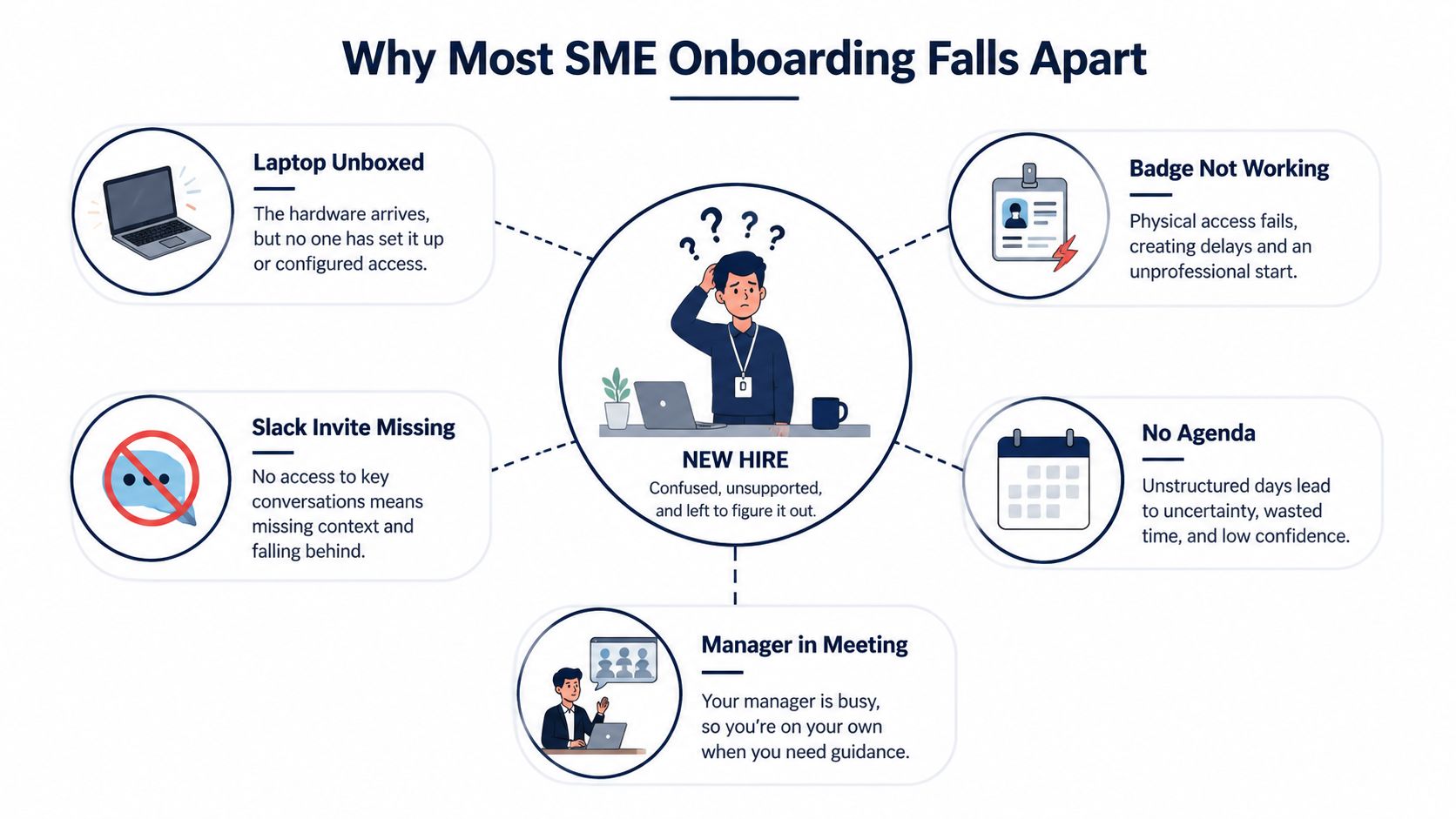
The three failures behind the bad experience
First, day one carries too much weight. Small companies often skip preboarding, leaving contracts, payroll details, policy acknowledgments, equipment setup, and introductions for the same day. The new hire spends time on administration instead of learning how the business operates.
Second, no one owns the full workflow. HR handles forms, IT handles accounts, and the manager handles role training. Without one person accountable for the complete checklist, missing steps become everyone's assumption and no one's responsibility.
Third, access setup sits across disconnected tools. A spreadsheet may list software, an email thread may contain approval, and an IT ticket may show only partial completion. Teams then struggle to confirm whether access is correct, permissions are appropriate, or a task has stalled.
Practical rule: Every onboarding task needs one named owner, one due phase, and one completion signal.
The consequences appear early. One benchmark places 20% of employee turnover within the first 45 days, while another reports that 41% of employers see new recruits resign within the first 12 weeks. The checklist must cover compliance, role clarity, tools, and social integration, not just signatures.
Set up the process as one workflow inside the ERP, assign tasks by role, and use RBAC-driven rules for system access. HR, IT, and managers then share the same operating view instead of relying on reminders scattered across documents, spreadsheets, and tickets.
The Four Phases of an Employee Onboarding Checklist
A useful checklist separates preboarding, day one, week one, and the first 90 days. Each phase has a different job, a primary owner, and a completion signal. If every phase ends with a confirmed outcome, the process won't stop after the welcome meeting.
| Phase | Timeframe | Primary Owner | Key Outputs | Completion Signal |
|---|---|---|---|---|
| Preboarding | Before the start date | HR | Signed documents, employee record, welcome information | HR confirms the record and document set are complete |
| Day one | First working day | IT and HR | Working device, email, SSO, payroll setup, manager welcome | New hire logs in and understands the day's priorities |
| Week one | First week | Hiring manager | Shadow sessions, tool training, first scoped deliverable | Manager reviews the first work artifact |
| First 90 days | 30, 60, and 90-day milestones | Hiring manager | Skill targets, feedback, readiness decision | Manager records a go, adjust, or additional-support decision |
Preboarding removes avoidable friction
Preboarding starts when the candidate accepts the offer. HR should send the contract, document list, start information, and a clear contact for questions. IT prepares the laptop, email, password manager entry, and required accounts. The manager sends a short welcome note with the first-week plan.
The outcome is simple: the employee arrives informed, not surprised. Paperwork should be completed in advance wherever possible, and the manager should know exactly what the new hire will do during the first morning.
Day one proves the process works
Day one is for administration, access, and human connection. Confirm paperwork, activate email and SSO, provision the employee's ERP role, and give the new hire a focused manager welcome. Don't fill the day with presentations that nobody can remember.
The manager should explain what success looks like, which meetings matter, and where the employee can ask basic questions. A short tour, a buddy introduction, and a small practical task create more useful context than a long company history lecture.
Week one builds working confidence
Week one should move from observation to contribution. Schedule role-specific tool walkthroughs, shadow sessions, and a first small assignment that produces a real artifact. The manager reviews that artifact and corrects misunderstandings while they're still inexpensive to fix.
Avoid dumping every policy, process, and system into one session. Give the new hire a small set of resources, then connect each resource to a task they need to complete.
The first 90 days create the feedback loop
Use milestones at 30, 60, and 90 days. The 30-day conversation checks understanding and removes obstacles. The 60-day checkpoint sets skill targets and increases independent work. The 90-day review records whether the employee is ready, needs adjustment, or requires additional support.
These milestones also give the business a way to measure retention at 30, 60, and 90 days, time to productivity, and manager feedback (Fountain onboarding checklist). Put the meetings and follow-up tasks in the same workflow as the original checklist.
Required Documents and Compliance Steps
Document collection for European SMEs works best as a controlled workflow. A shared folder of vaguely named PDFs is a common alternative, but it does not give HR the same visibility into ownership, missing information, or approval status. Requirements vary by country, employment structure, and sector, so HR should confirm local obligations with its adviser. The operating rule is simple: request the right evidence, assign an owner, and record completion.
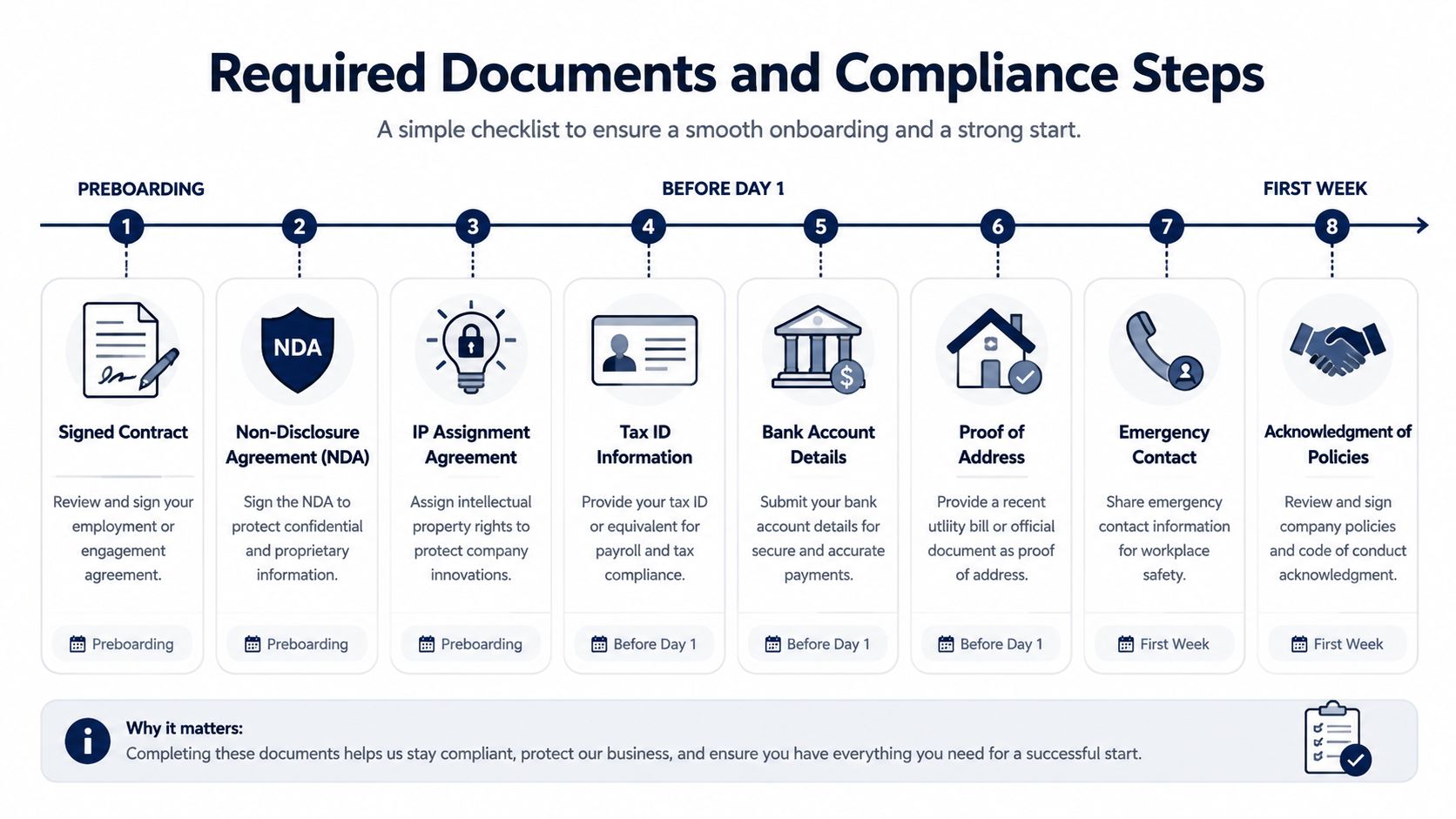
Preboarding documents
Before the employee starts, request:
- Signed employment contract: Store the final version with the employee record.
- NDA and IP assignment: Complete these before the employee receives confidential information or creates work product.
- Tax identification or social security equivalent: Capture the applicable identifier for payroll and registration.
- Proof of right to work: Verify the appropriate country-specific evidence.
- Bank details for payroll: Collect the account information needed for salary payments, such as an IBAN where applicable.
Accept scanned PDFs when they meet legal and internal requirements. Chasing original physical documents creates delay without improving control if a secure digital copy is accepted. Record who checked each file and what remains outstanding.
Day-one confirmations
On the first day, confirm emergency contacts and direct deposit or IBAN details. Send the employee handbook and code of conduct for acknowledgment. Assign sector-specific training, such as GDPR awareness for anyone handling personal data.
A handbook signature records that the employee received and acknowledged the rules they must follow. Apply the same control to safety instructions, confidentiality requirements, and operational policies relevant to the role.
Within the first week, check that required registrations and notices reached the correct owner. For organizations operating in the United States or hiring across jurisdictions, the Boston University onboarding checklist shows how identity, employment, payroll, access, and timesheet instructions can sit in one controlled process. It also specifies completion of an I-9 within the first three days of employment.
Benefits and safety follow-up
Within 30 days, record enrollment in pension or statutory benefits, reconfirm probation terms in writing, and complete a workplace safety briefing for office or hybrid roles. For frontline, regulated, or manufacturing positions, add policy acknowledgment, safety training confirmation, state notices, consistent background screening, and access approval.
Run the workflow through clear ownership:
- HR creates the employee record and assigns the regional document set.
- The employee uploads documents and signs required policies.
- HR verifies completeness and flags missing or inconsistent information.
- The responsible authority or payroll owner handles registration before its deadline.
- The manager confirms role-specific training and safety requirements.
- The system retains an audit trail showing who completed and approved each step.
Keep these tasks in the same ERP workflow as the onboarding milestones. That gives HR one status view instead of separate folders, spreadsheets, and email threads. For agencies and multi-client teams comparing broader business systems, Agency is listed as a non-ERP suite with accounting, inventory, project management, marketing, five company workspaces, and 25 users.
IT Setup and RBAC in Your ERP
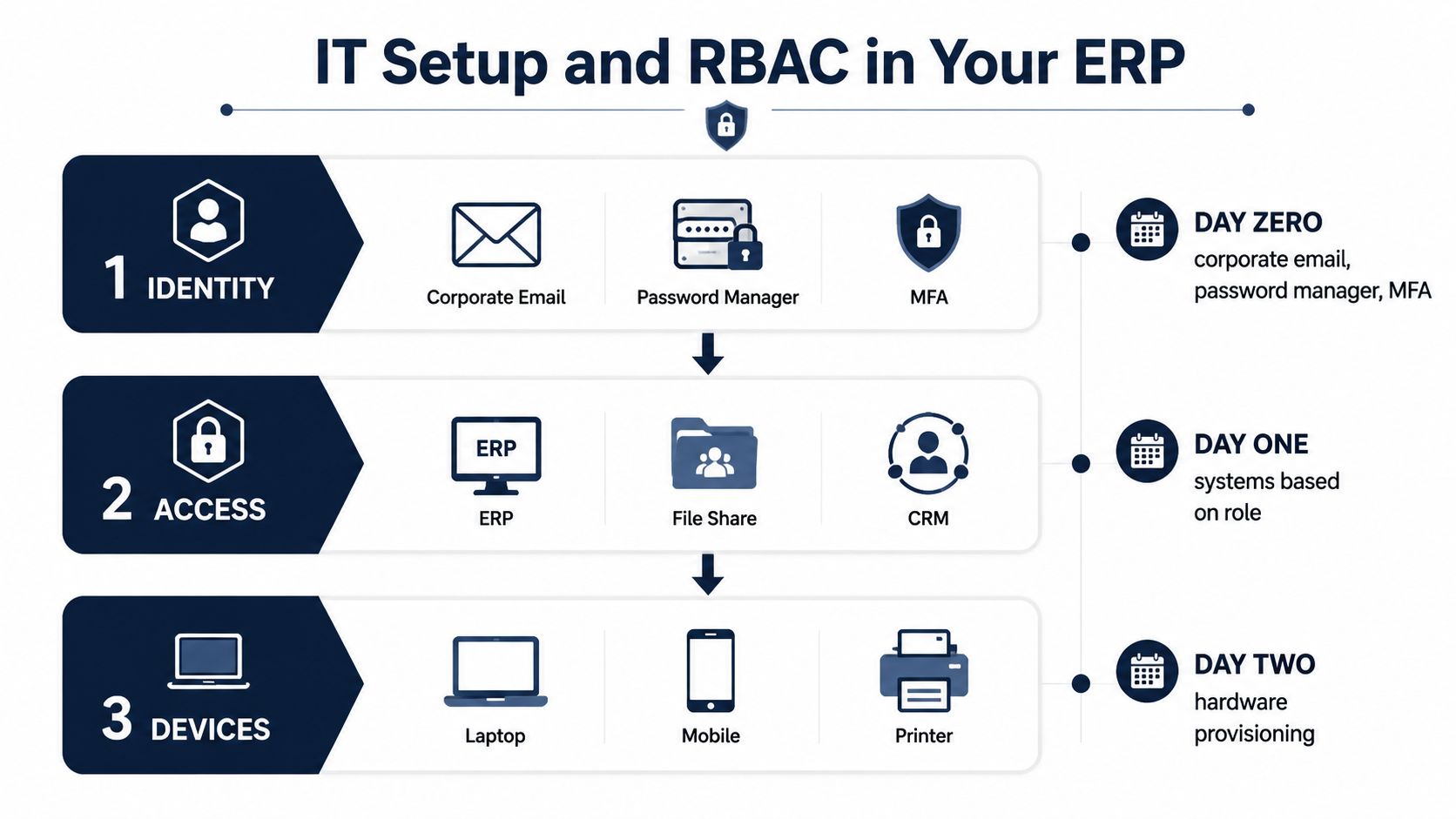
IT provisioning should follow dependencies, not an alphabetical software list. Start with identity, then grant role-based access, then confirm the device and hardware details. This order prevents a new hire from receiving a laptop that can't authenticate or an account that has access without the controls needed to protect it.
Identity comes first
Before the laptop ships, create the corporate email, add the employee to the password manager, and prepare MFA enrollment. The initial password should expire on first login. The new hire should complete MFA enrollment promptly for email, VPN, SSO, and high-privilege systems.
An IT checklist from HR Cloud includes role-required software licenses, MFA across key systems, confirmation of first-login MFA enrollment within the first two hours, closure of unresolved Day 1 tickets by the end of Day 2, and security awareness training within the first five business days.
Use role templates, not copied permissions
Set a starter role for each department, a separate manager tier, and an administrator role that's denied by default. Grant administrative access only after documented approval. Never copy the permissions of a previous employee just because the job title looks similar.
A practical mapping might look like this:
- Finance starter: Read access to finance records and assigned invoicing tasks.
- HR starter: Access to relevant personnel workflows, not unrestricted company administration.
- Sales starter: CRM records, assigned opportunities, and approved customer data.
- Project starter: Assigned projects, time tracking, and relevant documents.
- Support starter: Support inbox and customer context needed to resolve assigned work.
- Manager tier: Team visibility, approvals, and reporting relevant to the department.
- Admin tier: Explicitly approved control over system configuration and access management.
For a small team wanting a defined package rather than several disconnected tools, Kickstarter 2 is listed at €149 one-time, with lifetime access, everything in K1, 150 credits per month, finance and invoicing, a sales module, and an AI photo/video suite.
Review access after the hire starts
Run an access review at day 7. Ask the manager whether the employee can complete assigned work and ask IT whether any tickets remain open. Run another review at day 30, then revoke any access the employee hasn't used inside 30 days unless the owner documents a valid reason to retain it.
That last rule keeps permissions lean. It also creates a clean offboarding starting point because the company can see which systems were granted, approved, used, and removed.
First-Day and First-Week Templates That Work
A small team doesn't need an elaborate welcome program. It needs a prepared laptop, working credentials, a named buddy, and a manager who protects time for the new hire. Assign the buddy the night before, not after the new employee asks where to eat lunch.
A practical first day
Start at 9:00 with a personal welcome and a quick orientation to the physical and digital workspace. The first two hours should cover paperwork, payroll setup, credentials, and a concise tour. By late morning, move the employee to a small task that creates a real artifact, such as a reviewed customer note, a draft project brief, or a completed internal process map.
The afternoon belongs to the manager. Use a 30-minute one-to-one to align on the first 30 days, agree on three to five outcomes, and identify meetings the employee should observe rather than lead.
| Time | Task | Owner | Output |
|---|---|---|---|
| 09:00–09:20 | Welcome, workspace check, buddy introduction | Hiring manager, HR | Welcome confirmed and questions captured |
| 09:20–10:00 | Employment documents and policy acknowledgments | HR | Signed or verified document set |
| 10:00–10:30 | Payroll, benefits, and timesheet instructions | HR | Payroll details confirmed |
| 10:30–11:00 | Email, SSO, MFA, VPN, and ERP login | IT | Successful first login |
| 11:00–11:30 | Physical and digital workspace tour | Buddy | Location and system guide |
| 11:30–12:00 | First scoped task | New hire, buddy available | Initial work artifact |
| 13:00–13:30 | Manager one-to-one | Hiring manager | 30-day outcomes and meeting list |
| 13:30–15:00 | Role walkthrough and shadowing | Buddy or specialist | Notes and process questions |
| 15:00–16:00 | Continue first task | New hire | Draft deliverable |
| 16:00–16:15 | Day-one check-out | Hiring manager | Blockers logged and next steps set |
The first week should have a rhythm
Use a daily 15-minute manager check-in. Schedule two shadow sessions, assign one solo deliverable, and hold an end-of-week retrospective on day 5. The retrospective should answer three operational questions: what helped, what confused the employee, and what should be removed from week two?
Record the answer as a checklist update. If new hires repeatedly ask where a document lives, move the document. If they can't complete a system task, fix the access rule or training step instead of blaming the employee.
A strong first week produces evidence of understanding, not a completed calendar.
The buddy answers practical questions, the manager owns role clarity, HR owns compliance, and IT owns access. Those responsibilities can overlap, but they shouldn't be ambiguous.
Running the Whole Checklist Inside Zynthoro
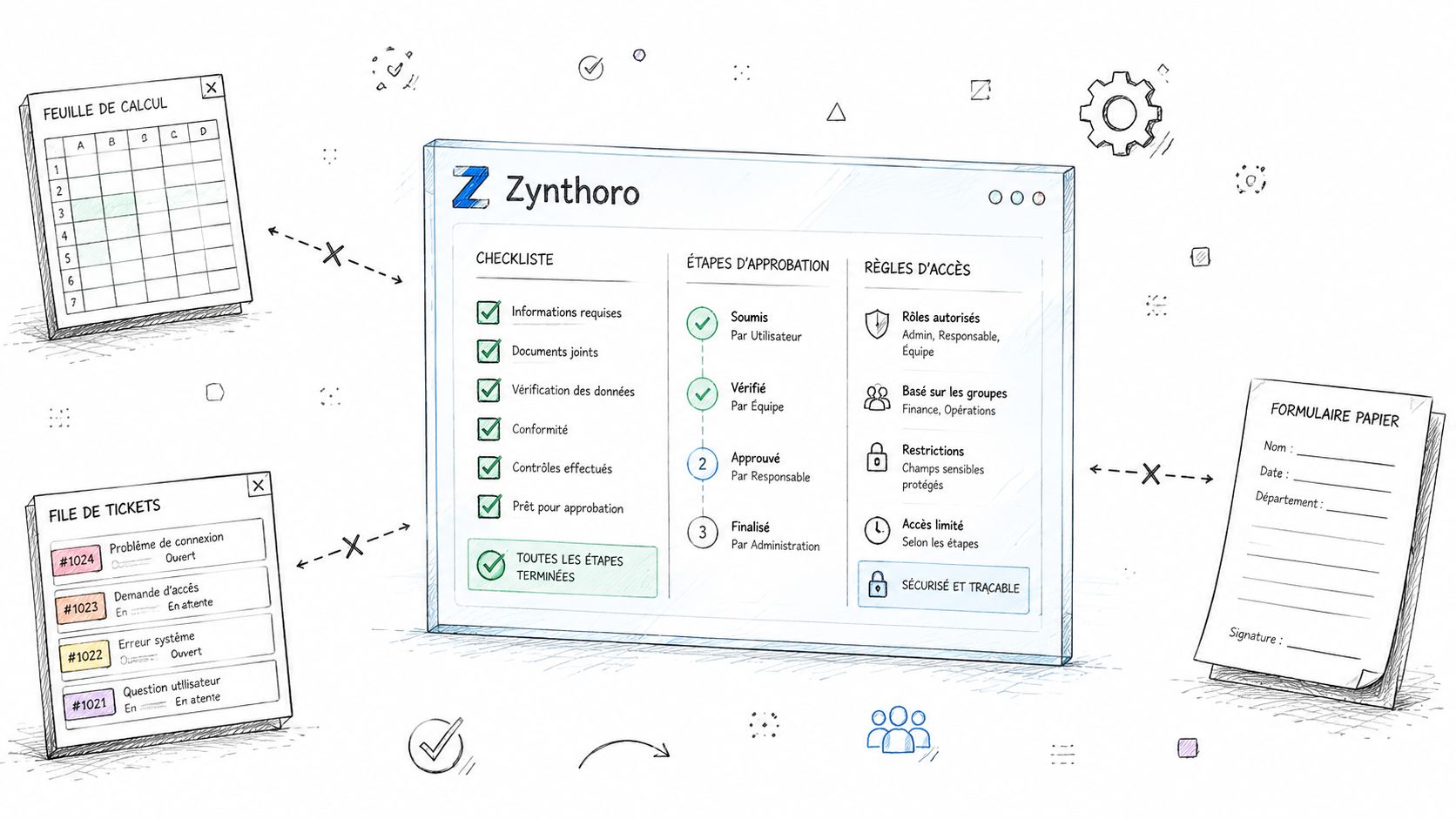
A folder of templates suits a very small team. It does not assign ownership, connect approvals, or show which onboarding phase has stalled. Once HR, IT, payroll, and managers work from separate spreadsheets, ticket queues, shared drives, and chat threads, the employee record becomes fragmented.
Zynthoro puts the onboarding checklist, approvals, personnel record, and role-based access rules in one workspace. Its HR and personnel workflows connect with finance, operations, communication, collaboration, compliance, and security features in an EU-hosted ERP environment.
Connect the handoffs
Create the hire record once. Use it to trigger the regional document list, route policy acknowledgments to the correct approver, assign the manager's first-week work, and create IT provisioning tasks from the employee's department and role.
Build ownership into each handoff:
- HR completes the document step: IT receives a ready provisioning task.
- IT confirms identity and access: The manager sees that role training can begin.
- The manager approves the 30-day plan: Follow-up tasks stay attached to the employee record.
- Payroll remains linked: HR and finance work from the same employee information.
- The access review reaches its due phase: The assigned owner receives a specific review task, not a vague reminder.
This structure keeps the workflow connected without turning onboarding into a software project. The audit trail records approvals, document status, and access changes, giving the business a clear record when someone needs to check what happened.
The right system does not make people care about onboarding. It makes forgotten handoffs visible before they become a new hire's problem.
Keep the process lean. Do not automate every message or force managers through irrelevant fields. Use templates by department, location, and permission tier, then add only the tasks that affect the employee's ability to work safely and effectively. Every task should have one owner, one phase, and a clear completion condition.
Your One-Page Onboarding Checklist and Final Takeaways
Put the checklist on one page, organized by phase and owner. The page should be usable in a shared workspace, printed for a frontline supervisor, or converted into a workflow without rewriting it.
Preboarding
- HR: Create the employee record.
- HR: Send and verify the contract, NDA, IP assignment, tax or social security information, right-to-work evidence, and bank details.
- IT: Prepare the device, email, password manager, MFA, VPN, SSO, and role-required licenses.
- Hiring manager: Send the welcome note and first-week plan.
- Buddy: Confirm availability and practical guidance.
Day one
- HR: Complete emergency contacts, payroll confirmation, handbook acknowledgment, code-of-conduct acknowledgment, and required training assignments.
- IT: Confirm first login, MFA, ERP role, file permissions, and open ticket ownership.
- Hiring manager: Hold the 30-minute welcome and agree on the first 30-day outcomes.
- Buddy: Give the physical and digital workspace tour.
Week one
- Hiring manager: Schedule daily 15-minute check-ins.
- Buddy or specialist: Run two shadow sessions.
- New hire: Complete a small solo deliverable.
- Manager: Review the artifact and record corrections.
- HR or operations: Run the day-five retrospective and update the checklist.
First 90 days
- Manager: Hold the 30-day check-in and revise priorities.
- Manager: Set 60-day skill targets.
- Manager and employee: Complete the 90-day review with a clear go or adjust decision.
- IT: Review access at day 7 and day 30, then remove unused access according to policy.
- HR: Track retention, readiness, time to productivity, and manager feedback.
Two habits keep this document alive. Hold a weekly onboarding standup during the first month, with the employee record as the agenda and blocked tasks as the output. At the 30-day check-in, turn feedback into a concrete checklist revision, then assign an owner and due date for the change.
A checklist that only records completion is paperwork. A checklist that exposes ownership, dependencies, access, and feedback is an operating control.
Zynthoro gives SMEs one workspace for HR onboarding workflows, approvals, connected business records, audit trails, and role-based access instead of scattered spreadsheets and tickets. Create a connected employee onboarding process with Zynthoro, then give your next hire a working laptop, a clear first task, and a manager who's ready.