



You open the finance inbox and find invoices in three formats, a spreadsheet with approval notes, and several messages asking whether payment has been scheduled. Your accounting tool shows some transactions, your purchasing tool shows others, and nobody has a complete answer without checking each system.
That setup works while the business is small and invoice volume is light. As suppliers, projects, departments, and payment obligations grow, manual rekeying creates delays, duplicate work, and uncertainty around cash. Owners end up chasing approvals instead of improving margins, while suppliers chase payment updates instead of serving customers.
An invoice automation system brings those disconnected steps into a controlled workflow. It captures invoices, reads their data, checks purchase and tax details, routes approvals, posts information to accounting, and supports reconciliation. The useful difference isn't scanning a document. It's connecting the document to the finance records and decisions that follow.
EU compliance makes this shift more urgent. France requires all businesses to be able to receive e-invoices from September 2026, while SMEs and micro-enterprises must also begin issuing them by September 2027. Belgium's B2B e-invoicing requirement already applies from January 2026, and Germany's domestic B2B rollout begins with receipt mandates before later issuance deadlines, as outlined in this EU e-invoicing mandate update.
This guide explains what the system does, which capabilities matter, how to measure the business impact, and how to choose a connected setup. The focus is practical: helping an SME replace scattered tools with a finance backbone, such as Zynthoro, that links invoices with purchasing, accounting, sales, and operations.
Table of Contents
- Introduction Why Manual Invoicing Slows Growing SMEs
- What an Invoice Automation System Really Does
- Key Features That Make Invoice Automation Work
- Real Benefits for SMEs From Faster Cash to Fewer Errors
- How to Evaluate Integration ROI and EU Compliance Fit
- Implementation Best Practices That Prevent Stalled Invoices
- Conclusion Bringing Invoice Automation Together in Zynthoro
Introduction Why Manual Invoicing Slows Growing SMEs
A typical growing company doesn't have one invoice problem. It has a chain of small interruptions.
A supplier sends a PDF to a shared inbox. Someone downloads it, types the supplier name and total into accounting, and forwards the file to a project manager. The manager replies from a phone, the approval note stays in email, and the finance team later searches for both messages before scheduling payment. If the invoice includes VAT, a purchase order, or a change in bank details, another manual check enters the process.
One missed message can stall the whole chain. A late approval can affect supplier relationships and cash forecasting. A duplicated attachment can create a duplicate payment risk. A correction made in a spreadsheet may never reach the accounting record.
Practical rule: If employees must ask, “Where is this invoice now?”, the workflow needs a shared status record.
This isn't a problem limited to large finance departments. A small agency may have one person handling supplier bills, client projects, and collections. A manufacturer may have invoices tied to purchase orders, goods receipts, batches, or production costs. A consultancy may use separate tools for contracts, time tracking, expenses, invoicing, and bookkeeping. Each handoff adds another place for data to diverge.
Invoice automation also gets confused with automated customer invoicing. Accounts payable automation handles supplier invoices received by the business. Accounts receivable automation creates and sends invoices to customers, then supports chasing and payment tracking. A connected ERP can link both sides, which matters because outgoing invoice timing and incoming payment obligations jointly shape cash flow.
For businesses selling through complex structures, it can also help to review specialist guidance on automated invoicing for merchants of record. The important lesson is to understand which party issues the invoice, which party receives funds, and where the accounting record belongs.
Zynthoro approaches invoicing as part of an AI-native ERP workspace rather than an isolated AP add-on. That means invoice information can sit alongside purchase administration, accounting, VAT handling, sales, and reconciliation. You still need sound rules and clean supplier data, but the team doesn't have to rebuild the same context in several applications.
What an Invoice Automation System Really Does
Think of an invoice automation system as a digital assembly line. Each invoice enters through a controlled intake point, passes a series of checks, reaches the right decision-maker, and leaves with a reliable accounting and payment status.
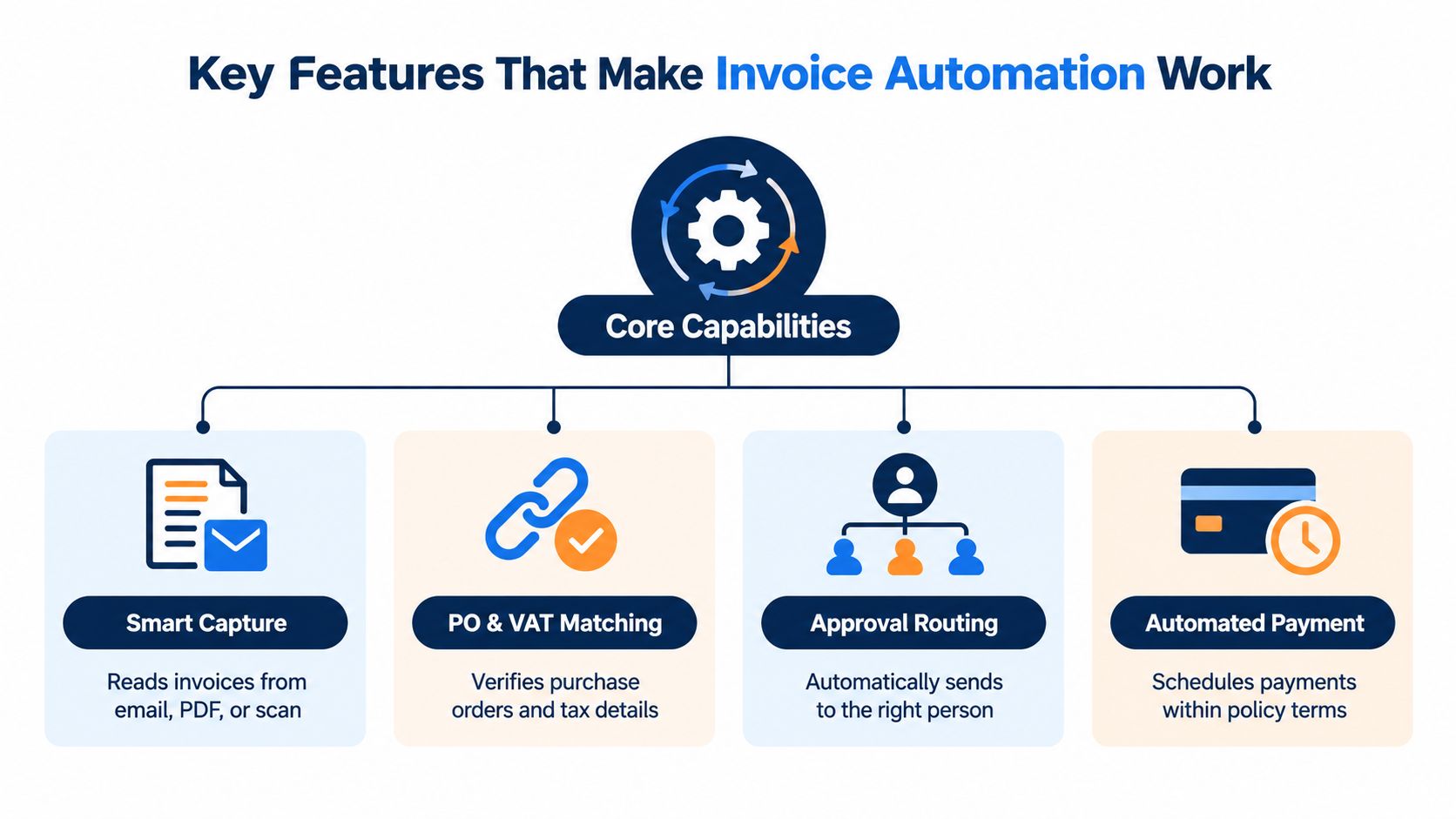
The first stage is capture. The system collects invoices from agreed channels, such as email attachments, uploads, scans, or structured e-invoices. Instead of asking a finance employee to monitor several inboxes and folders, it creates one queue where every document can be tracked.
Next comes data extraction. AI document capture reads fields such as the supplier, invoice number, dates, purchase order reference, line items, tax values, and total. It doesn't make the process perfect by itself. The quality and consistency of the document still affect how much human review is needed.
From document to validated transaction
Validation checks whether the extracted information makes sense. The system can look for missing fields, unusual totals, possible duplicates, supplier mismatches, and tax details that need attention. This step matters because downstream automation is only as dependable as the data entering it.
The invoice then moves to matching and coding. A purchase-order invoice may be compared with the purchase order and evidence that goods or services were received. A non-PO invoice may require a cost centre, project, or ledger code chosen according to business rules.
After that, approval routing sends the invoice to the right person. Rules can reflect department, project, supplier, invoice type, or internal approval limits. An invoice shouldn't sit in a general inbox because nobody knows who owns it.
Posting, payment, and the difference between partial automation and STP
Once approved, the clean record can move into accounting or an ERP for posting. Payment scheduling can then follow supplier terms and company policy, while the invoice status changes from received to approved, posted, and paid.
Partial automation may capture a PDF but still require staff to rekey it, email it, and reconcile it manually. Straight-through processing, or STP, means an invoice moves from receipt to posting without human intervention. That distinction matters. A scanner that creates another manual queue hasn't solved the full workflow.
For practical guidance on improving intake, validation, and handoffs, these invoice processing tips provide useful process context. Within Zynthoro, the same principle is to keep invoicing, accounting, purchasing, and finance connected so an approval doesn't become a disconnected event.
For a small team testing a broader operating workspace, Kickstarter Kickstart 1 includes AI Assistants, 50 credits per month, Planning & Time Tracking, the Communication module, and Canva Studio for a one-time €79, with lifetime access.
Key Features That Make Invoice Automation Work
A useful evaluation starts with four capabilities. They work as a chain, not as isolated checkboxes. Weak capture creates matching errors, weak matching creates exceptions, and poor routing leaves approved invoices waiting in email.
Smart capture and extraction
The system should accept the formats your suppliers use. It should read email attachments, PDFs, scans, and structured electronic invoices without forcing the team to create a separate process for each channel.
AI capture extracts the fields needed for accounting and control. Benchmark reporting places AI invoice capture at 92.71% for scanned invoices and 96.50% for clean invoices, according to AI invoice processing benchmarks. The same source describes practical target bands of 95% to 98% for clean documents, 88% to 93% for scanned documents, and 99% or more as best-in-class for clean invoices.
These figures shouldn't be treated as a universal promise. A clean, standardized PDF and a skewed low-resolution scan present very different problems. Better document intake and supplier onboarding can improve the automation yield. For background on why optical character recognition supports digitization, see this overview of OCR benefits for digital transformation.
PO and VAT matching
A supplier invoice for materials should be compared with the related purchase order and, where relevant, proof that the goods arrived. A mismatch in quantity, price, supplier identity, or tax treatment should become a visible exception instead of an unnoticed posting.
VAT validation is especially important for European SMEs. The system needs to retain the relevant tax information, apply configured rules, and keep an audit trail that helps finance staff understand why an invoice passed or stopped.
Approval routing
Approval rules should reflect how your business operates. A project invoice may go to the project owner, a software subscription to operations, and a larger equipment purchase to a senior approver.
Good routing also handles exceptions. If the invoice lacks a purchase order, exceeds a policy threshold, or contains changed supplier details, it should reach someone who can resolve that specific issue. Generic forwarding creates delay because the reviewer must first work out what they're being asked to decide.
Reconciliation and payment control
The final capability connects approved invoices with accounting entries, payment status, and bank or ledger reconciliation. Finance should be able to see whether an invoice was received, approved, posted, paid, or awaiting investigation.
This connection reduces rekeying and makes duplicate detection more useful. It also gives owners a clearer view of upcoming obligations without exporting data from one tool and rebuilding it in another.
Real Benefits for SMEs From Faster Cash to Fewer Errors
The business case isn't “finance staff will click fewer buttons.” The stronger case is that invoices stop disappearing into handoffs, approvals become visible, and cash decisions use a more complete record.
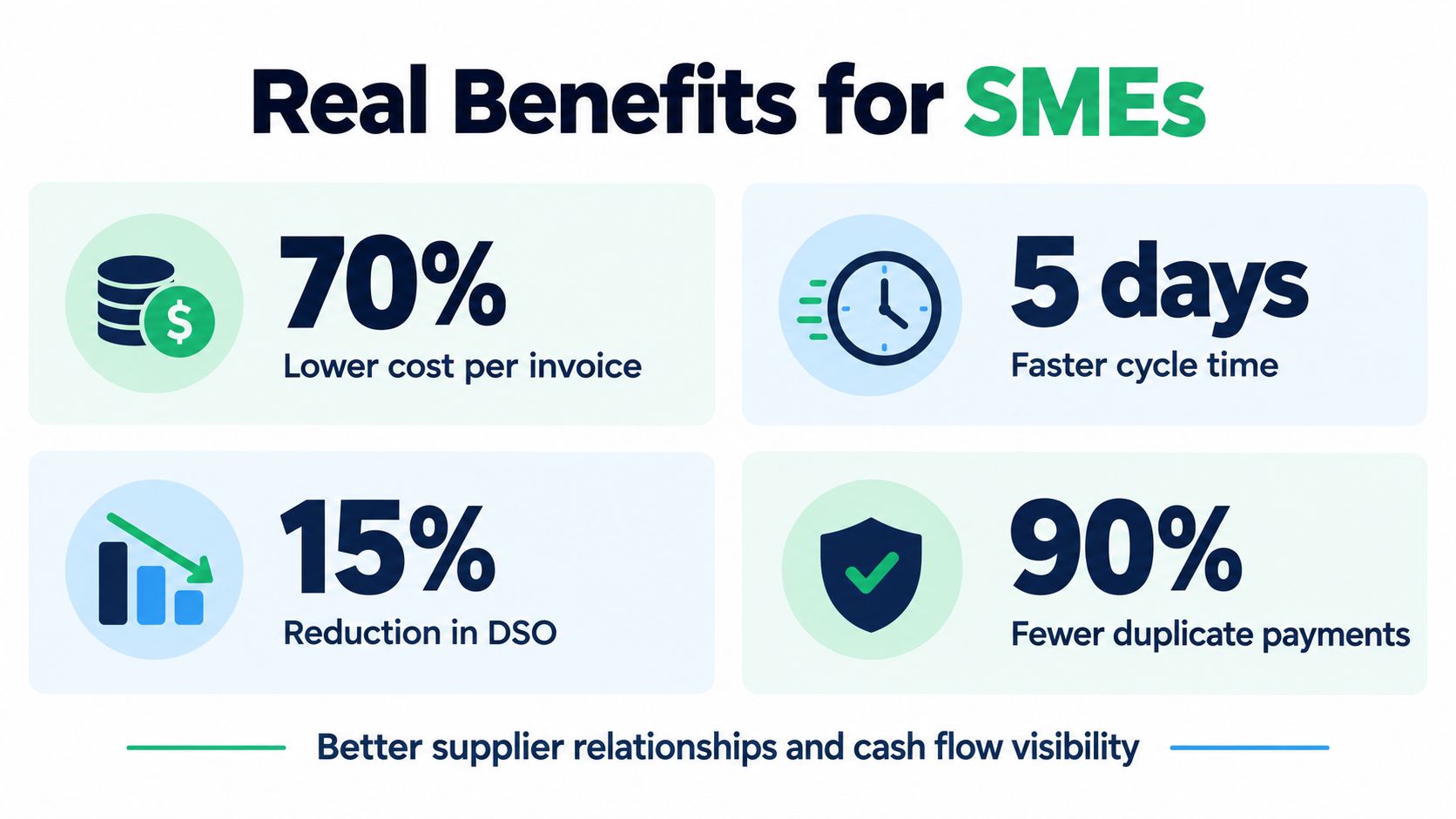
Ardent Partners benchmarks cited in invoice automation statistics report that best-in-class automated AP teams spend about 79% less per invoice than the $12.88 average manual cost, bringing processing to roughly $2.78 per invoice. The same benchmark reports a cycle-time change from 17.4 days to 3.1 days in best-in-class automated environments.
Those numbers show why automation can matter even to an SME with a modest finance team. Lower processing cost helps protect margin, while shorter cycle time reduces the risk that an approved invoice remains unpaid because the next step is unclear.
The cash-flow effect
Suppose a small design studio receives supplier bills for contractors, software, and production services. Under a manual process, the owner asks whether invoices were approved, the bookkeeper checks a spreadsheet, and someone later compares the paid bills with bank activity. Under a connected workflow, the studio can see what arrived, what needs approval, what has been posted, and what requires reconciliation.
That visibility supports better decisions around payment timing and customer collections. On the receivables side, automated sending and chasing can help reduce the delay between completed work and a customer payment. The invoice system doesn't create cash by itself, but it removes avoidable waiting from the process.
Independent benchmark summaries also report that automation can cut paper-based processing costs by 60% to 80% and bring automated handling to about $3 to $5 per invoice, compared with roughly $15 to $16 manually, as reported in the same invoice automation benchmark summary.
Fewer exceptions and stronger control
Exceptions are where much of the hidden effort accumulates. A 2025 industry analysis reports an average automation cost of $9.84 per invoice, an exception rate of 18.4%, and STP of 35.4%, according to research on the invoice exception queue. That makes exception design a core ROI question, not a minor technical detail.
Fewer duplicate payments, clearer VAT records, and searchable approval histories also strengthen auditability. For an agency with multiple client teams, Agency is listed at €1,199 per month and includes a full non-ERP suite for agencies and multi-client teams, with full accounting and inventory, project management and marketing, five company workspaces, and 25 users. It is explicitly identified as No ERP, so buyers should distinguish a broad suite from an AI-native ERP where finance data is part of the same operating model.
How to Evaluate Integration ROI and EU Compliance Fit
License cost is only one part of the decision. An inexpensive standalone tool can become expensive if employees still copy invoice data into accounting, chase approvals in email, and reconcile payments in spreadsheets.
Start with the complete path. Map where an invoice arrives, where supplier data lives, where purchase orders are created, where VAT is handled, who approves expenditure, and how payment status returns to the ledger. Then ask which handoffs disappear when the system is connected.
| Evaluation Criteria | Standalone Automation Tool | Zynthoro AI-Native ERP |
|---|---|---|
| Invoice capture | Captures documents within an AP workflow | Connects invoicing and finance with the wider ERP workspace |
| Purchase context | May depend on a separate purchasing system | Purchase administration and supplier orders can share the operating environment |
| Accounting continuity | Often requires an integration or export | Accounting, VAT handling, invoicing, and reconciliation are connected modules |
| Approval ownership | Depends on configured routes and external records | Can be evaluated alongside operational, project, and finance responsibilities |
| Compliance controls | Depends on the provider's access, audit, and hosting model | EU-hosted workspace with GDPR-ready controls, audit trails, and role-based access |
| Total cost | Tool fee plus integration and exception handling | Platform decision across connected business domains |
The table isn't a promise that every standalone product is weak. Some are well suited to a company that already has a stable ERP and needs a focused AP layer. The question is whether your business needs another specialist tool or a single source of truth.
Compliance readiness
Structured invoice support matters because EU mandates are moving from optional digitization toward required receiving and issuing workflows. France's receiving requirement begins in September 2026, with SME and micro-enterprise issuance beginning in September 2027. Belgium's B2B requirement applies from January 2026, while Germany's rollout starts with receipt obligations before later issuance deadlines, according to the earlier e-invoicing mandate guidance.
Ask vendors whether they support structured formats, inbound receiving, outbound issuing, country-specific dates, VAT records, role-based access, and audit trails. GDPR and data residency aren't separate from invoice automation. Supplier names, bank details, tax identifiers, and payment records all belong in the control conversation.
Calculate the real return
Use your own workflow as the baseline. Count staff time spent downloading, entering, chasing, correcting, searching, and reconciling invoices. Then estimate which tasks the system will remove and which exceptions will remain.
A solution that captures documents but leaves payment status disconnected may lower data entry while preserving the most frustrating work. Zynthoro's relevance is its connected model, where invoicing and finance sit with accounting, purchasing, sales, and operations rather than operating as a separate island.
Implementation Best Practices That Prevent Stalled Invoices
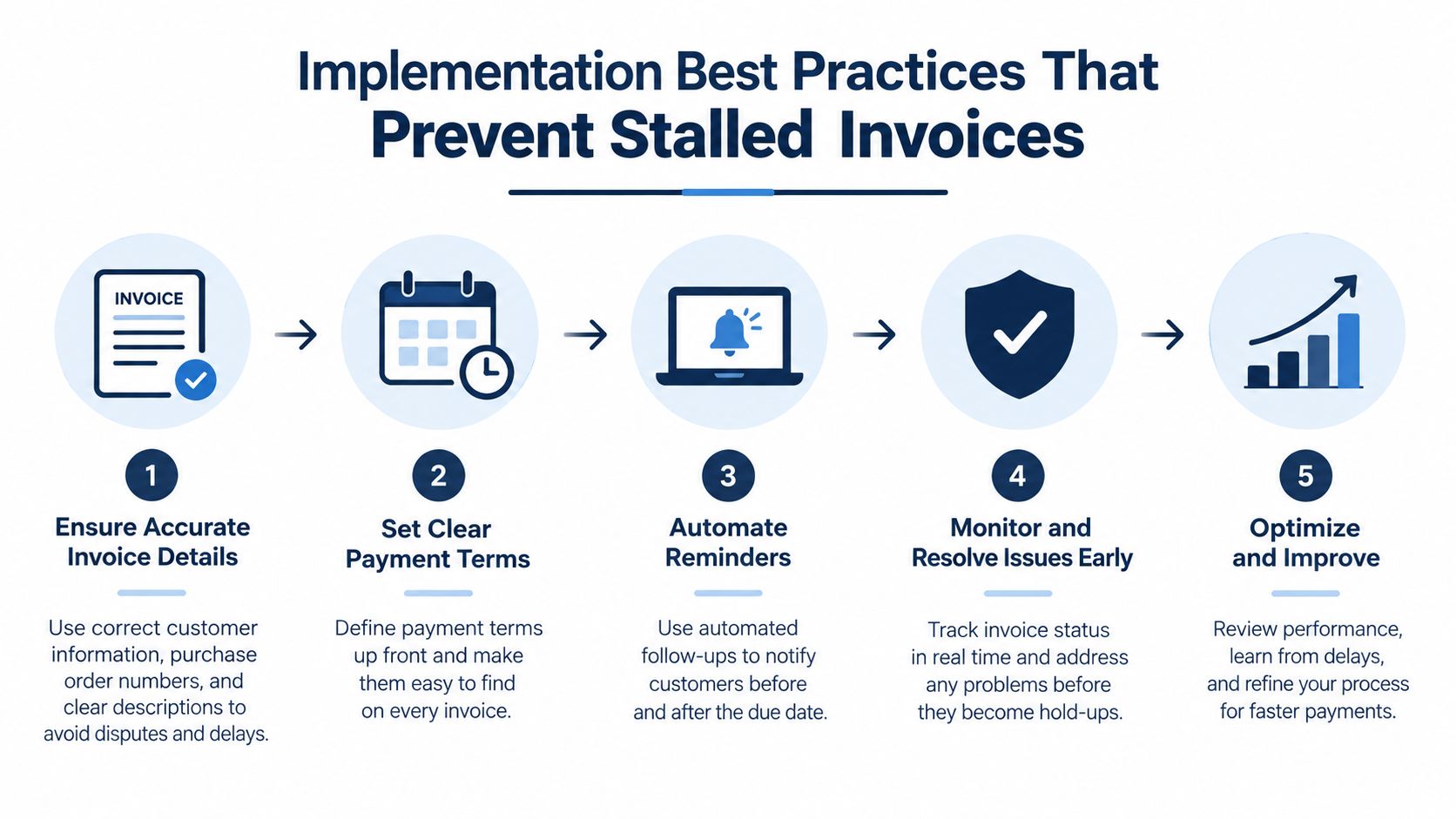
A rollout doesn't need to begin with every supplier and every invoice type. It needs a controlled first workflow, clear ownership, and enough visibility to learn where exceptions originate.
Start with supplier and document hygiene
Clean the supplier master before switching on automation. Check supplier names, tax details, payment information, purchase-order references, and duplicate records. Inconsistent supplier data can make a good extraction engine look unreliable because the system can't confidently match what it read to the record it needs.
Set clear intake rules too. Ask suppliers to use a defined invoice address or structured channel where possible. Keep scans readable, and separate invoice attachments from unrelated correspondence. Document quality affects the amount of correction work that follows.
Prioritize invoices that can match cleanly
PO-backed and repeat-supplier invoices are usually the best starting point because the system has stronger reference data. Market benchmarks cited in independent AP automation research show an all-buyer average of around 25% STP, best-in-class organizations at 35% or higher, and PO-backed invoice flows reaching 85% to 95% STP in high-performing environments.
That doesn't mean non-PO invoices should be ignored. Give them a separate coding and approval path so unusual bills don't block the cleaner queue.
Configure rules before inviting everyone
Define who approves by supplier, department, project, invoice type, or amount. Add escalation paths for overdue approvals, and decide which discrepancies require review. A system can't enforce a policy that the business hasn't expressed clearly.
Then monitor two practical measures, STP rate and exception rate. When exceptions rise, look for the cause. It may be poor scan quality, missing purchase orders, outdated supplier data, or a rule that sends too many invoices to manual review.
Keep fraud controls layered
Generative AI has made fabricated invoices more convincing, so blind straight-through processing is unsafe. Use supplier-master controls, duplicate detection, bank-detail change verification, anomaly review, role-based access, and a complete audit trail.
Manual bridges deserve special attention. If staff export data from the invoice system and re-enter it into accounting or payments, that gap can undermine both efficiency and control. AI-assisted exception handling is useful when it helps employees investigate unusual invoices, but the system should preserve human accountability for sensitive decisions.
Zynthoro's embedded assistants and voice input can support hands-free updates and operational follow-up, but adoption still depends on simple rules, clear training, and a named owner for the invoice queue.
Conclusion Bringing Invoice Automation Together in Zynthoro
An invoice automation system is more than a digital scanner. It creates a controlled path from receipt to extraction, matching, approval, posting, payment, and reconciliation. The value grows when that path shares data with purchasing, accounting, sales, projects, and operations.
For SMEs, the practical priorities are clear. Improve document intake, maintain supplier data, begin with PO-backed invoices, route approvals by policy, monitor STP and exceptions, and build fraud and compliance controls into the workflow. Faster processing matters, but so do cleaner VAT records, fewer duplicate-payment risks, clearer cash visibility, and less time spent searching across disconnected tools.
Zynthoro positions invoicing and finance inside an AI-native ERP workspace that is EU-hosted and connects accounting, VAT handling, purchase administration, sales administration, and reconciliation. Its embedded Claude-powered assistants, including voice input across devices, support work inside the same operating environment rather than adding another isolated application.
You don't need to automate every process on the first day. You do need a system that can grow from a cleaner invoice queue into a shared financial backbone as your SME replaces scattered tools.
Zynthoro connects invoice capture, approvals, accounting, VAT handling, chasing, and reconciliation inside one AI-native ERP workspace for growing SMEs. Visit Zynthoro to see how a connected finance workflow can replace manual handoffs and give your team a clearer path from invoice received to cash reconciled.