



Tuesday morning starts with five tabs open before the first coffee. Your CRM holds the customer history, invoicing lives somewhere else, project status sits in a spreadsheet, the team's answer is buried in chat, and time tracking has become too unreliable to trust. Everyone is working, yet nobody has a complete view of what's happening.
That's the SME software problem. Small teams rarely choose a bad tool on purpose. They add one app for yesterday's pain, another for a new client requirement, and a third because the existing system can't connect cleanly. The result is retyping, reconciliation, missed handovers, and an owner acting as the integration layer.
European SMEs are still investing in digitalisation. KfW reported that SME spending on digitalisation projects rose from EUR 23.0 billion in 2021 to EUR 29.3 billion in 2022 and EUR 31.9 billion in 2023. Average spending among SMEs conducting digitalisation activities was about EUR 26,000 per firm in 2021, EUR 23,000 in 2022, and roughly EUR 25,000 in 2023, according to the KfW SME Digitalisation Report. The question isn't whether small businesses need software. It's whether the stack makes the business clearer or merely gives the team more places to look.
Table of Contents
- The Tool Sprawl Trap Most Small Businesses Don't Notice
- The Four Core Categories Every SME Stack Covers
- What Consolidation Actually Saves and Where It Doesn't
- EU Compliance and Data Residency Without the Headache
- A Vendor Evaluation Framework That Survives Contact
- When an AI-Native All-in-One ERP Like Zynthoro Makes Sense
- A 90-Day Adoption Plan to Replace Disconnected Tools
The Tool Sprawl Trap Most Small Businesses Don't Notice
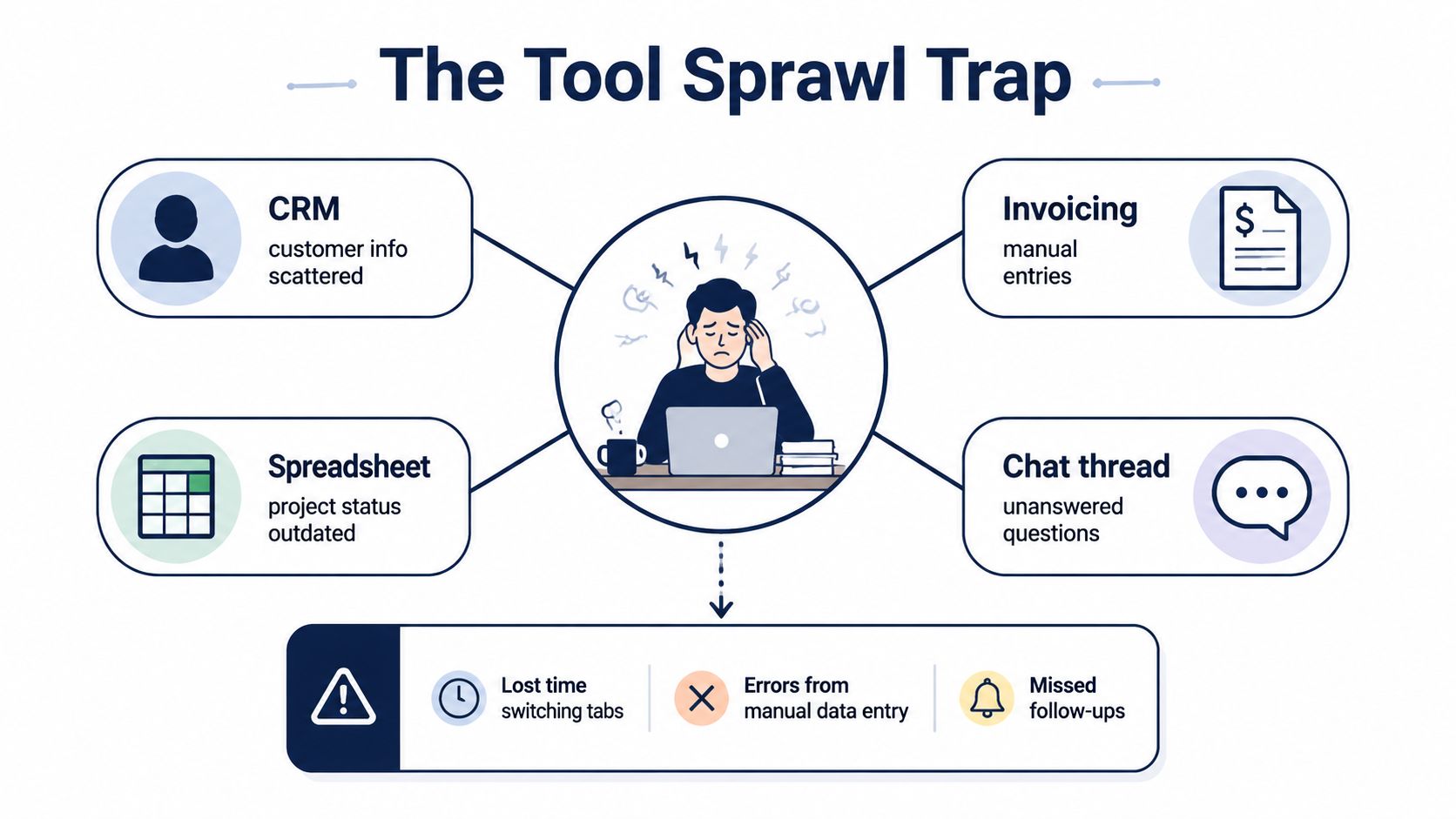
At 9:07, a client asks whether the revised quote includes the extra workshop. The sales history sits in the CRM, the latest agreement is in email, and the project manager finds an outdated delivery date in a spreadsheet. Finance has already prepared an invoice against a different customer record.
This is how SME software sprawl becomes an operating problem. No one chose badly. The CRM handled pipeline work, the invoicing app was quick to adopt, the spreadsheet offered flexibility, and time tracking promised clearer margins. Each decision made sense alone. Together, they created another responsibility: keeping systems aligned.
Why sensible purchases create an expensive stack
The subscription cost of one more app feels manageable. The operational cost shows up later through duplicate customer records, manual exports, failed integrations, and meetings spent deciding which version is correct.
A 12-person services firm can lose time in work that never appears as a software charge:
- Customer handovers: Sales updates the CRM, delivery updates a project board, and finance requests the same information again.
- Manual finance work: Someone retypes order details into an invoice, then checks whether payment status returned to the project record.
- Untrusted reporting: The owner combines exports from several systems because no report covers the complete workflow.
- Follow-up gaps: A promise made in chat never becomes a task, leaving the client to ask twice.
The cost is not just duplicate data. It is slower decisions, unclear ownership, and staff time spent checking work that should have moved automatically.
Practical rule: Audit the stack as one operating system, not as a collection of unrelated purchases.
Start with the information flow, not the feature list. Ask, “Where does this information become authoritative, and who has to copy it somewhere else?” That question exposes the friction that product demos often hide. If one tool removes a task but creates three reconciliation steps, consolidation is the better choice. Keep separate tools only when they serve a distinct workflow and transfer reliable data without extra supervision.
The Four Core Categories Every SME Stack Covers
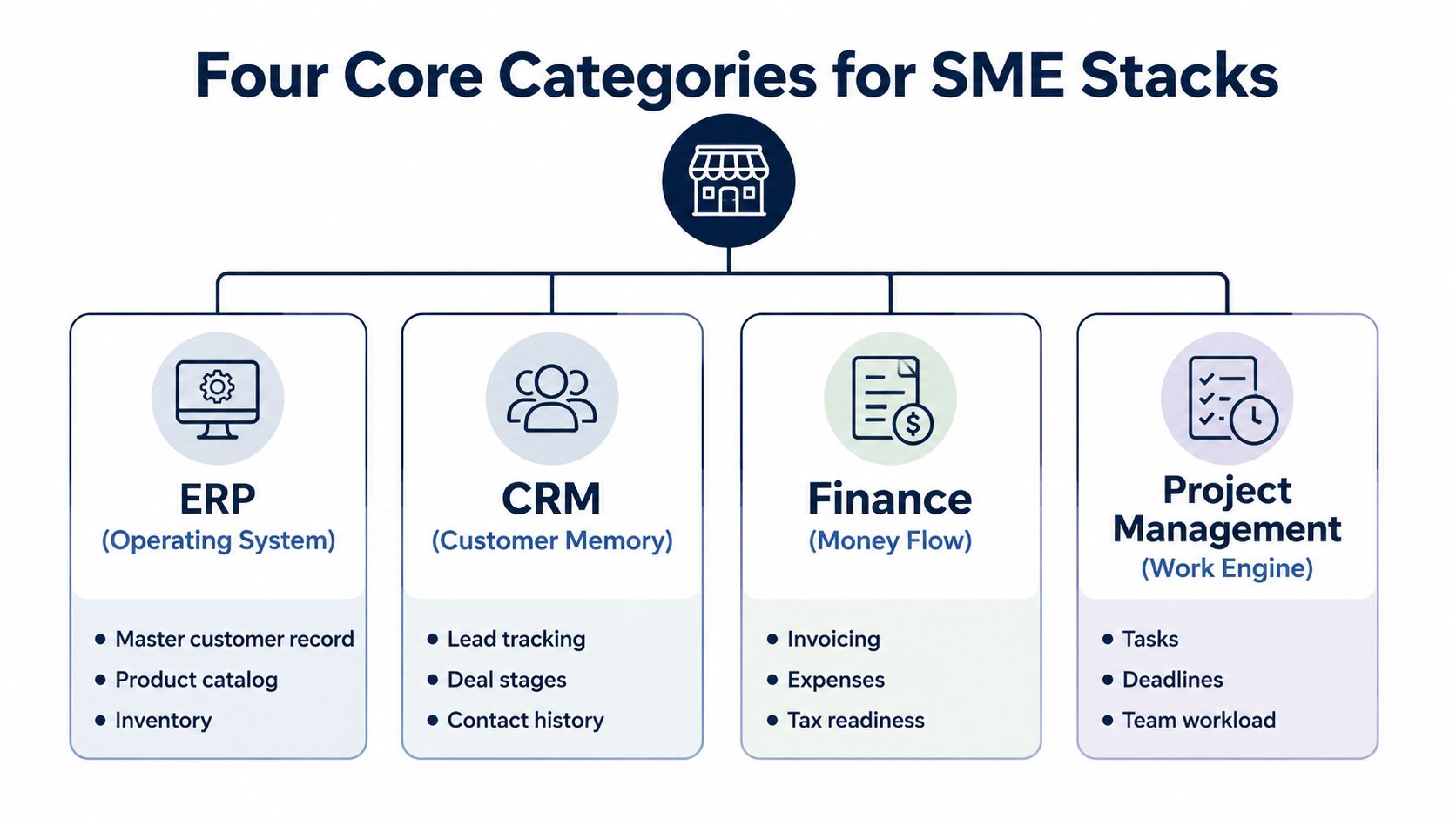
Most small businesses eventually need four job families. These systems run daily operations, record money, retain customer knowledge, and organise delivery. The goal is not to buy one tool for every feature. It is to give each workflow a clear owner and reduce the handoffs that small teams struggle to maintain.
ERP keeps the master record of business activity
ERP software connects customers, products, orders, purchasing, inventory, and operational data. That shared record prevents the team from maintaining separate versions of the same information.
For a small wholesaler, the ERP should answer whether a product is available, whether it has been ordered, which customer bought it, and what remains to be invoiced. If staff need three exports and a spreadsheet to answer those questions, the system is not serving as the operational record.
Accounting turns activity into financial truth
Accounting covers invoices, expenses, tax preparation, payment status, and the records used by an accountant or finance lead. The practical test is whether a completed sale can move into invoicing and reporting without someone acting as a manual relay.
Every repeated entry creates another chance to enter the wrong amount, customer, tax treatment, or payment status. Choose a system that carries transaction details through the workflow instead of forcing finance to reconstruct what happened elsewhere.
CRM preserves customer knowledge
A CRM stores the customer history that otherwise sits in inboxes and individual relationships. It should track leads, contact history, deal stages, commitments, and follow-ups.
A consultant does not need a huge sales machine. They need to know what was promised, when to contact the prospect, and whether the quote was accepted. CRM adoption remains uneven across company sizes. In a 2024 Eurostat release, usage ranged from 22% among small enterprises to 61% among large enterprises, as reported by Eurostat. Treat adoption as a workflow decision. If staff cannot update the record during normal work, the CRM will become another place to check.
Project management makes delivery accountable
Project management turns a sale into assigned work. It covers tasks, deadlines, owners, dependencies, and workload. A project board helps, but it becomes more useful when the project begins with the actual customer order and ends with accurate time and billing information.
The four categories overlap, and those handoffs expose weak stacks. A customer can appear in the CRM, accounting system, project tool, and support inbox under slightly different names. Shortlist software by how reliably it connects these four blocks, not by the number of isolated features in a demo. Consolidation wins when it removes duplicate updates and compliance checks without forcing every team into an unsuitable workflow.
A practical overview of connected business software is available in this SME software video.
For a growing team that needs more modules but does not need ERP, the Business plan snapshot lists full time tracking and sales, basic accounting and operations, three company workspaces, and ten users with unlimited emails.
What Consolidation Actually Saves and Where It Doesn't
Consolidation usually saves coordination before it cuts subscription fees. With eight to fifteen tools owning different parts of the workflow, the bill includes licences, duplicate administration, integration upkeep, training, and time spent checking whether records moved correctly.
An independent SMB survey identifies difficult multi-vendor management and confusing pricing as recurring problems. The same SMB software consolidation research reports a 2026 analysis estimating that around 30% of global SaaS spend is wasted on redundant, unused, or underused tools. Treat that figure as a warning to audit usage, not as a promise that every business can recover the same amount.
| Cost Area | Disconnected Stack (10 tools) | Consolidated Platform |
|---|---|---|
| Licences | Several contracts, seat rules, and renewal dates | One primary commercial relationship |
| Data entry | Customer, order, invoice, and project details may be copied | Shared records can reduce repeated entry |
| Integrations | APIs, connectors, and ownership require ongoing attention | Fewer system boundaries to maintain |
| Reporting | Exports need manual combination and checking | Cross-functional reporting can use connected data |
| Administration | Multiple logins, permissions, bills, and support channels | One workspace and a simpler access model |
| Migration | Little change at the start, but complexity accumulates | Upfront data cleanup, training, and workflow redesign |
| Specialist capability | Best-of-breed tools may offer deeper niche features | Broader coverage may require compromise |
Consolidation reduces operational work
A consolidated platform can give the team one vendor relationship, one bill, one login, and one place to investigate what happened. Finance can work from connected records instead of combining exports and chasing missing updates during the close.
The trade-off arrives during implementation. Migration takes time, staff must learn new habits, and workflow redesign can expose inconsistent customer, order, or billing data. A niche tool may still handle advanced manufacturing, regulated field service, or a specialised creative process better than a general platform.
The wrong platform creates a different form of sprawl. If it cannot evolve with the business, the team will add specialist tools around it and rebuild the integration burden it meant to remove.
Use a practical rule. Consolidation is a strong candidate when the same people repeatedly re-enter data across core workflows and can standardise the process. Keep best-of-breed tools when a specialised capability directly differentiates the business and the team has the skill and time to maintain the integration. The decision should follow the cost of daily handoffs, not a feature-count contest.
EU Compliance and Data Residency Without the Headache
GDPR readiness isn't a badge in a vendor footer. It's a set of controls your team must be able to inspect, operate, and explain.
Start with the data map. List customer, employee, supplier, financial, and operational information. Then ask where each category is stored, backed up, accessed, retained, and deleted. An EU data-residency guide for SMBs warns that many SMBs run 30 or more SaaS tools and often can't identify the country where employee or customer data is stored. That uncertainty is a governance problem before it becomes a legal one.
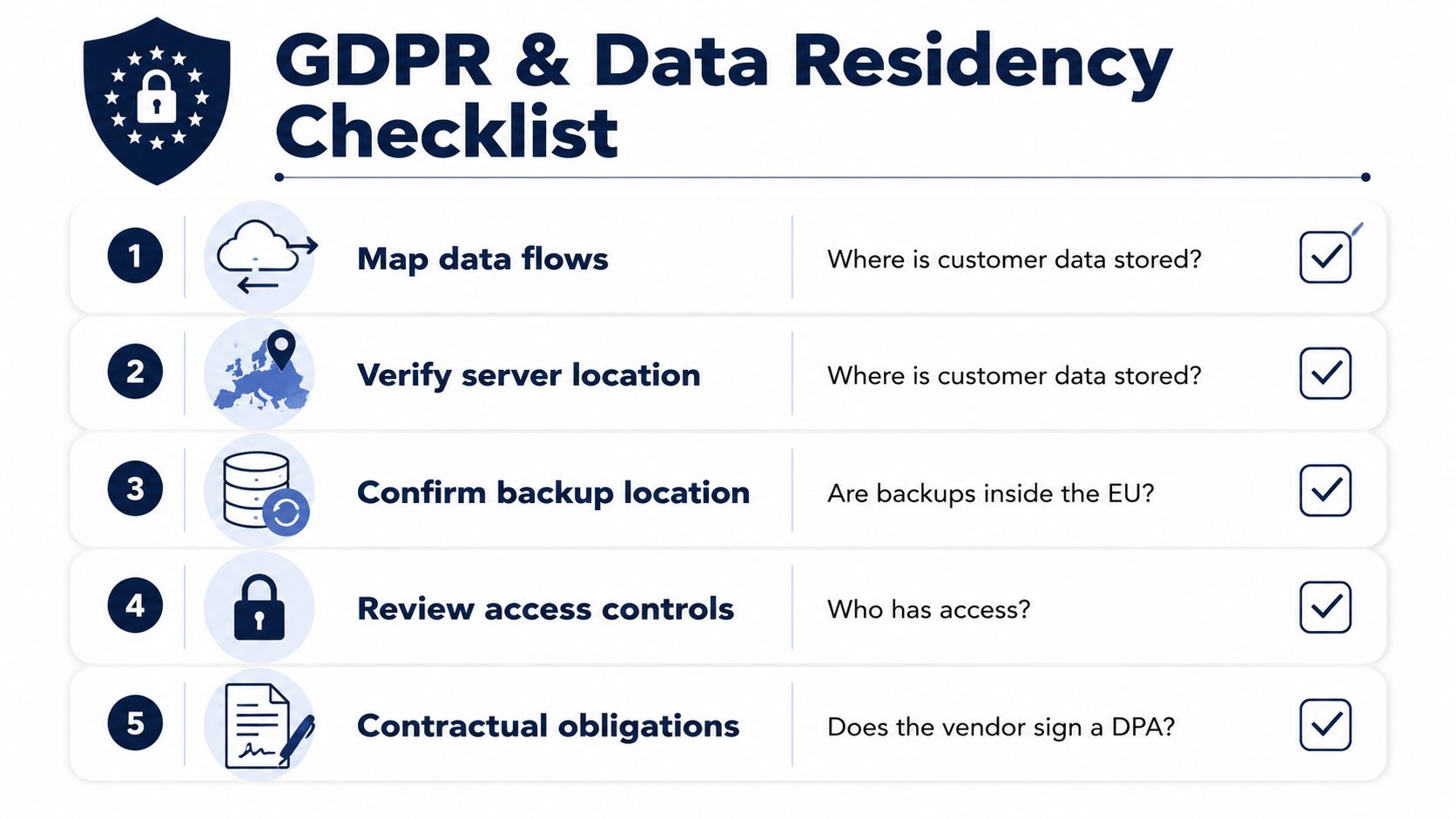
Five checks to put in front of the vendor
- Map data flows: Request a plain-language diagram showing where information enters, moves, and leaves the platform.
- Verify server location: Confirm the relevant production, support, and processing locations, not just the vendor's registered office.
- Confirm backup location: Ask where backups sit, how recovery works, and whether backup copies follow the same residency requirements.
- Review access controls: Require role-based access so staff can see and change only what their jobs require. Administrator access should be separate and reviewed.
- Contractual obligations: Request the current subprocessor list, security documentation, data-processing agreement, retention rules, and incident notification terms.
Encryption should cover data in transit and at rest, with sensible key management and tested recovery. Audit logs should record who viewed, changed, exported, or deleted information, and those logs shouldn't be easy for ordinary administrators to erase.
Test the privacy workflow, not just the paperwork
Ask the vendor to demonstrate consent records, privacy requests, data portability, and the removal or separation of a customer's data. Accounting records can have longer statutory retention requirements, so deletion workflows must balance privacy duties with legal recordkeeping.
An EU-hosted, GDPR-ready platform can reduce the number of vendor relationships and data flows you need to govern. It doesn't automatically make your deployment compliant. Your business still owns lawful processing, access policies, contracts, employee permissions, and incident response.
A Vendor Evaluation Framework That Survives Contact
Feature pages are designed to make every product look complete. Your evaluation should force each vendor through the same real workflows.
Start with four tests: one order to cash process, one purchase to pay process, one active project, and one customer follow-up. Use realistic records, not a polished demo account. Note every missing step, duplicate entry, manual export, permission problem, and delay.
| Evaluation area | Questions to verify | What a strong answer includes |
|---|---|---|
| Module coverage | Can finance, CRM, projects, purchasing, and operations share records? | One workflow with clear ownership and minimal re-entry |
| AI depth | Can AI classify transactions, summarise accounts, draft follow-ups, or surface exceptions? | Business-context assistance using authorised company data |
| Data ownership | Can you export records, history, and attachments in usable formats? | Clear export rules, API access, and an understandable data model |
| Data residency | Where are production systems, backups, and subprocessors located? | Written locations, DPA terms, retention rules, and recovery details |
| Pricing model | What changes with users, modules, storage, support, and integrations? | A workflow-based quote with implementation and ongoing costs visible |
| Implementation risk | Who migrates data, configures workflows, and trains staff? | Named responsibilities, migration conditions, rollout plan, and support |
| Daily usability | Can the owner maintain the system without a specialist? | Simple administration, clear permissions, and usable reports |
Score implementation as seriously as functionality
Capterra's 2025 survey reports that SMBs are more likely to blame poor implementation for software regret, with staff acceptance and training among the leading challenges, as described in its SMB enterprise software purchase guidance. That should change how you score vendors. A missing feature is visible during selection. A failed rollout appears after contracts are signed, data has moved, and the team has stopped trusting the system.
Ask who cleans the source data, how historical records are handled, whether the old system can run beside the new one, and what happens when a user gets stuck. Speak with a customer that has a comparable team size and workflow. Ask about surprises, support quality, and the monthly administration burden.
For a lightweight entry point with AI Assistants, planning and time tracking, a communication module, and Canva Studio, the Kickstarter snapshot lists Kickstart 1 at EUR 79 one-time with lifetime access and 50 AI credits per month. Treat any plan as a workflow decision, not a shopping decision.
When an AI-Native All-in-One ERP Like Zynthoro Makes Sense
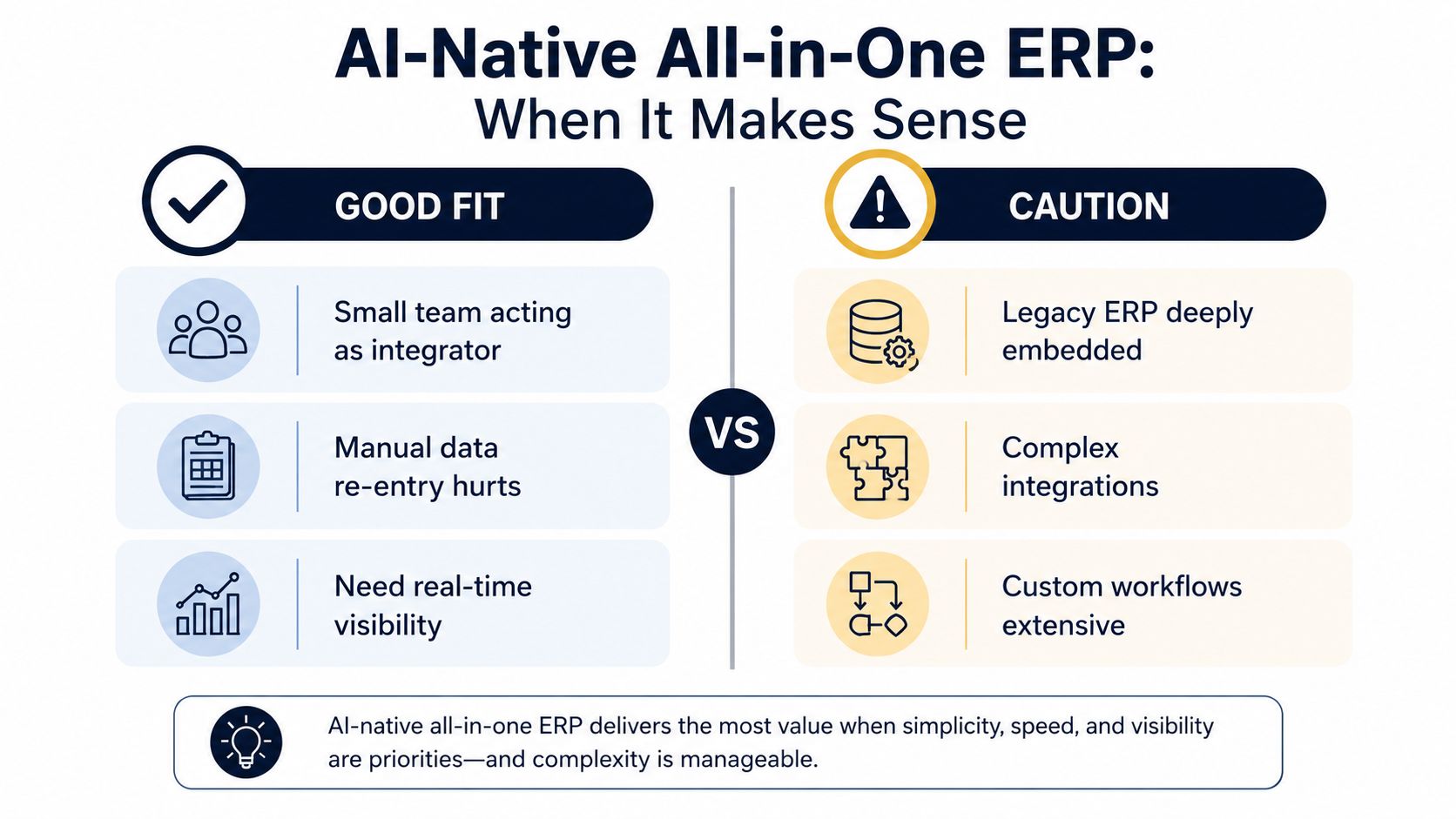
An AI-native ERP earns its place when a small team is already acting as the integration layer. The owner, operations lead, or finance manager keeps sales, purchasing, projects, invoicing, support, and reporting aligned by hand. That person is performing system administration without the title, budget, or spare time.
The EU software gap makes the case sharper for smaller firms. Eurostat reported that enterprise ERP usage in 2023 ranged from 37.9% among small enterprises to 86.3% among large enterprises, a 48.4 percentage-point gap, in its E-business integration data. The OECD also notes that small firms are less likely than large firms to use ERP systems, with the diffusion gap between medium and small firms larger than the gap between large and medium-sized firms, according to its digital transformation of SMEs analysis.
The fit is about handoffs
Zynthoro is an AI-native ERP platform with connected modules for finance, accounting, CRM, project management, inventory, purchasing, reporting, HR, operations, communication, marketing, and production. Its embedded AI assistants can support tasks such as record summaries, draft preparation, classification, status reporting, and exception review. The platform is EU-hosted and includes GDPR-ready controls, audit trails, and role-based access.
The practical test is simple. Can a quote become an order, an order become delivery work, delivery become an invoice, and the resulting activity become a report without the owner stitching together separate systems? If yes, consolidation may solve the operating problem rather than merely replace the interface.
Where caution is sensible
An all-in-one platform isn't automatically right for a very early business with one simple process, a few users, and no cross-functional reporting need. It can also be the wrong choice when advanced manufacturing, regulated field service, or another specialised capability is the company's competitive core and a best-of-breed system handles it materially better.
Before signing, test a complete workflow using real, representative data. Ask what the AI can access, how staff review outputs, how permissions restrict it, and how errors are corrected. Include migration, training, configuration, and ongoing administration in the business case.
If your team spends more time coordinating systems than serving customers, evaluate the platform against the handoffs, not the feature count.
A 90-Day Adoption Plan to Replace Disconnected Tools
A good platform still fails when nobody owns the rollout. Give one person accountability for the decision, data quality, training, and cutover. That owner doesn't need to do every task, but they must have authority to stop new tool purchases and resolve competing requests.
Days 1 to 30
Audit every application, integration, spreadsheet, shared inbox, and recurring export. Map where customer, order, project, supplier, and payment data enters the business. Choose two pilot workflows, usually invoicing and CRM, then export clean CSV files and set a firm cutover date.
Budget 15% to 20% extra time for data cleanup as an operating assumption, not as a statistic about every implementation. Remove duplicates, standardise names, check tax fields, and decide which historical records need to move. Don't customise the new platform to reproduce every weakness of the old stack.
Days 31 to 60
Run the pilots beside the legacy tools. The parallel period feels slower because the team is checking both systems, but skipping it is the fastest route to discovering a missing field after live data has moved.
Train the people who touch the workflows daily, not just managers. Write short SOPs for creating a customer, approving a purchase, changing a project status, issuing an invoice, and correcting an error. Keep a visible issue list with an owner and a decision date.
Days 61 to 90
Switch the primary workflows and retire the highest-friction legacy apps first. Measure practical operating signals such as time to invoice, unresolved handovers, weekly administration hours, and the number of manual exports still required. Don't celebrate a clean launch if the team has rebuilt the old spreadsheet around the new system.
Run a post-cutover review after the first month. Fix permission gaps, reports, training problems, and missing workflow steps. Keep a gate on new software purchases until the team can explain why the consolidated platform can't handle the need.
Zynthoro brings finance, sales, projects, operations, communication, compliance, and AI assistance into an EU-hosted workspace for SMEs that are tired of managing disconnected tools. Visit Zynthoro to evaluate whether its connected workflows can replace your handoffs, duplicate entry, and five-tab Tuesdays.